Product Description
Signal coverage
• Signal coverage: Australia
• Network: Telstra-5G

Product Description
Signal coverage
• Signal coverage: Australia
• Network: Telstra-5G
[eSIM IP address]
eSIM will automatically adjust its IP address based on the applications you use.
Using TikTok will require using a Singapore IP address.
Using ChatGPT will use US IP.
Other applications will use a Hong Kong IP address.
[TikTok Compatibility Notes]
iOS: Supports TikTok App and Web Version
Android: TikTok App is not currently supported; only the web version is supported.
Precautions:
• Service providers have enhanced TikTok compatibility, but cannot guarantee that TikTok will work properly on all phones. Requests for refunds due to TikTok incompatibility with your phone will not be accepted.
• For iOS users experiencing login issues with the TikTok App: Please update your iOS system to the latest version, uninstall and reinstall the TikTok App. If the problem persists, try accessing the TikTok website through your mobile browser and logging into your account. Once logged in, you can then access the App.
• Service providers may discontinue support for TikTok at any time without prior notice.



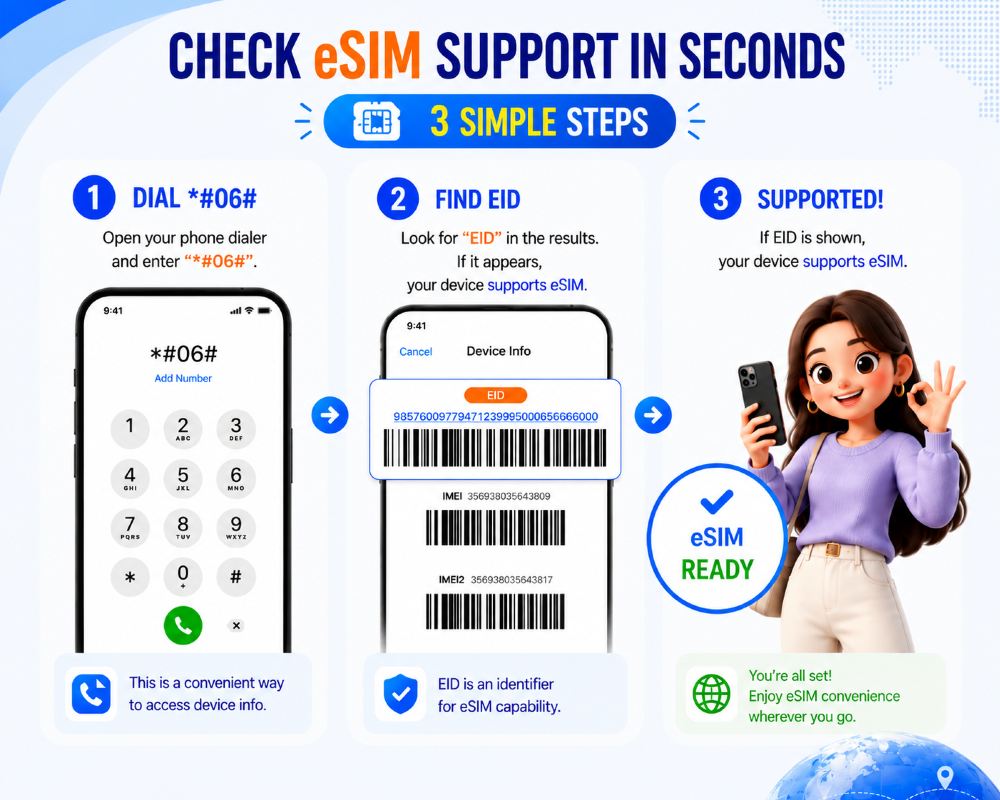
[eSlM Usage Conditions]
1. The device supports eSIM functionality.
How to check: Dial *#06# on the phone screen. Generally, the presence of an EID indicates eSIM support. Without an EID, eSIM cannot be used.
2. Unlocked mobile phone
How to check: Confirm with your mobile network operator whether your device is locked to the network.
*Please check that the above conditions are met before purchasing; all conditions must be met for eSIM to function properly.
[Setting eSlM]
eSIMs can only be installed with a network connection, so it is recommended to install an eSIM 6-12 hours before departure.
[Enable data roaming]
Please ensure that the "Data Roaming" option for eSlM is enabled.
[Do not delete eSlM after installation]
Each QR code can only be installed once. If the eSIM has been removed from the device, we cannot assist you.