【2026 DiDi App Guide】 How to Use DiDi in China: Sign Up, Pay & Ride

Contents
- DiDi | Why Use It in China?
- Key Feature
- Ride Types and Fare Difference
- DiDi | Download and Sign Up
- Downloading the App on iPhone and Android
- Registering with an International Phone Number
- What to Prepare Before Your Trip
- DiDi Payment Methods | Alipay, AlipayHK, and Card Linking
- Credit Card Payment Setup
- How DiDi Payments Work
- What to Do If Your Payment Fail
- Backup Options | What If You Still Cannot Pay?
- DiDi | Step-by-Step Booking Guide
- DiDi Fare Estimate
- Typical fares in major citie
- A Simple Price Comparison
- Peak Hours and Late-Night Surcharge
- DiDi | Useful Feature
- Switching Between Regions and Citie
- Custom Ride Request
- Scheduled Ride
- Using DiDi in Mainland China | Practical Tip
- Choosing a Payment Method
- Language Setting
- Staying Safe During Your Ride
- Avoiding Unnecessary Detour
- When to Schedule in Advance
- DiDi vs Other Ride-Hailing Apps in China
- DiDi vs Amap Ride-Hailing
- DiDi vs Caocao Mobility
- Which One Should You Use?
- DiDi | The Main Benefits of Using DiDi
- DiDi | Common Payment Question
- DiDi | Final Tip
Show more
DiDi is one of the easiest and most convenient ways to get around mainland China. This guide walks you through everything international travelers need to know about the DiDi app in China, from signing up and setting your pickup point to choosing a car type and paying for your ride. Once you know the basics, using one of China’s essential transport apps becomes second nature — and getting around the country a whole lot easier.
You enter both your pickup point and your destination before the app shows an estimated fare.
DiDi is China’s leading ride-hailing app, and it is also built into WeChat Mini Programs, which makes it especially easy to use.
You can book rides across most of the country, and if you have a mainland Chinese phone number and bank account, DiDi is often the most convenient option of all.
Express: The standard everyday ride option, and the most basic choice.
Carpool: Share your ride with other passengers heading in a similar direction, for a lower fare.
Premier: A higher-end option with better cars and generally more polished service.
Designated Driver: If you have been drinking or cannot drive, a professional driver will drive your own car to your destination.
There are two main ways for international travelers to use DiDi in mainland China: the standalone DiDi app or the DiDi mini-program inside Alipay or WeChat. If you can, set up both before your trip so you always have a backup.
Option 1: Download the standalone DiDi app
| Platform | What to search for | Note |
| iOS (iPhone) | Search the App Store for “DiDi” | Make sure you download the official passenger ride-hailing app, usually with a bright orange logo. |
| Android | Search Google Play for “DiDi” | Check that it is the official DiDi passenger app before downloading. |
The DiDi app supports international users and can be set up with an overseas phone number. After downloading it, enter your mobile number, receive a verification code, and finish signing up.
Option 2: Use DiDi through Alipay or WeChat (no extra app download needed)
If you already use Alipay or WeChat, this can be an easier way to access DiDi without installing the main app.
- Open Alipay or WeChat.
- Search for “DiDi”. If needed, you can also try searching “滴滴出行”.
- Allow the mini-program to access your location.
- Sign in with your phone number and complete verification if prompted.
- Once setup is complete, you can book rides directly inside the app.
For many travelers, using DiDi through Alipay or WeChat is the simplest option, especially if payment is already set up in one of those apps.
DiDi supports registration with international mobile numbers. Here is the full process:
Step 1|Open the App and Select Your Region
Open the DiDi app. You may be asked to choose your country or region — select the country code that matches your mobile number.
Step 2|Enter Your Phone Number
Enter your mobile number in international format, following the country code you selected.
You may also see options to continue with a Google or Apple account, but phone verification is usually still required, so a working mobile number is essential.
Step 3|Receive and Enter the Verification Code
Tap “Send Code” and wait for an SMS with a 4- to 6-digit verification code. Enter the code in the app to complete phone verification.
If the code has not arrived after 60 seconds, tap “Resend.”
If the code still does not arrive after several attempts, check that your phone can receive international text messages, that your signal is stable, and that spam filters or carrier settings are not blocking the message.
Step 4|Set Your Password and Basic Profile
Once your number is verified, set a password and complete your basic profile, such as your display name. In some cases you may also be asked to complete additional identity verification, especially when you use payment features in mainland China.
Step 5|Add a Payment Method
After registering, it is best to set up your payment method right away:
| Payment Method | Suitability | Note |
| Alipay | Most recommended | Widely accepted and often the easiest option for international traveler |
| WeChat Pay | Recommended | Also widely used, but setup requirements may vary by account |
| Bank card linked in the app | Varie | Availability and success rates depend on your card issuer and account setup |
| Cash | Not recommended | Cash is not widely supported for most rides in many cities |
Best practice: Set up Alipay or WeChat Pay before your trip, then use DiDi with one of those payment methods already linked, for a smoother booking and payment experience.
We strongly recommend completing registration and payment setup 1 to 2 weeks before departure, rather than waiting until you land in mainland China. Here is a practical pre-departure checklist:
Pre-Departure Checklist
1. Set up Alipay or WeChat Pay
Download Alipay or WeChat and complete the required account verification steps.
Link an eligible international bank card, such as Visa, Mastercard, or JCB, if supported by your account and region.
Also check whether your bank has enabled overseas transactions, as some cards need this switched on before they can be used abroad.
2. Download the DiDi app (or get familiar with the mini-program)
Download the app and complete registration before leaving home.
Take a few minutes to learn the interface, including how to enter a destination, choose a ride type, and check the estimated fare.
3. Make sure your travel documents are valid
Some services in China may require identity verification, so make sure your passport and any required travel documents are valid for your trip.
4. Enable mobile data or prepare an internet connection
Ride-hailing apps need an internet connection to work properly.
Option 1: Enable international roaming with your home mobile carrier.
Option 2: Buy a China SIM card or eSIM.
Option 3: Rent a portable Wi-Fi device.
5. Turn on location service
Make sure GPS and location services are switched on your phone so the app can pinpoint your pickup point accurately.
If possible, test your location settings before departure.
Useful Tip
Offline prep: Save the Chinese addresses of important places — your hotel, the airport, and major attractions — before your trip. That makes them much easier to copy and paste when you need them.
Driver communication: DiDi includes in-app messaging, and some versions offer translation support. It helps to prepare a few simple phrases in advance, such as “I’m at the main entrance(我在正门口)” or “Please wait two minutes(请等我两分钟).”
Safety check: Before you get in, always confirm that the license plate number and driver details match what the app shows.
Compare prices: You can also check other mapping or transport apps in China if you want to compare ride options and fares.
Backup plan: If DiDi is unavailable or the wait is long, ask your hotel, restaurant, or local host to help you arrange a taxi.
Summary: For most international travelers, the easiest setup is to register DiDi with your regular mobile number, link a payment method through Alipay or WeChat Pay, and complete everything before departure. Once you arrive in mainland China, you can start booking rides with far less hassle.
In many countries, the most natural way to pay for a ride is with cash, a credit card, or a local digital wallet. In mainland China, ride payments usually work differently. The good news is that several cross-border payment options now let international visitors use DiDi without opening a mainland Chinese bank account. Below are three of the most common payment methods, ranked by overall convenience:
| Payment Method | Recommended | What You Need | Best For |
| Alipay mini-program | ⭐⭐⭐⭐⭐ | Passport + international credit card | The easiest and most reliable option for most traveler |
| AlipayHK cross-border ride booking | ⭐⭐⭐⭐ | Hong Kong mobile number + bank card / FPS | Travelers based in Hong Kong or those who regularly travel between Hong Kong and mainland China |
| Linking a card directly in the DiDi app | ⭐⭐⭐ | Passport + international credit card | Travelers who want to use the full DiDi app experience |
If you choose to link an international credit card through the Alipay app or directly in the DiDi app, here is the setup process and the main things to keep in mind. Alipay and WeChat Pay both support major international bank cards for overseas visitors, including Visa and Mastercard.
Supported card type
| Card Type | Supported | Note |
| Visa | ✅ | Widely supported |
| Mastercard | ✅ | Widely supported |
| JCB | ✅ | Supported in many case |
| UnionPay | ✅ | Often works smoothly when available |
| American Expre | ⚠️ | Support may be more limited |
| Debit card | ⚠️ | Depends on the issuing bank and card setting |
How to link a card in Alipay
Step 1|Open the Wallet section
Open the Alipay app, then go to Me and find Bank Cards or the wallet section.
Step 2|Add an international card
Tap Add Bank Card.
Choose the option for an international card if it appears. The wording may vary depending on your app language and region.
Step 3|Enter your card detail
Enter your card number, expiry date, and security code.
Make sure the cardholder name matches the name on your verified account.
Your bank may send a one-time passcode (OTP) to confirm the card link.
Tip: Make sure you can receive bank verification messages on your phone before you travel.
Fees and transaction limit
| Item | Detail |
| Single transaction up to USD 28 | No 3% service fee for transactions of CNY 200 or less. |
| Single transaction above USD 28 | A 3% transaction fee may apply once the payment exceeds CNY 200. |
| Single-transaction limit | Up to USD 5,000. |
| Annual cumulative limit | Up to USD 50,000. |
Important limitation
What happens when you reach your destination? In most cases you do not need to do anything at all — the app handles payment automatically. Here is how it works in different situations:
Scenario 1: Booking through the Alipay mini-program (recommended)
This is the simplest option, with payment handled automatically from start to finish:
- Before the ride: Search for “DiDi” in Alipay → enter your destination → choose a ride type → confirm your booking
- During the ride: Just ride as normal; no extra action is needed
- After arrival: The fare is settled automatically → payment is charged to your linked card or payment method → Alipay sends a payment notification
- Done: No cash, no manual payment, and usually no extra payment step with the driver
On some routes, such as airport trips or longer-distance rides, prepayment may be required. If so, the estimated fare will be shown and charged in advance.
Scenario 2: Booking through the DiDi app
- Before the ride: Open the DiDi app → enter your destination → choose a ride type, such as Express, Premier, Carpool, or Taxi
- Confirm the booking: The app shows an estimated fare range and lets you choose a payment method, such as Alipay or a linked bank card
- During the ride: No extra action is usually needed
- After arrival: Payment depends on the ride type
- Express / Premier: The fare is usually charged automatically
- Taxi: The driver enters the final metered fare, and the app processes payment
- Carpool: The final fare is based on the actual route and may be lower than the estimate
- Rating: After payment, you can rate the driver and leave a comment
Scenario 3: Booking through Amap (for fare comparison)
- Open the Amap app and tap Ride-Hailing or the local taxi-booking section
- After entering your destination, Amap may show ride options from multiple platforms
- You can compare the estimated fares and choose the option that suits you best
- Payment follows the payment method linked to your Amap or Alipay account
Estimated fares by ride type
| Ride Type | Description | Estimated Fare |
| Expre | The most common option, similar to UberX | Varies by city and distance |
| Premier | A more comfortable option with higher-end vehicle | Higher than Expre |
| Carpool | Shared with other passengers, usually the cheapest | Often 20% to 40% cheaper than Expre |
| Taxi | Traditional metered taxi | Depends on the city and traffic |
| Luxury | High-end vehicle category | Usually significantly more expensive than Premier |
During peak hours — such as rush hour, weekends, and public holidays — surge pricing may apply. If your trip is not urgent, waiting 15 to 30 minutes can sometimes bring the fare down.
If your payment does not go through, do not panic. It is a fairly common hiccup, especially the first time you use cross-border mobile payments in mainland China. Here are the usual reasons and how to fix them.
Most common reason
1. Your bank blocks the transaction for security reason
This is one of the most common causes: your card issuer may flag the charge as unusual overseas activity and decline it automatically.
Fix: Contact your bank before your trip and tell them you will be traveling in mainland China. Many banks also let you manage overseas transaction settings in their app. Make sure your card is enabled for international and online payments.
2. Alipay blocks the transaction during a security review
Alipay has its own risk-control system, and some transactions may be declined if the account or payment details cannot be verified. Alipay’s help center notes that some payment failures happen because personal information does not pass its security checks.
Fix: Make sure your account has completed the required identity verification and that your card and account details are entered accurately.
3. A VPN causes a location mismatch
If you book or pay with a VPN switched on, the app may detect a mismatch between your network location and your actual location, which can interfere with payment or verification.
Fix: Turn off your VPN before paying and use your normal mobile data, local SIM, eSIM, or hotel Wi-Fi instead.
4. Your name does not match across system
If the name on your Alipay account does not match the name on your bank card, the payment may fail.
Fix: Make sure the cardholder name matches your verified account details as closely as possible.
5. You exceed the transaction limit
Official guidance for overseas visitors says the mobile-payment limit is USD 5,000 per transaction and USD 50,000 per year.
Fix: Most DiDi rides are far below that threshold, but if you are booking a long-distance ride or a premium vehicle, try a different card or another payment method.
What to do when a payment fail
- Check whether your bank declined the transaction in its app or by SMS
- Try the payment again after confirming your card settings
- Switch to Alipay or WeChat Pay if you were paying another way
- Try a different bank card
- Turn off any VPN and retry
- If the problem continues, contact your bank or the platform’s customer support
If every digital payment method fails, you still have a few backup options:
| Option | Explanation |
| Cash | Some taxis in certain cities may still accept cash, but most Express and Premier rides do not. Check with the driver before the ride starts. |
| Ask a travel companion to pay | Some ride-hailing platforms allow shared payment or order-sharing, so a companion with a working payment method may be able to help. |
| Try another ride-hailing platform | If DiDi does not work, try Amap ride-hailing or another major platform. Different platforms may use different payment channels. |
| Use your WeChat balance | If your WeChat account is fully set up and funded, it may work as a backup payment method. Availability depends on your account setup. |
Important: Do not wait until the last minute to test payment. It is a good idea to book a short ride on your first day in mainland China, such as from the airport to your hotel, so you can confirm everything works and still have time to fix any problems.
Step 1: Open the DiDi app, or access DiDi through WeChat or Alipay if you prefer using a mini-program.
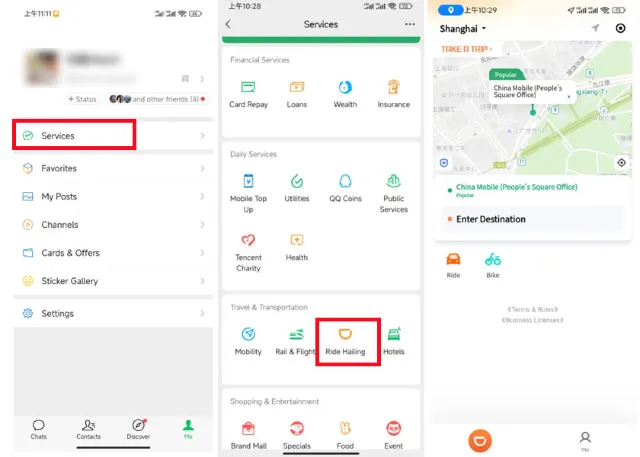
(Photo source: International Services Shanghai.)
Step 2: If needed, switch the app language to English in the settings.
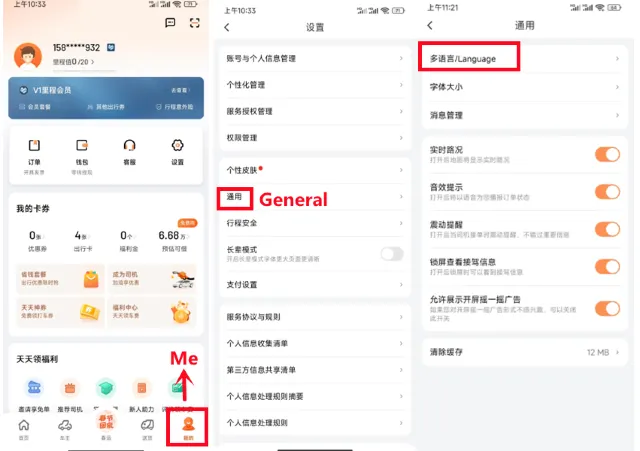
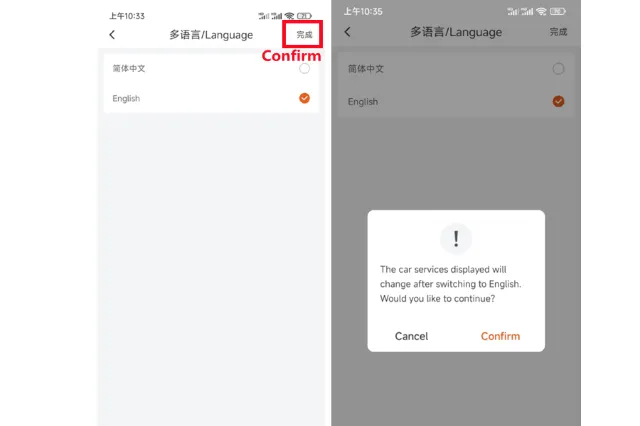
(Photo source: International Services Shanghai.)
Step 3: The app will usually detect your current location automatically. Enter your destination in the search box — using the address in Simplified Chinese often works best.
Step 4: Check and adjust your pickup point and destination on the map if needed.
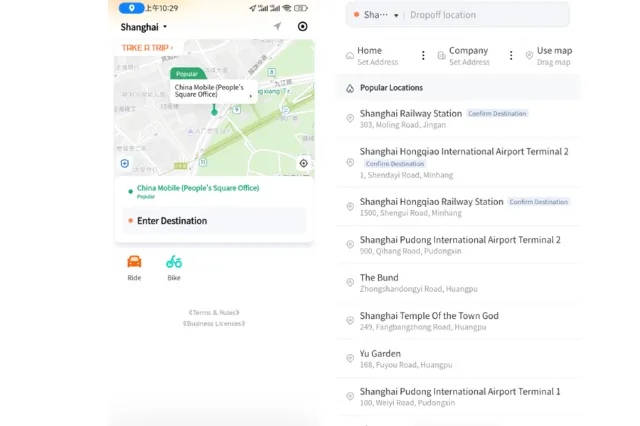
(Photo source: International Services Shanghai.)
Step 5: Choose your ride type, such as Taxi, Express, or Premier. For most travelers, Express is the most practical option.
Step 6: Tap Confirm Request or the equivalent ride request button. The app will then match you with a nearby driver.
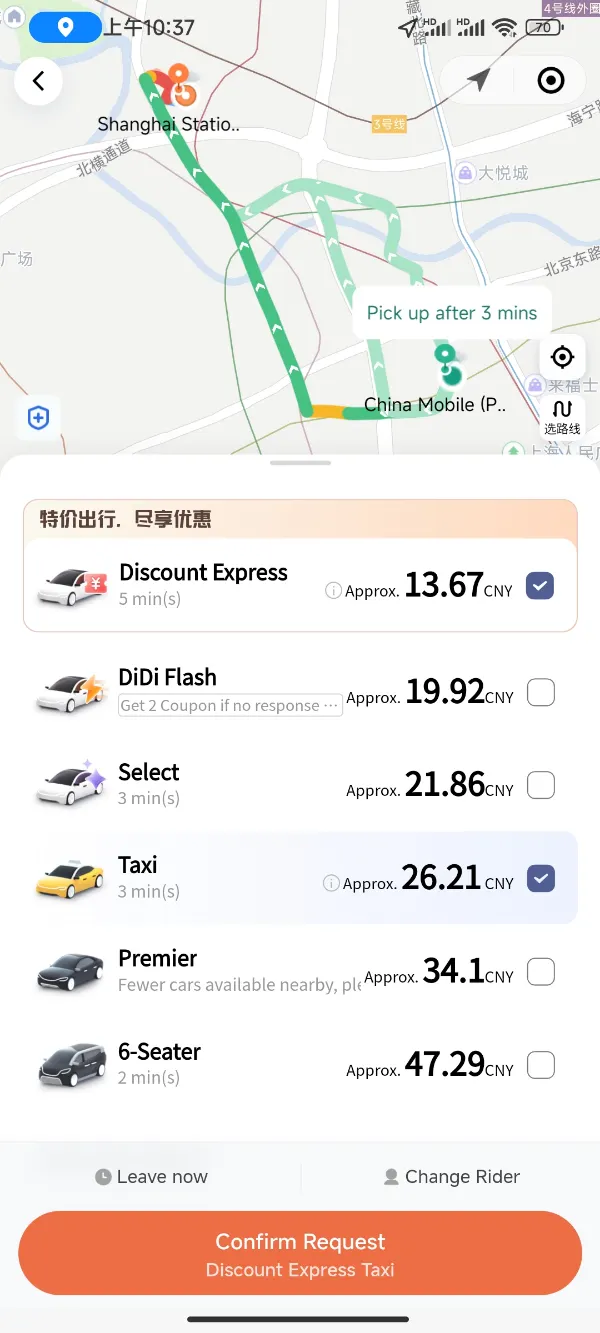
(Photo source: International Services Shanghai.)
Step 7: Review the driver’s details in the app, including the license plate number, vehicle type, and estimated arrival time.
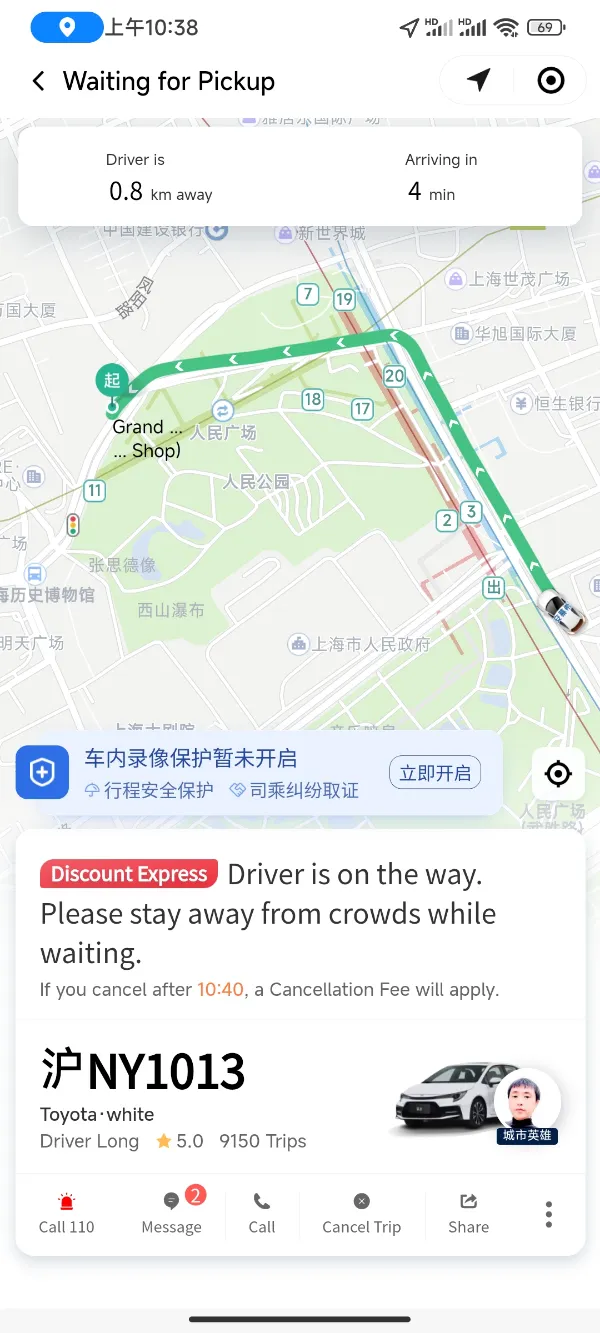
(Photo source: International Services Shanghai.)
Step 8: If you need to contact the driver, use the in-app messaging or call feature. Some versions also include translation support.
Step 9: When the driver arrives, make sure the license plate number matches the one shown in the app before you get in.
Step 10: In some cases, the driver may ask you to confirm part of your phone number for security.
Step 11: Once the trip ends, the fare is usually charged automatically through your selected payment method, such as Alipay, WeChat Pay, or another linked option. On some Taxi rides, the final metered fare may be entered at the end of the trip before payment is processed.
To give you a quick sense of pricing: DiDi rides in mainland China are often quite affordable by international city standards. As a rough guide, a 30-minute Express ride in a major city may cost about CNY 30 to 50 (about USD 4.20 to 7.00), while a short trip may cost as little as CNY 7 to 10 (about USD 1.00 to 1.40).
Fares vary by city. Major first-tier cities such as Beijing, Shanghai, Guangzhou, and Shenzhen are usually more expensive than smaller cities, but ride-hailing is still relatively inexpensive for most everyday trips.
| City | Typical 30-minute Express ride |
| Beijing | CNY 25 to 40 (about USD 3.50 to 5.60) |
| Shanghai | CNY 28 to 45 (about USD 3.90 to 6.30) |
| Guangzhou | CNY 20 to 30 (about USD 2.80 to 4.20) |
| Shenzhen | CNY 22 to 35 (about USD 3.10 to 4.90) |
| Hangzhou / Chengdu | CNY 18 to 30 (about USD 2.50 to 4.20) |
DiDi offers several ride types, and the price difference can be significant. For most travelers, the most useful options are Carpool, Express, Taxi, and Premier.
| Ride Type | Price Level | Best For |
| Carpool | Cheapest | Budget trips when you are not in a hurry |
| Expre | Best value | Everyday travel and most trip |
| Taxi | Slightly higher or similar | Metered rides and traditional taxi |
| Premier | More expensive | Extra comfort, business travel, airport run |
| Luxury / Business Van | Highest | Groups, luggage, or higher-end travel |
For a trip of around 10 km in a major city:
| Ride Type | Estimated Fare |
| Carpool | CNY 18 to 25 (about USD 2.50 to 3.50) |
| Expre | CNY 28 to 40 (about USD 3.90 to 5.60) |
| Taxi | CNY 30 to 38 (about USD 4.20 to 5.30) |
| Premier | CNY 45 to 60 (about USD 6.30 to 8.40) |
This is one of the easiest things for travelers to overlook. DiDi pricing in mainland China does not work like a simple flat night surcharge. In practice, fares can go up in two main ways: fixed surcharges and dynamic pricing.
Peak hour
Peak-hour pricing usually applies during the morning and evening commute, although the exact timing varies from city to city.
| Time Period | Typical Hour | What to Expect |
| Morning peak | 7:00 to 9:30 | Higher fares or longer time-based charge |
| Evening peak | 17:00 to 19:30 | Higher fares or longer time-based charge |
In major cities, morning peak hours can start earlier than many travelers expect. If you are heading to the airport during rush hour, it is smart to leave extra time.
Late-night surcharge
Late-night pricing is also common, usually from 23:00 to 5:00 the next morning. Depending on the city and ride type, this may appear as a higher per-kilometer rate, a service surcharge, or another fixed adjustment.
| Time Period | Typical Hour | What to Expect |
| Late night | 23:00 to 5:00 | Fares are often around 20% to 35% higher |
Dynamic pricing
This is the part that can raise fares the most. When rider demand is far higher than driver supply, DiDi may apply dynamic pricing, and the fare can rise significantly.
| Situation | Typical Fare Increase |
| Heavy rain or severe weather | 1.5x to 2.5x |
| Major holiday | 1.5x to 3x |
| Concerts, exhibitions, or major event | 1.5x to 2x |
| Airports or rail stations late at night | 1.5x to 2x |
The app usually shows the higher pricing clearly before you book. If your trip is flexible, waiting 15 to 30 minutes can sometimes make a big difference.
Money-saving tip
| Tip | Why It Help |
| Avoid peak time | Travel a little earlier or later if possible |
| Use Carpool | Often cheaper than Express if you are not in a hurry |
| Compare fares in Amap | You may see cheaper options across multiple platform |
| Choose Taxi when appropriate | Metered taxis may be more predictable in some situation |
A simple example
For the same trip, the fare during off-peak hours can be much lower than during rush hour, late at night, or in bad weather. In practice, the difference can reach 2 to 3 times the off-peak fare.
DiDi is available across different regions, and the app adapts to where you are traveling. Availability and features may vary by location, so it is worth checking the local version of the service after you arrive.
If you have special requirements — such as traveling with a pet or needing extra assistance — you may be able to add a note when you place your booking. Availability depends on the city and ride type.
If you like to plan ahead, DiDi also offers a scheduled ride feature in some cities, so you can book in advance.
If you do not have a mainland Chinese bank card, the easiest options are usually Alipay, WeChat Pay, or a supported international bank card linked through one of those platforms.
DiDi supports Simplified Chinese and English, and some versions may offer additional language options depending on the platform and region.
Before you get in, always check that the license plate number and driver details match what the app shows. During the ride, you can also follow the route in real time inside the app.
If you are worried about detours, keep an eye on the route shown in the app and compare it with the estimated fare and travel time. If something looks off, message the driver through the app.
If you need a ride at a specific time — especially for an airport transfer, an early train, or a late-night departure — booking in advance is a useful option.
This is one of the comparisons travelers find most confusing. Put simply, DiDi is a ride-hailing platform, while Amap is a comparison and booking platform.
The key difference
DiDi is a full ride-hailing service with its own dispatch system, pricing, and driver network.
Amap Ride-Hailing is an aggregator. It does not operate its own driver fleet. Instead, it pulls in ride options from multiple platforms, letting you compare prices and availability in one place.
Quick comparison
| Category | DiDi | Amap Ride-Hailing |
| Best for | Reliable, straightforward booking | Comparing prices across platform |
| Pricing | Standard platform pricing | Often better for fare comparison |
| Ease of use | Simple, consistent experience | Useful if you want more option |
| Language support | More foreigner-friendly | Usually more Chinese-focused |
When to use DiDi
When to use Amap
For many travelers, the best approach is simple: use DiDi for convenience, and check Amap when you want to compare fares.
Caocao Mobility is another major ride-hailing platform in China. It is often known for a cleaner, quieter experience, with many rides using electric vehicles.
Quick comparison
| Category | DiDi | Caocao Mobility |
| Coverage | Wider coverage | Available in many major citie |
| Vehicle mix | Broad range of vehicle | Often stronger in electric vehicle |
| Price | Standard pricing | Sometimes slightly cheaper or similar |
| Ride experience | Varies by vehicle and driver | Often cleaner and quieter |
What the experience is like
Compared with a typical DiDi ride, Caocao may feel:
One possible downside is that some vehicles may have less luggage space than larger DiDi options. If you are traveling with several bags, a Premier ride, business vehicle, or a larger car category may be a better choice.
For most international travelers, the best strategy is not to rely on just one app. Different platforms are useful in different situations.
| Situation | Best Option | Why |
| First time using ride-hailing in China | Alipay + DiDi | Simple and easy to set up |
| Want the lowest fare | Amap | Good for price comparison |
| Airport or station transfer | DiDi | Usually the most straightforward option |
| Cannot get a car during peak hour | Amap | More platform options in one place |
| Late-night ride | DiDi | Strong coverage and easy booking |
| Care most about vehicle quality | Caocao Mobility | Often a cleaner, quieter experience |
| Traveling with family or lots of luggage | DiDi larger vehicle option | Better for space and comfort |
DiDi can make getting around mainland China much easier. Once your account and payment method are set up, booking rides is usually quick, simple, and reliable.
Popular recommendations

Most Beautiful Natural Landscapes Around the World
 Trip.com