

Have you booked a flight ticket on Trip.com, but need to change your travel plan? This article will explain how to change the booking of air tickets and their terms and conditions. Booking changes may seem complicated, but let's check them one by one and proceed smoothly!


Can You Change a Booking on Trip.com?
All changes to air tickets purchased on Trip.com are subject to the arrangements of the airline or the agency. Therefore, please be sure to confirm when changing your reservation. If you have already checked in, you can apply for a change after canceling your check-in.
How to Change a Flight Booking on Trip.com
Changing a flight booking on Trip.com is generally done online through the "Manage My Booking" section.1 The ability to make a change and any associated fees are determined by the airline's and the ticket's specific fare rules. Here is a step-by-step guide based on the general process:
1. Access Your Booking
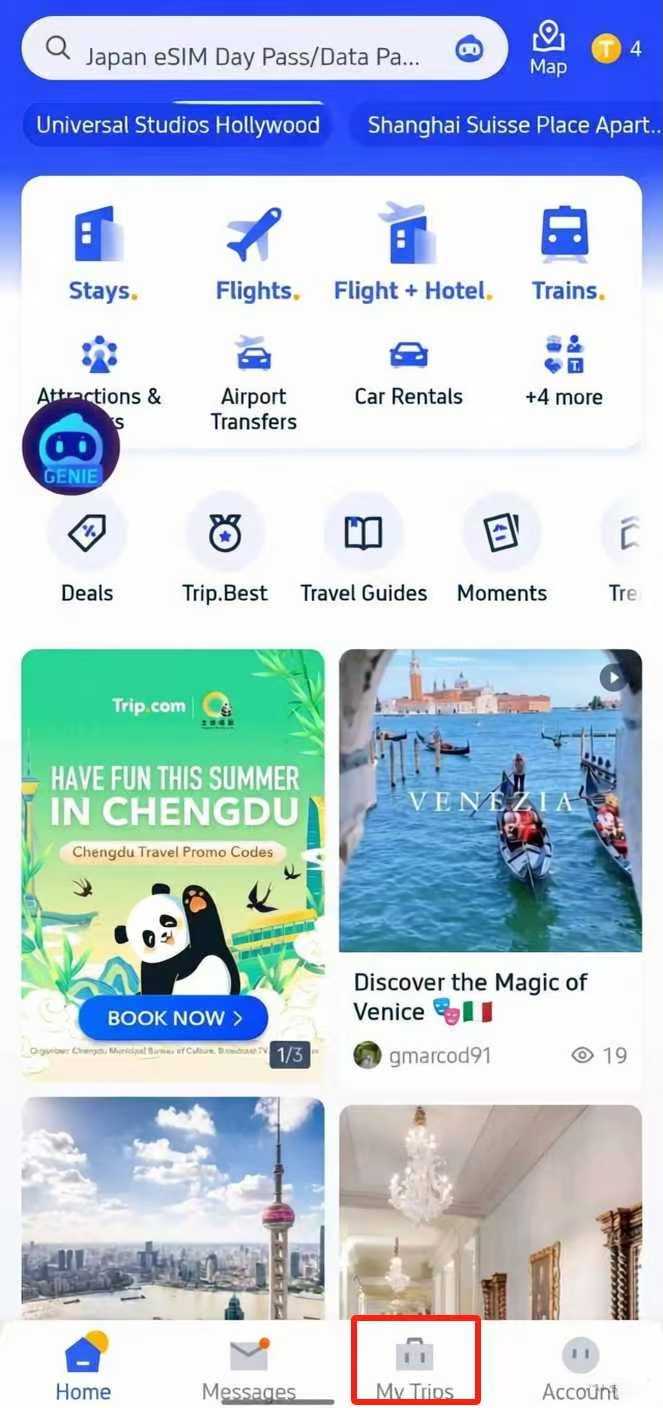
- Trip.com App: Open the app, log in, and tap on "My Trips" or "My Bookings" (usually at the bottom of the screen).3 Find and select the flight you wish to change.4
- Trip.com Website: Log in to your account, go to "My Bookings," and select the flight reservation you want to modify.
2. Initiate the Change Request
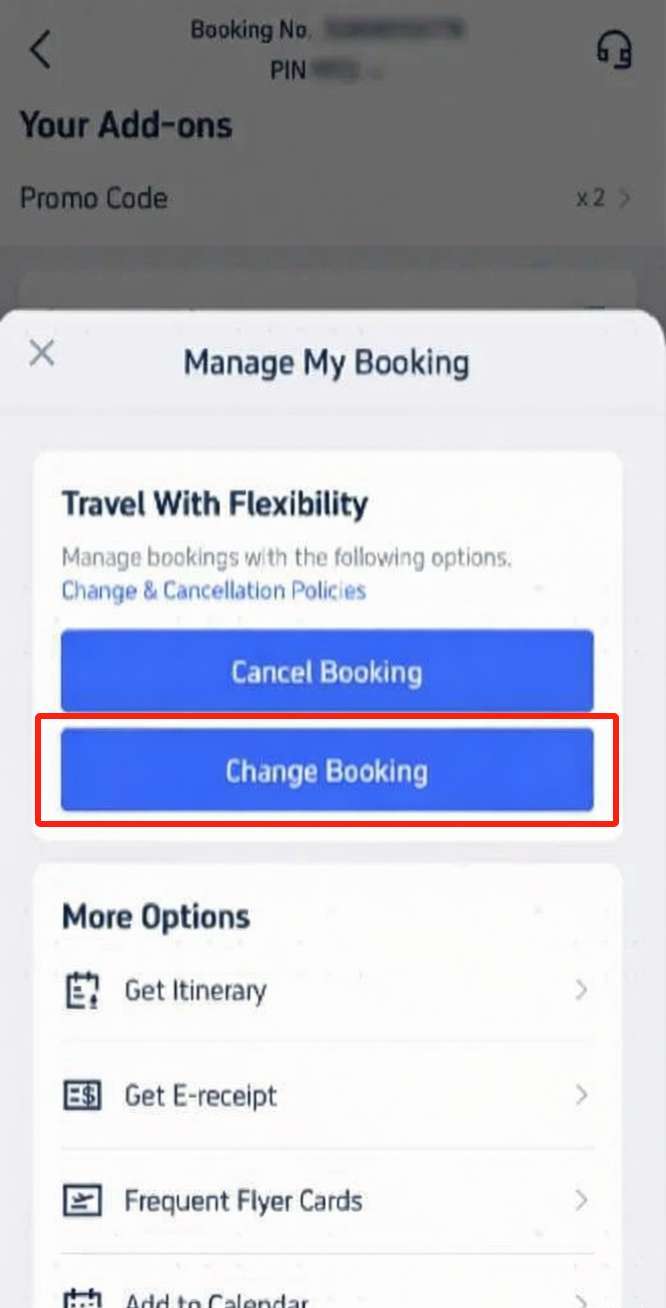
- On the booking details page, look for and click on "Manage My Booking" or simply "Change".5
- Select the option to "Change Booking" or "Change Date / Flight".6
3. Review Policies and Select Passengers
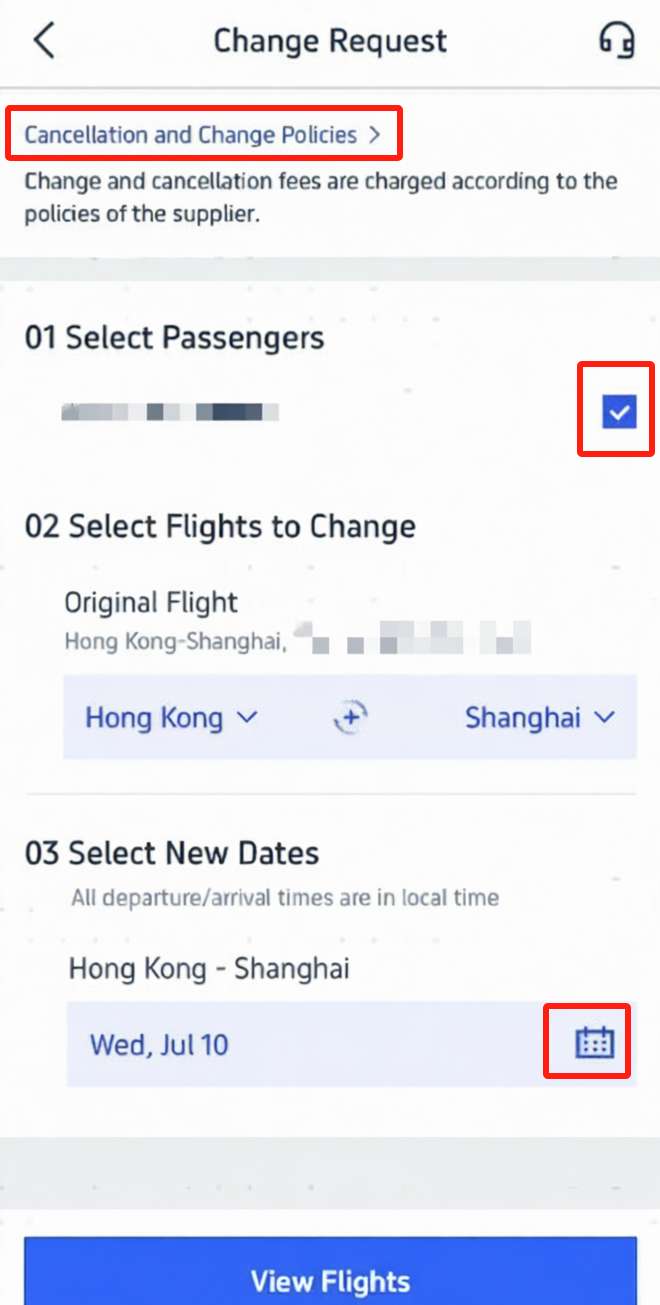
- Before proceeding, you will typically be prompted to review the "Cancellation & Change Policies" for your specific ticket.8 It's crucial to read these to understand any fees, restrictions, or fare differences.
- On the 'Change Request' page, select the passengers who need to change their flight.9
- Confirm the original flight and select your new travel dates using the calendar tool.10
4. Select New Flights
- Click to "View flights" or "Find Flights" to see available options for your new dates.11
- Browse the search results and select your preferred new flight.12 Note: In most cases, you must select a flight that is operated by the same airline or their partner airlines.13
- Choose your desired class (e.g., Economy, Business).14
5. Review and Confirm
- The system will calculate the cost difference, including:
- Airline Change Fee: Set by the airline's policy.15
- Fare Difference: If the new flight is more expensive than your original ticket.16
- Trip.com Service Fee (if applicable).
- Review all the details on the new booking summary, paying close attention to the final price.17
- If the new flight and final cost are acceptable, click "Confirm" and proceed to payment for any additional charges.18
6. Receive Confirmation
- Once payment is complete, you will receive a new booking confirmation via email.19
How to Change a Hotel Booking on Trip.com
Changing a hotel booking on Trip.com primarily depends on the specific cancellation and change policy of the room type you originally booked. This policy is set by the hotel and is displayed during the booking process.
Generally, changes are handled through the "My Bookings" section on the Trip.com platform.
1. Find Your Booking
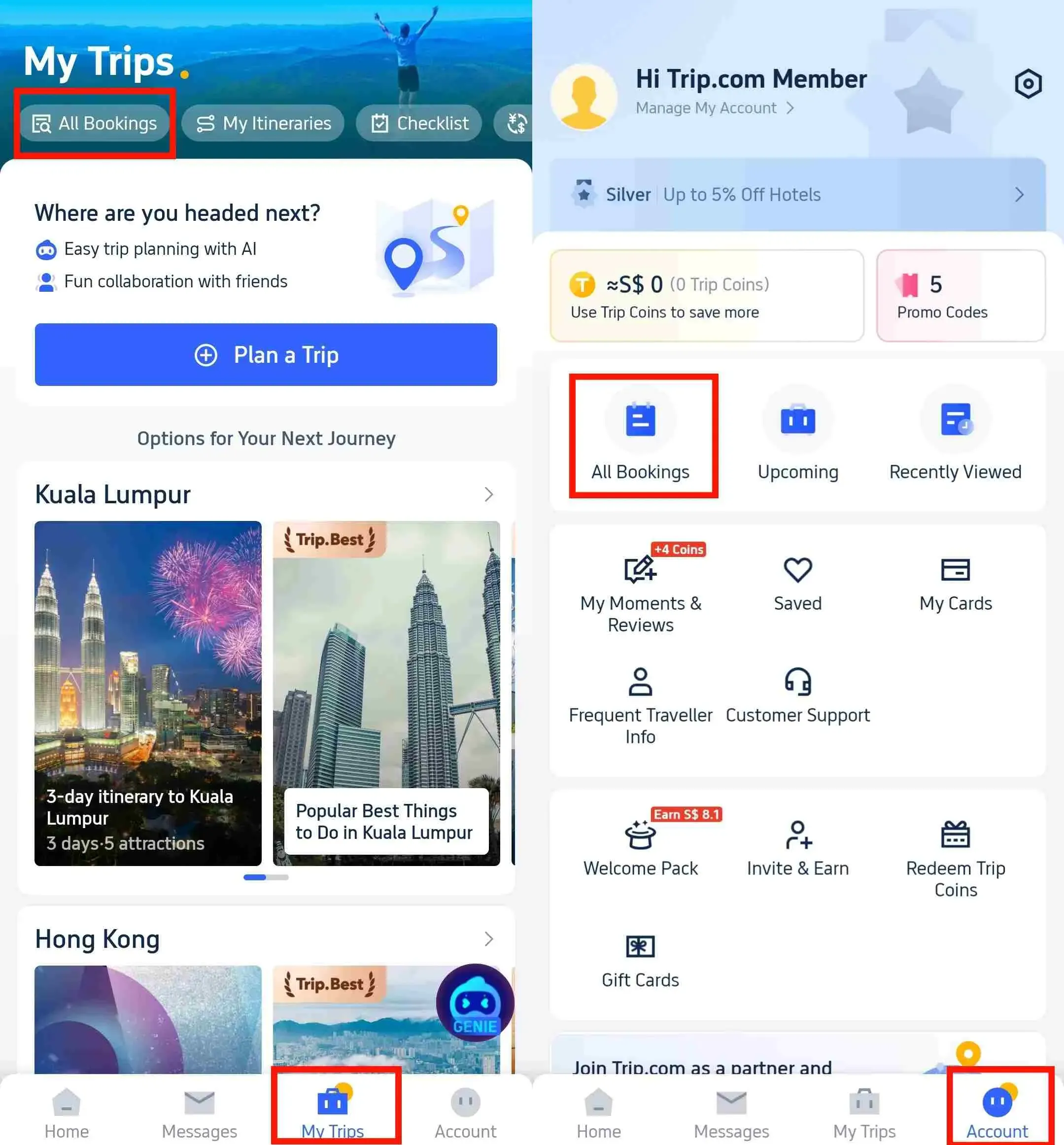
- Trip.com App or Website: Log in to your account.
- Navigate to "My Trips" or "My Bookings" (usually located at the bottom of the app or top right of the website).
- Select the hotel reservation you need to modify.
2. Check the Change Policy
- On the booking details page, you must look for the "Cancellation & Change Policies" or similar section.
- Crucially, read this policy. Your ability to change dates, room type, or guest name, as well as any fees, is based on the fare type you chose:
- Flexible/Free Cancellation Rate: These rates usually allow you to modify dates or room types for free before a specific deadline (e.g., 24-48 hours before check-in).
- Non-Refundable/Restricted Rate: These rates typically do not permit changes (date change or room type) and often require you to cancel the booking (losing the original payment) and make a new one.
3. Initiate the Change
- If your policy allows changes, look for a button that says "Change", "Modify Booking", or "Manage My Booking" on the reservation page.
- Select the details you wish to change, such as:
- New Check-in/Check-out Dates
- Room Type
- Guest Details (usually limited to minor corrections or adding a second guest, not a full name transfer).
4. Review New Details and Pay Difference
- The system will search for the new dates/room type and display the updated cost.
- Pay attention to the final price. If the new reservation is more expensive, you will need to pay the price difference to complete the modification.
- Review all details carefully before finalizing the request.
5. Confirm and Receive Updated Confirmation
- Once you confirm and submit the changes (and pay any additional fees), you will receive a new booking confirmation email from Trip.com with the updated reservation details.
 NO.1
NO.1






Trip.com Booking Change | Tips to Avoid High Change Fees

Trip.com Booking Change | Book Flexible Options
Always choose flexible flight tickets or hotel bookings if your plans are not confirmed, as they allow easier changes without high penalties.
Trip.com Booking Change | Change Early
Try to make changes as soon as possible, because last-minute modifications often come with higher fees and limited availability.
Trip.com Booking Change | Look for Promotions
Keep an eye on Trip.com promotions, since they sometimes waive change fees or offer discounts that can help you save money.
Trip.com Booking Change Instructions

Source from Unsplash
- Passenger or Airline Changes are Not Possible: You can change the terms of your Trip.com booking, but you cannot change the passenger or the airline. In such cases, you will need to cancel your original booking and purchase a new ticket.
- Change Fees May Increase as the Departure Time Approaches: Change fees are determined by the airline or the agent (Trip.com). Therefore, the amount will vary depending on when the change is made. It is advised to avoid making changes close to the departure date if possible.
- Cancellations After a Change are Non-Refundable (for the Change Fees).: If you cancel your booking after making a change and paying the associated fees, you will not receive a refund for the change fees paid. Therefore, exercise caution when deciding between changing or canceling a reservation. Any refund for the fare difference will be arranged by the airline or the agent.








FAQs about Trip.com Booking Change
Can I change passenger names on Trip.com?
Usually no, but minor corrections (like spelling errors) may be allowed depending on airline policy.Can I change my hotel check-in date on Trip.com?
Yes, if the hotel’s policy allows changes. Non-refundable bookings cannot be modified.How long does it take for changes to be confirmed?
Flight changes are usually instant; hotel changes depend on the property’s approval.