China eSIM Guide: VPN, Best Plans, Setup & Coverage Tips

Planning your next big adventure to China? But dealing with physical SIM cards, language barriers at local kiosks, or facing hefty international roaming fees on your Australian phone plan is the last thing you want to worry about. We’ll show you how a eSIM China works, how it easily bypasses local internet restrictions, and why it’s the smartest, most budget-friendly way to keep your phone connected across China.

Top 3 China eSIM Plans (with VPN)
CMCC China 4/5G eSIM
- CoverageMainland China
- Data0.5G-3GB/day or 1-50GB Total
- Validity1 to 30 Days
- Pricefrom AU$0.67

China Mobile 5G eSIM
- CoverageMainland China
- Data0.5G-3GB/day or 1-50GB Total
- Validity1 to 30 Days
- Pricefrom AU$0.67

China/HK/Macau eSIM
- CoverageChina(Mainland,HK&Macau)
- Data3-50GB Total or 0.5-100GB/Day
- Validity1 to 30 Days
- Pricefrom AU$0.69
If you’d like more options, just click the “Find More China eSIM Plans” button below. Don’t forget to claim your New User Coupon below! Enjoy an extra 5% off on top of already affordable eSIM prices.
Which China eSIM Providers to Choose?
When choosing an eSIM provider for your travels in China, Trip.com offers several advantages over traditional providers like China Mobile (CMCC), China Unicom, and China Telecom. Here's a comparison of Trip.com with these major Chinese eSIM providers:
Feature | China Mobile (CMCC) | China Unicom | China Telecom | |
Coverage Areas | Nationwide coverage in China | Nationwide, but varying by region | Strong in urban areas, less coverage in rural regions | Good coverage in major cities, less coverage in remote areas |
Price | From AU$0.79 | Generally higher prices | Competitive, but varies | Higher prices for short-term plans |
Activation Method | Quick QR code activation | Requires several steps for activation | Activation involves more steps | Complex activation process |
Cancellation Policy | Free cancellation before activation | Stricter cancellation policy | Stricter cancellation policy | Stricter cancellation policy |
Customer Support | High rating, responsive | Good support, but slower response times | Average support, longer waiting times | Average support, may have delays |
Data Usage Limits | 1GB high-speed, throttled to 384kbps after usage | Various speed limits depending on the plan | Various speed limits depending on the plan | Various speed limits depending on the plan |
Hotspot Sharing | Supported | Supported | Supported | Supported |
Why Choose Trip.com for Your China eSIM?
Trip.com stands out for its affordable pricing, easy activation via QR code, and flexible cancellation policy. While China’s major carriers (China Mobile, Unicom, and Telecom) often come with higher prices and stricter cancellation rules. For a more convenient and budget-friendly eSIM solution in China, Trip.com is a top choice for travelers!
China eSIM Users' Review
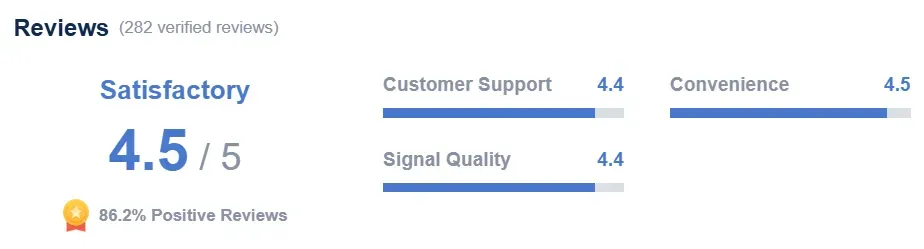
Reviews of China eSIM

Mainland China/Hong Kong/Macau 5G eSIM | 5 Carriers | Day Pass/Total Data Package | 24-Hour Billing | QR Code
4.6/5
21955 reviewsThe eSim was super easy to install on both Android (Samsung) and iPhone, and we had already set it up before our trip. It was really useful for us since we travelled to Beijing, Yangshuo and Hong Kong, with another layover at Beijing Intl. Airport on our way back home. We could use WhatsApp, Instagram, YouTube, Spotify, Netflix, Gmail etc. without any problems and without needing an extra VPN. The price was also very reasonable considering we got up to 100GB per day for a total of 14 days. We paid around €25,- per person. Sometimes the connection would randomly drop, which was a bit annoying because we had to restart our phones (a several times) to get it working again. Especially when you're standing in a line trying to pay with WeChatPay or AliPay this can get a bit awkward. But other than that: 10/10 would definitely book again! :)


Mainland China 5G eSIM | Day Pass/Total Data Package | ChatGPT Available | 24-Hour Billing | 1-365 Days | QR Code
4.6/5
66741 reviewsThe eSIM works perfectly, it's very easy and quick to install. Excellent signal all around, an excellent product.
Which is Better in China? eSIM, SIM card, or Wi-Fi router

When traveling in China, choosing between an eSIM, a physical SIM card, and a Pocket Wi-Fi router depends heavily on your budget, travel group size, and tech preferences.
Here is a breakdown comparing all three options:
Feature | eSIM | Physical SIM Card | Pocket Wi-Fi Router |
Average Cost | ~AUD $10 – $35 / week | ~AUD $15 – $30 / month | ~AUD $6 – $12 / day (+ deposit) |
VPN Included? | Yes (Roamed data bypasses Great Firewall) | No (Requires a separate VPN) | No (Requires a separate VPN) |
Setup Convenience | ★★★★★ (Instant QR scan) | ★★★☆☆ (Physical swap & registration) | ★★★★☆ (Power on & connect) |
Best For | Solo travelers, short trips, unlocked modern phones | Longer stays, budget solo travelers needing a local number | Families, groups, multiple device users |
1. eSIM (Best Overall Choice for Most Travelers)
An eSIM is a digital SIM profile downloaded directly onto your phone before or upon arrival.
- Pros:
- Bypasses the Great Firewall: Most international travel eSIMs (e.g., via Trip.com or travel connectivity providers) route data through Hong Kong or other international hubs, giving you seamless access to Google, Instagram, WhatsApp, and Google Maps without buying a separate VPN.
- Instant Activation: No physical swapping of SIM cards or waiting in long airport lines.
- Keep your original home SIM active for SMS verification codes.
- Cons:
- Only works on unlocked, eSIM-compatible smartphones (e.g., iPhone XS or newer, recent Samsung/Google devices).
- Usually does not come with a local Chinese (+86) phone number.
- Cost: Expect to pay around AUD $12 to $35 depending on data allowance (e.g., 5GB–10GB for 7–10 days).
2. Local Physical SIM Card (Best for Long Stays & Local Number Needs)
You can buy a local physical prepaid SIM card (China Mobile, China Unicom, or China Telecom) upon arriving at major international airports (Beijing, Shanghai, Guangzhou) or official carrier stores.
- Pros:
- Includes a Chinese (+86) Phone Number: Crucial if you need to register for local apps, make local calls, or book certain venue tickets requiring phone verification.
- Excellent coverage and fast 5G speeds across rural and urban regions.
- Cost-effective for extended stays (2+ weeks).
- Cons:
- Requires a VPN: Local Chinese networks block blocked sites/apps, so you must install and set up a reliable VPN before arriving in China.
- Real-Name Registration Required: You must present your passport and complete facial recognition verification at the counter.
- Cost: Plans typically range from AUD $15 to $35 for 10GB–30GB of monthly data.
3. Pocket Wi-Fi Router (Best for Families & Groups)
A portable Wi-Fi hotspot device rented at the airport or ordered online in advance.
- Pros:
- Connects Multiple Devices: One router can power up to 5–10 devices (laptops, tablets, phones).
- No need to change SIM cards or check device compatibility.
- Cons:
- Must be kept charged throughout the day and carried around in your bag.
- Requires a VPN: Like a local SIM card, network traffic is subject to local internet restrictions.
- Pick-up and return logistics (airport counters or mail return).
- Cost: Rental fees run around AUD $6.50 to $12.00 per day (often with an upfront refundable security deposit of around AUD $100–$150).
Verdict: Which One Should You Pick?
- Choose an eSIM if you have a compatible unlocked phone, are traveling for 1–2 weeks, and want instant, hassle-free access to your usual apps (social media, Google) without setting up a VPN.
- Choose a Local SIM Card if you are staying in China for a longer period, need a local +86 phone number, or are traveling on a strict budget.
- Choose a Pocket Wi-Fi Router if you are traveling in a group, have non-eSIM devices, or need to connect laptops and tablets on the go.
How to Get a China eSIM: Step-by-Step Guide
To get an eSIM for China, follow these easy steps:
1. Purchase the eSIM Package
- Choose Your Plan: Select the China eSIM package that fits your needs, such as a Day Pass or Data Package for 1 to 30 days, with data options like 1GB/day, 3GB/day, or more.
- Buy Online: Purchase the eSIM package from a trusted provider, such as Trip.com or other eSIM services that support China.
2. Receive the QR Code
- After purchasing, you’ll receive an email containing a QR code for your eSIM activation.
3. Install the eSIM on Your Device
- For iPhone (iOS):
- Open your Settings app.
- Go to Cellular or Mobile Data.
- Tap on Add Cellular Plan.
- Use your phone’s camera to scan the QR code from the email you received.
- For Android:
- Open your Settings app.
- Go to Network & Internet > Mobile Network.
- Tap on Add Carrier or + next to SIM options.
- Scan the QR code provided in the email.
4. Activate the eSIM
- Turn on Data Roaming: Go to your phone settings and ensure Data Roaming is enabled to start using the eSIM.
- Restart your phone (if necessary) to ensure proper activation and connection.
5. Start Using Your Data
- Once activated, you’ll have access to high-speed data. After your daily data limit is reached, speeds will be reduced (e.g., to 384kbps).
- Your eSIM will be valid for 1 to 30 days, depending on the package you selected.
How to Activate Your China eSIM on Trip.com (No QR Code Needed!)
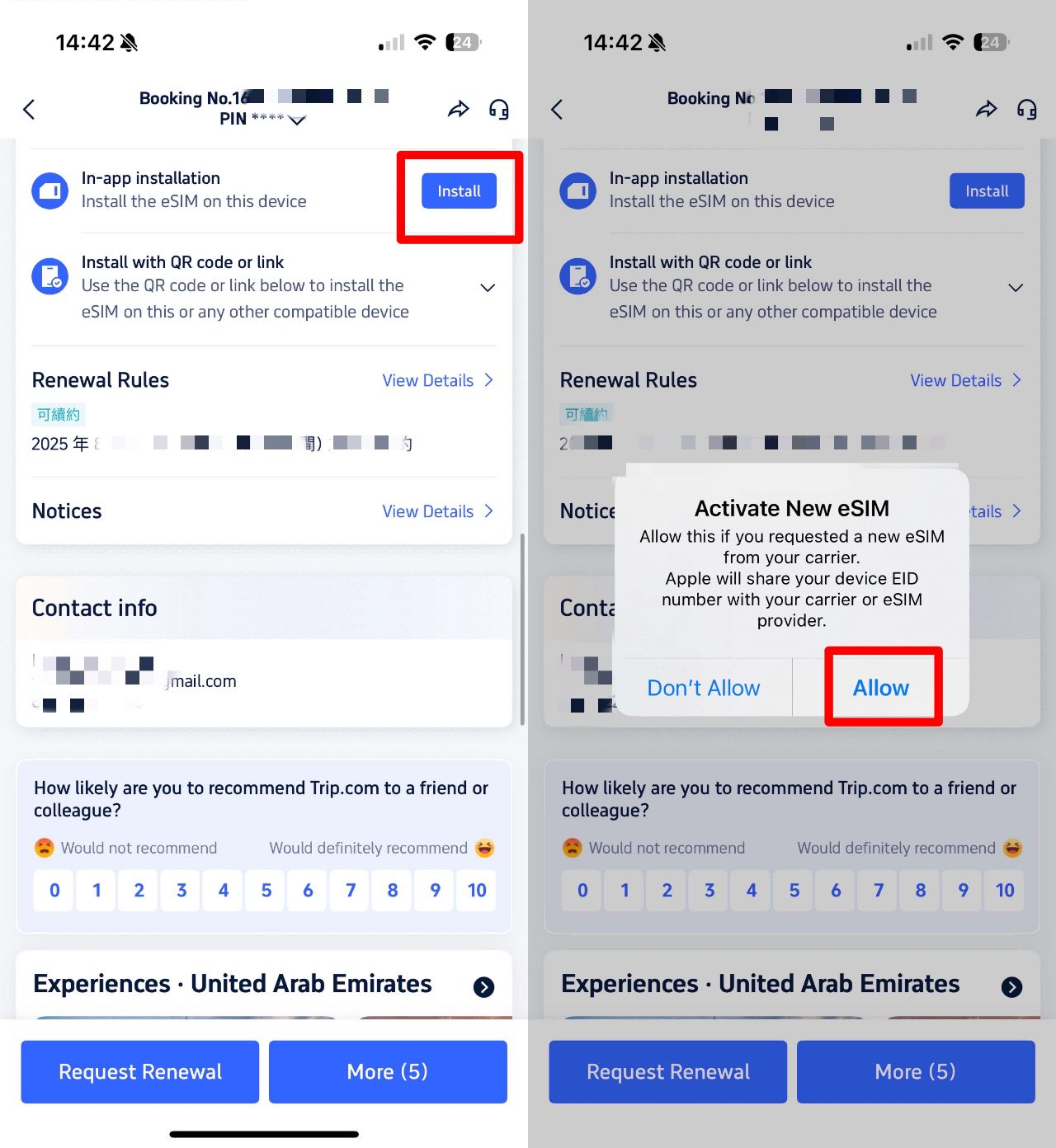
Booking your China eSIM is now easier than ever—no QR code scanning required! Here’s how it works:
1️⃣ Book your China eSIM on Trip.com
2️⃣ Go to your booking details → Find "In-App Installation"
3️⃣ Install directly to your device with one tap—no extra steps!
That’s it! Instant activation, no hassle, and you’ll stay connected to Western apps (no VPN needed).
Does Your Phone Support eSIM?
To determine if your phone supports eSIM, follow these steps:
1. Check Your Device Model
eSIM is supported on many newer smartphones, but not all phones have this feature. Most flagship models from Apple, Samsung, Google, and some others support eSIM. Here are some examples of devices that support eSIM:
- Apple: iPhone XS, iPhone XR, iPhone 11, iPhone 12, iPhone 13, iPhone 14, iPhone 15, and newer models.
- Samsung: Galaxy S20, S21, S22, S23, Galaxy Z Fold, and Z Flip (certain models only).
- Google Pixel: Pixel 3 and newer models.
- Motorola: Some Motorola Edge models (e.g., Edge+ 2020).
- Huawei: Some models, like the Huawei P40 and Mate 40.
2. Check Your IMEI Number
You can check if your phone supports eSIM by looking at your IMEI (International Mobile Equipment Identity) number. Here's how:
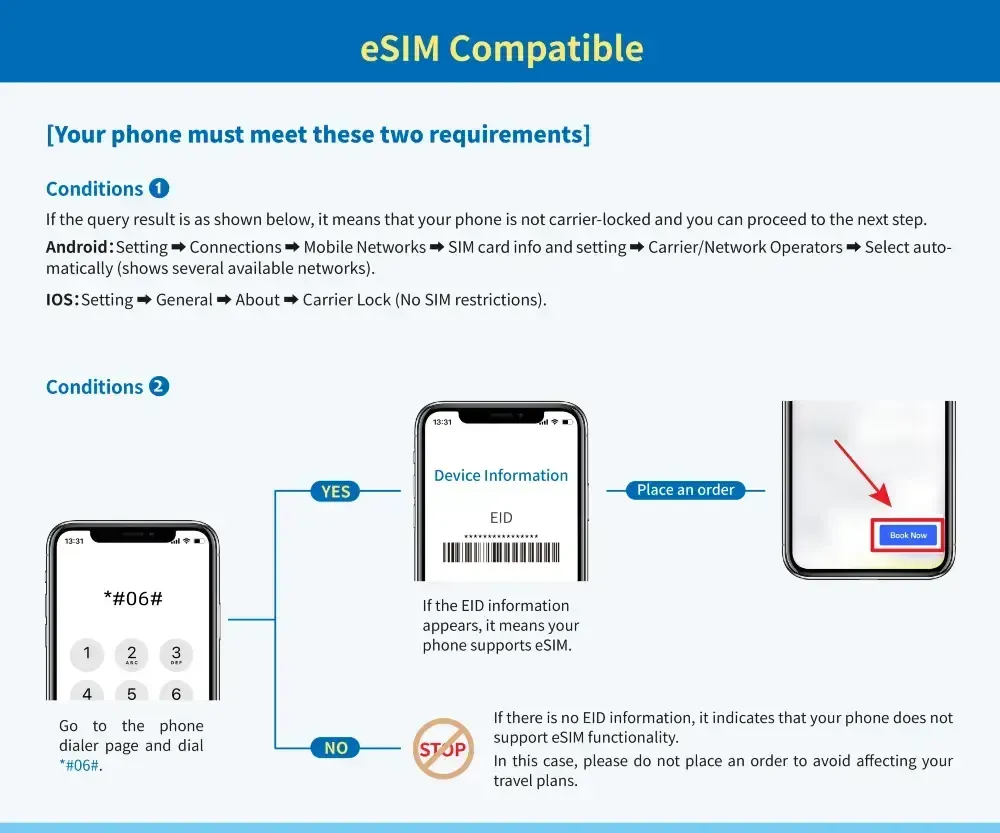
- For iPhone: Dial
*#06#or go to Settings > General > About to see the IMEI. If it displays an EID (Embedded Identity Document), your device supports eSIM. - For Android: Dial
*#06#or go to Settings > About Phone > Status > IMEI information. If an EID is displayed, your phone supports eSIM.
3. Check in Settings
Many devices will have an option in their settings to add a cellular plan using eSIM.
- For iPhone:
- Go to Settings > Cellular or Settings > Mobile Data.
- If you see an option that says Add Cellular Plan, your device supports eSIM.
- For Android:
- Go to Settings > Network & Internet.
- Look for Mobile Network or SIM Cards.
- If you see an option to Add eSIM or Add Carrier, then your phone supports eSIM.
4. Check with Your Carrier
Even if your device supports eSIM, you'll need to make sure your carrier offers eSIM support. Some carriers may not support eSIM yet, or they may require a special setup process.
5. Look Up Your Model Online
If you're still unsure, you can look up your device's model on the manufacturer’s website or check a third-party website like GSMArena, which will usually list whether the device supports eSIM.
Quick Checklist for eSIM Support:
- Does your phone have a recent model (2018 or newer)?
- Does your phone display an EID (Embedded Identity Document) when checking your IMEI?
- Can you see the option to add a cellular plan in your settings?
If your phone meets these criteria, it's likely that your device supports eSIM.
China eSIM is a Must-have Item for a Fun Trip to China!

A China eSIM is a must-have for anyone traveling to China, offering a hassle-free and seamless way to stay connected. With an eSIM, you can access high-speed mobile data throughout your trip, making it easy to use navigation, translation apps, or stay in touch with family and friends.
- You don’t need to hunt for a local SIM upon arrival, unlike traditional esims, the process is digital, and you simply scan a QR code to activate it.
- Many eSIM plans also allow hotspot sharing, so you can connect multiple devices, making it ideal for group travel.
- eSIMs are often more cost-effective than international roaming or buying a physical SIM card. There's also no need to worry about switching SIM cards if your phone has limited slots—your home country SIM and the Chinese eSIM can work together. The convenience, flexibility, and ease of setup make China eSIM the perfect choice for a smooth and enjoyable trip!
Book Your Flights and Hotels with Trip.com for a Smooth China Trip
Planning your trip to China? Complete your travel experience with Trip.com for the best deals on flights and hotels. Whether you're flying from Australia or looking for a great place to stay, Trip.com has everything you need to make your trip seamless.
Hotels in China
Whether you're visiting Beijing for its rich history, stunning landmarks, or vibrant culture, Trip.com offers a wide range of accommodation options to suit every traveler. From luxury hotels near the Forbidden City to cozy guesthouses in Hutong alleyways, you'll find the perfect place to stay and enjy a comfortable, memorable experience in China's capital.
See All Hotels
 NO.1
NO.1



Flights from Australia to China
Choose from a wide selection of flights to major Chinese cities like Beijing and Shanghai. Book your flight with top airlines and enjoy great prices and flexible schedules.
Flights from Australia to China
- One way
- Return
 SYD16:5024h 35m1 stopsPKX14:25Sydney - Beijing|Mon, Nov 9|Tianjin Airlines€ 237€ 26812% offBook12% off€ 268€ 237
- SYD16:5021h 30m1 stopsPEK11:20Sydney - Beijing|Mon, Nov 9|Tianjin Airlines€ 238€ 26811% offBook11% off€ 268€ 238
 SYD08:5014h 25m1 stopsPKX20:15Sydney - Beijing|Mon, Nov 9|Juneyao Airlines€ 243€ 2689% offBook9% off€ 268€ 243
 SYD13:0014h 25mDirectBJS14:00Sydney - Beijing|Mon, Sep 6|Normal AirlineFind more flightsFind more flights
FAQs about China eSIM
-
Can I use an eSIM in China?
-
Do I need to visit a store to get an eSIM for China?
-
Is an eSIM better than a physical SIM for traveling to China?
-
Can I use my regular SIM card and an eSIM at the same time in China?
-
Can I use the eSIM for data, calls, and texts in China?
Disclaimer: This article has been provided by an individual contributor or third party platform. If there is any discrepancy regarding the copyright, please contact us directly and we will delete the content immediately.

Trending Researches
-
eSIM/SIM card
-
Popular Cities
-
Latest Flight Deals
-
Popular Attractions
- Shanghai Hotels
- Bali Hotels
- Guangzhou Hotels
- Bangkok Hotels
- Beijing Hotels
- Chongqing Hotels
- Tokyo Hotels
- Hong Kong Hotels
- Chengdu Hotels
- Shenzhen Hotels
- Melbourne Hotels
- Ho Chi Minh City Hotels
- Sydney Hotels
- Singapore Hotels
- Zhangjiajie Hotels
- Osaka Hotels
- Kuala Lumpur Hotels
- Seoul Hotels
- Phuket Hotels
- Xi'an Hotels
- Forbidden City Tickets
- Universal Studios Japan
- Shanghai Disneyland Map
- Hutong Beijing
- Shanghai Disneyland Fast Pass
- Shanghai Disneyland Ticket Types
- Tokyo Disneyland Ticket
- Terracotta Warriors
- Canton Tower
- Taronga Zoo Sydney minisite
- Zhangjiajie National Forest Park
- Shanghai Disneyland Ticket
- Shanghai Tower
- Summer Palace Beijing
- Puffing Billy Tickets