Baidu Maps Guide: How to Use China's Top Map App in English


Do you want to have a thorough understanding of the installation, functions and usage tips of the latest Baidu Map? In this article, Trip.com will offer the most comprehensive guide to Baidu Map, covering everything from download and registration tutorials, function introductions, to usage tips, helping you understand how to use Baidu Map all at once!
To Beijing
To Shanghai
To Guangzhou
See all flights


Baidu Map | Basic Introduction

Baidu Map is one of the most popular navigation and map applications in Mainland China. Leveraging AI technology, it provides more intelligent personalized recommendations and AR real-world navigation. The app is available on iOS, Android, and web platforms, and supports in-car systems. Whether you're driving, walking, cycling, or using public transportation, Baidu Map can help you find the optimal route.
Core Features & Services
- Navigation: Real-time navigation, optimal route planning for driving, walking, cycling, and public transport.
- Map Services: Traffic condition queries, street view, offline map downloads.
- AI-Powered Features: Personalized recommendations, AR real-world navigation, smart travel solutions.
- Travel Solutions: Bike-sharing service integration.
How to Install Baidu Map App?

- Download from the App Store: Go to the App Store or Google Play, search for "Baidu Map," then tap download and install ✅.
- Registration and Login: After installation, open the app. Use your mobile number to register or log in, and complete the identity verification.
- Basic Setup and Permissions After Installation: Go to your phone's Settings → Privacy → Location Services, and allow Baidu Map to use GPS for precise location 🔍.
- How to Use Baidu Map on a Computer: Search for Baidu Map → Log in with your Baidu account to start using it.
Baidu Map Function Introduction
Feature Name | Description |
Real-time Traffic & Congestion Avoidance | When planning a route, users can select the "Avoid Congestion" option. Baidu Map will use real-time traffic data to plan a route that avoids congested areas, saving you time. |
Offline Map Download | You can download offline maps for areas to ensure navigation functionality works without an internet connection. Offline maps must be downloaded in advance, and not all regions are supported. |
Street View & 3D Map | After opening the app and logging in, tap "Route" at the bottom right → set your destination → switch the navigation mode to "Walking" → tap the "AR Navigation" button at the bottom to activate the street view mode. |
Nearby Parking Information | Near your destination, Baidu Map displays information on nearby parking lots, including location, pricing, and vacancy status, making it convenient for users to park. |
Live Traffic Conditions | Baidu Map displays real-time road conditions, using different colors to indicate the level of congestion, allowing users to check traffic in advance and avoid delays. |
Baidu Map | eSIM& Network Card in Chinese mainland
✅Need reliable data for Map App in China? You can't miss these high-speed SIM/eSIM plans.
See all attractions
 890672 booked




Can I Use Baidu Map Without a Chinese Phone Number?

Source from Unsplash
You can still use the baidu map app with an international mobile phone number without a Chinese mobile phone number, but you may be restricted in functions such as hailing a taxi, sharing locations, and replying to comments.
Feature | Access |
Map Navigation | Yes (driving/walking) |
Public Transit Routes | Yes |
Location Sharing | Unavailable |
Ride-Hailing (Didi) | Blocked |
Offline Maps | Yes |
Reviews/Payments | No access |
How to Use Baidu Map in English?
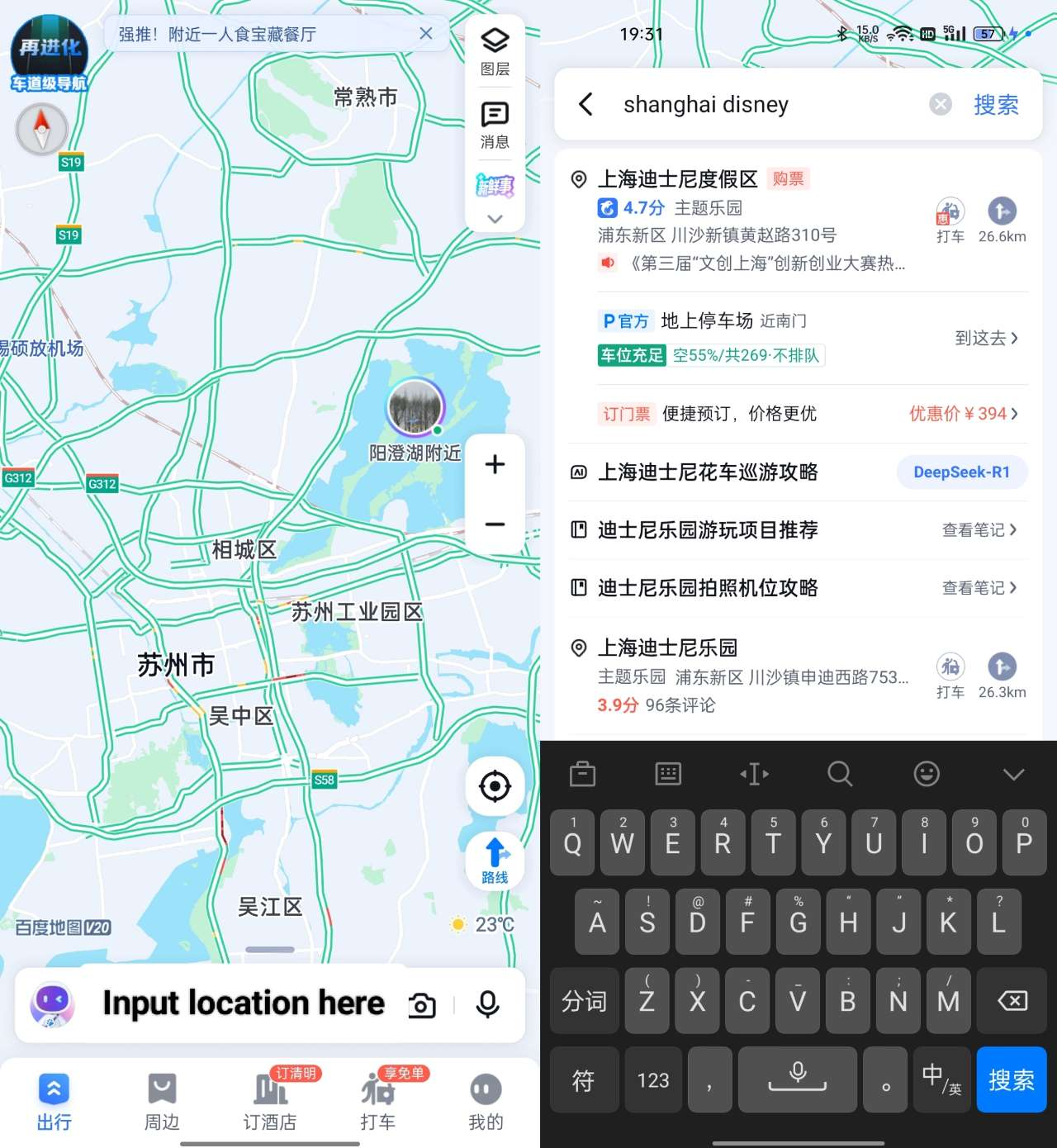
(Source from Baidu)
Baidu Map | How to Find a Place
- Enter the place you want to go in the search bar. It is recommended to enter in Chinese or pinyin
- Select the option that best matches your destination in the search results
Baidu Map | How to Navigate
- After completing the first step (find a place), click the button on the right, and there will be different ways to arrive
- Choose the mode you need among driving, walking or taking public transportation, and follow the directions to get there
Baidu Map | How to Use Public Transport
Search for the target location. After determining the location, select the public transportation mode you need:
- Subway: Look for (Exit) + numbers.
- Bus schedules: Tap 公交 → Check First bus and Last bus.
Baidu Map | How to Save a Place


(Source from Baidu)
- First, search for the address you need to save
- Select this address and click the star at the lower left corner to ensure successful saving
- Click "Collect → Location", "long-press the Chinese name", and you can rename the location you have saved.
Car Rentals
Car Rental Promo Code - 8% Off
New User Enjoy up to 8% Off
TRIPCAR8
China Map Apps Compared: Baidu Map vs. Amap

Source from Unsplash
Amap or Baidu Map are commonly used Map tools by Chinese people. They are used for navigation and route planning when walking, cycling, taking buses or subways, and can also set arrival reminders. They are similar to Google Map, but in China, Amap and Baidu Map are more accurate and don't need vpn.
Baidu Map vs. Amap | When to Use Which
Scenario | Recommended App | Key Reason |
Public Transit Commute | Amap | Real-time bus tracking + payment integration |
Driving Commute | Baidu | Smart driving-restriction handling |
Long-Distance Drives | Amap | Accurate ETAs + service area data |
Self-Guided Tourism | Amap | Detailed digital guide maps |
Guided Group Tours | Baidu | AI auto-narration + optimized routes |
Checking Destination Layout | Baidu | Only reliable street view |
Car Infotainment Ecosystem | Amap | Seamless phone-car destination sync |
[10%] China's Hotel Recommendation
Register FREE on Trip.com & save up to 10% instantly on hotels. Book before they're gone! ✅
Shanghai Hotel
Hong Kong Hotel
Beijing Hotel
See All Hotels










FAQ about Baidu Map App
-
Does Baidu Map have an English option?
-
Does Baidu Map have an English version?
-
Is there a Chinese map in English?
Disclaimer: This article has been provided by an individual contributor or third party platform. If there is any discrepancy regarding the copyright, please contact us directly and we will delete the content immediately.
Trending Searches
-
Top Flight Routes
-
Latest Flight Deals
-
eSIM/SIM card