Dianping App Guide 2026: How to Find the Best Food & Deals in China


Unlock China’s best dining experiences with our foreigner’s guide to Dianping. Discover how to switch the app to English, locate hidden culinary gems, and master in-app features for a seamless, local-style dining experience.
to Shanghai
to Guangzhou
to Beijing
See all flights


What Is Dianping App?

Whether you're an expat or a short-term traveller, Dianping is an indispensable tool for discovering China’s local scene. This all-in-one platform excels at identifying high-quality dining, booking essential services like haircuts, and securing discounted vouchers for wellness and leisure activities.
What Can Dianping Do?
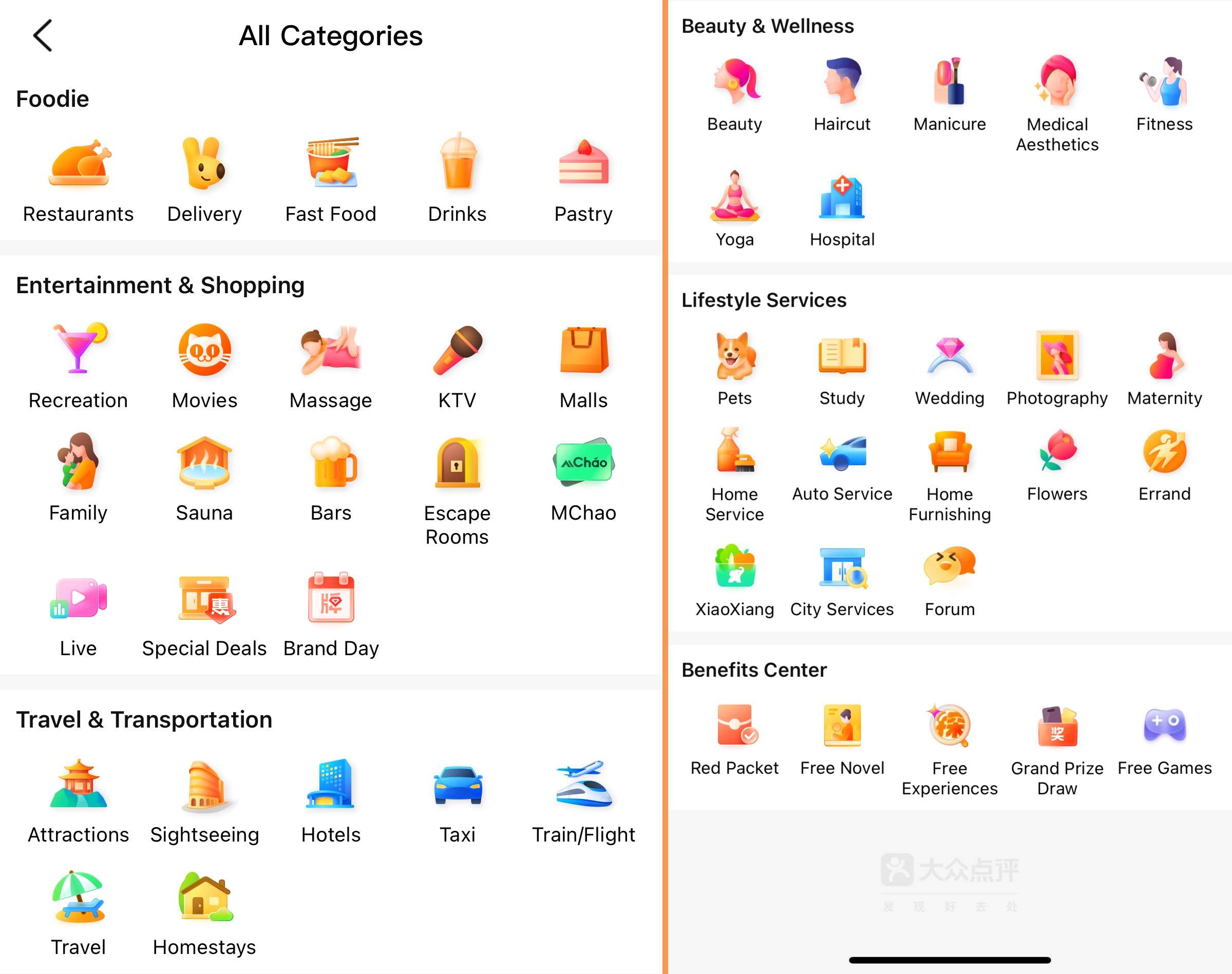
Dianping (大众点评) is China’s premier lifestyle platform—essentially combining the best of Yelp, TripAdvisor, and Groupon into one indispensable app. It’s the ultimate tool for navigating local life, offering these key features:
- Skip the Wait: Join digital queues remotely to avoid standing in line at popular hotspots.
- Seamless Bookings: Schedule everything from haircuts and laundry to massages without needing to make a phone call.
- Expert Dining Guides: Search by cuisine (like fiery Sichuan), browse star ratings, and view authentic user photos of every dish.
- Local Exploration: Discover top-rated theme parks, live performances, and local markets with verified reviews.
- Exclusive Savings: Purchase discount vouchers for dining, cinema tickets, or spa treatments directly in-app and simply scan your QR code on arrival.
See all attractions
 939346 booked




How to Use Dianping App as a Foreigner (in English)

1. Register a Dianping Account
You can use Dianping in two ways:
- WeChat Mini-Program: No need to download an app. It offers accurate translations but has fewer features.
- Dianping App: Download it for full features. Group-buy coupons here are often cheaper than on WeChat. You can browse in the mini-program first and buy coupons via the app.
To use the app, register an account. You can log in with: Phone number (foreign numbers are supported—just select your country code). Or WeChat/QQ.
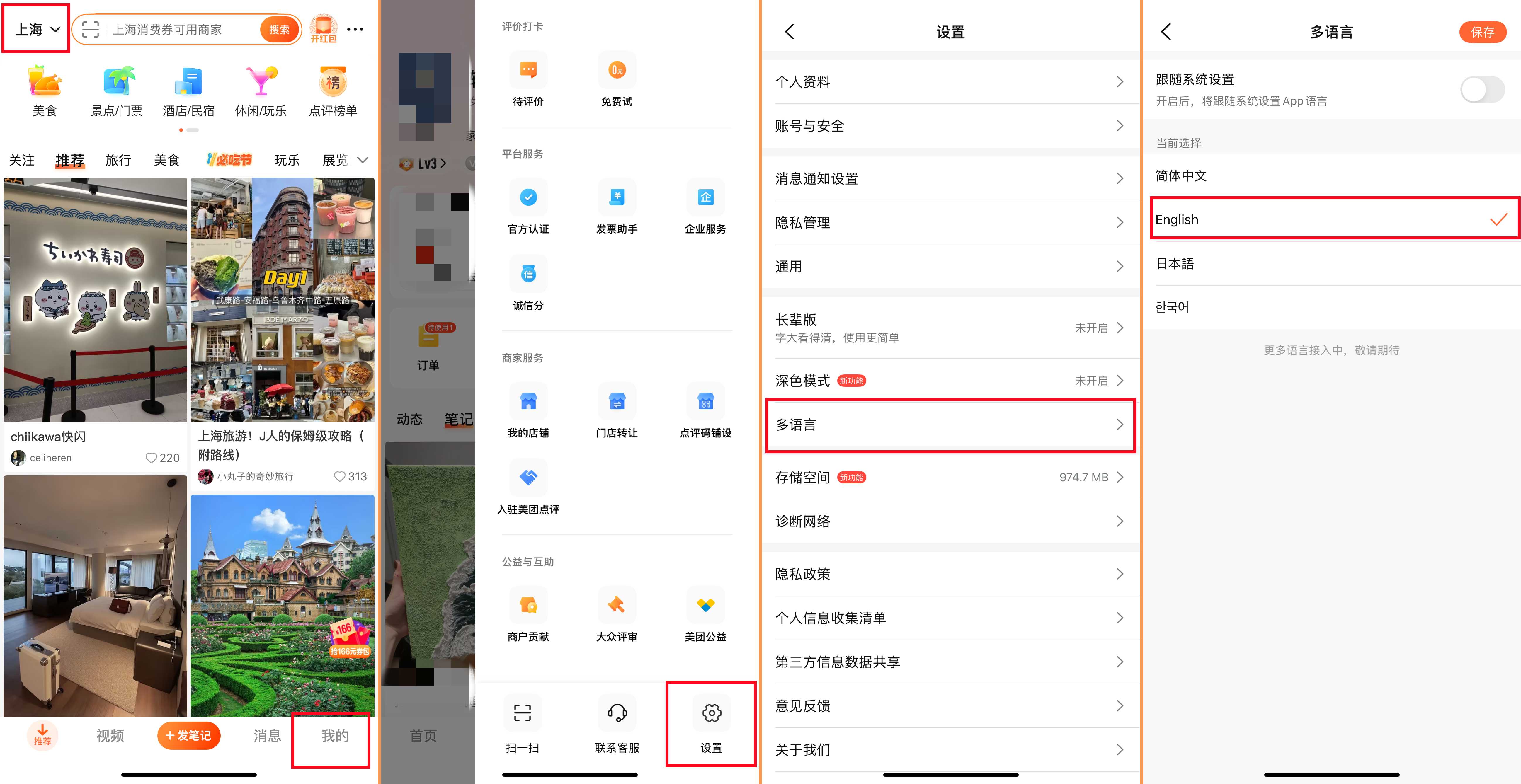
2. Switch Dianping to English (or Your Language)
Dianping supports multiple languages. Here’s how to change it:
- Tap “我的” (Profile) at the bottom right.
- Tap the three horizontal lines (menu icon) at the top right.
- Select “设置” (Settings) → “语言” (Language).
- Choose your language (English, Japanese, Korean, etc.) and save. Now the app will display in your chosen language.
How to Search for Stores on Dianping
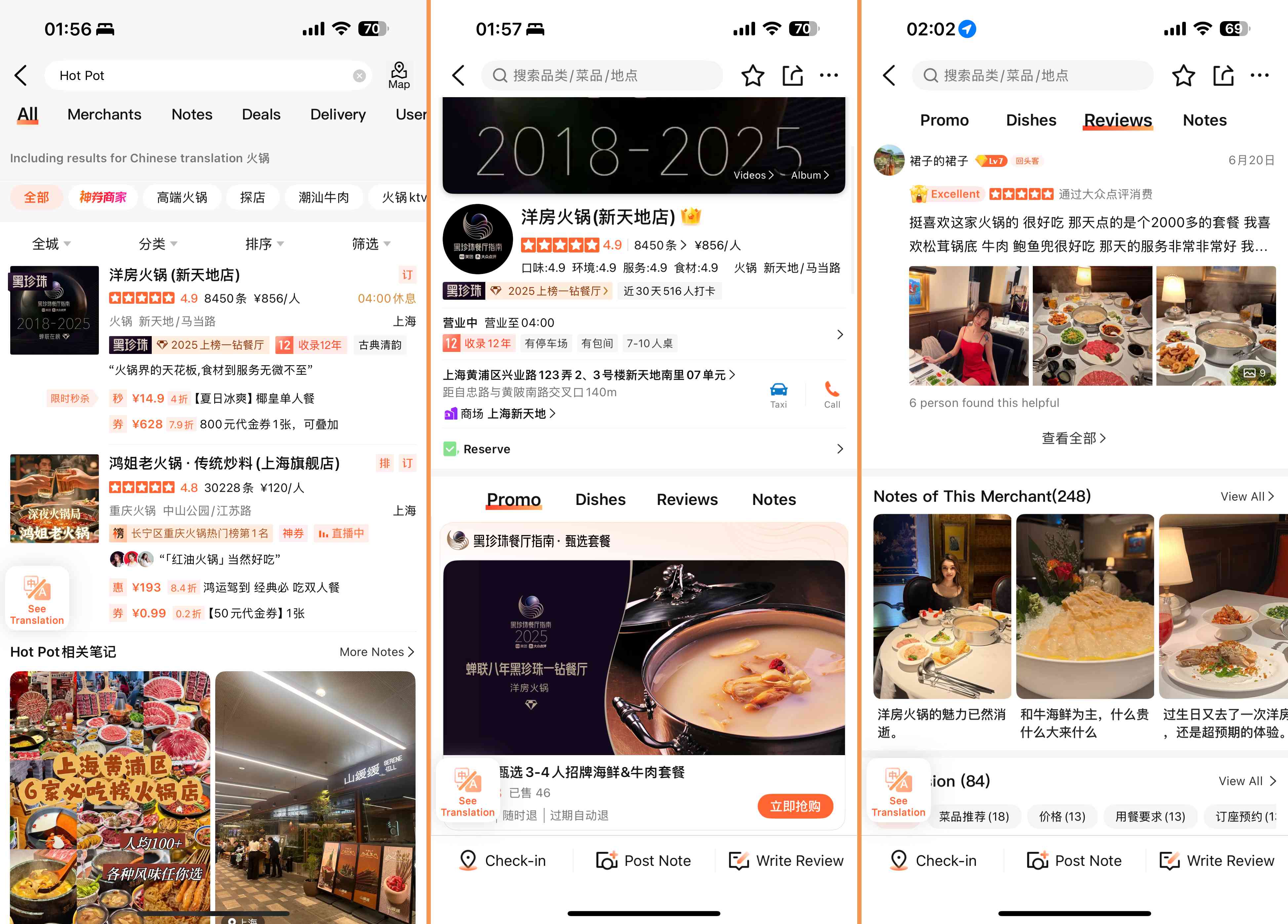
On the homepage of Dianping, you can find the store through the following four ways:
- Store name: Enter the exact name of the place you want to visit.
- Location: Look for stores near you or near a specific destination.
- Store type: Search by category, such as "Hot pot" or "nail salon".
- Filter: Narrows down the result by distance, rating or average price.
After entering the store page, you can:
- Browse store details: View photos of dishes/services, opening hours, addresses, average prices, and real user reviews. This helps you understand the store's environment, services and costs.
- Online queuing: If the store is busy, check if online queuing is available. Get a number to track your location in real time without having to wait on site.
- Purchase group-buying coupons: Find discounted deals on the store page. Make the payment in the app and then show the QR code to the staff when you arrive to redeem it.
How to Pick Restaurants & Use Deals on Dianping
How to Source Top-Tier Dining on Dianping
- Audit the Ratings: Aim for venues with a 4.5-star rating or higher and a substantial volume of reviews. This ensures the score is backed by a broad customer base.
- Visual Verification: Prioritize recent reviews that include user photos. Authentic snapshots provide a more reliable look at portion sizes and presentation than professional marketing shots.
- Look for the "Must-Eat" Badge: Keep an eye out for the "Must-Eat List" (必吃榜) icon—Dianping’s official seal of approval for a city’s standout culinary experiences.
- Filter Critiques Smartly: Don’t let a few low scores deter you. Check the specific complaints; if a user marks a place down for being "too loud" or "too spicy" but you love a vibrant atmosphere and heat, it could still be your perfect match.
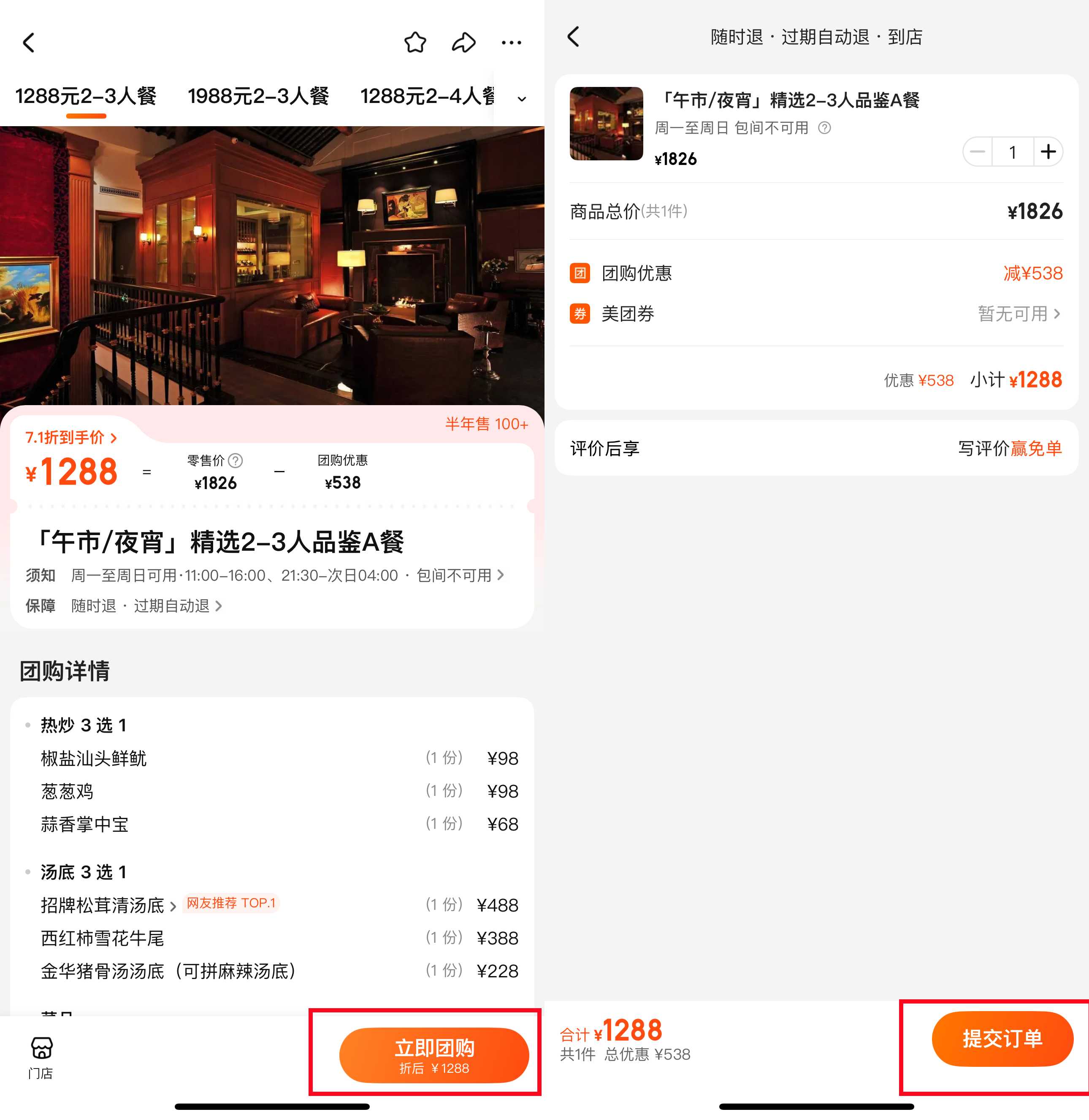
Maximising Value with Group Deals
- Navigate to the restaurant’s profile and locate the "Offers" or "Coupons" section.
- Select a deal that fits your group, such as a "20% Discounted Lunch Set" or a fixed-price "Double Dinner" voucher.
- Complete the transaction seamlessly using Alipay or WeChat Pay (linked to your Aussie bank card).
- Upon arrival, access your QR code via the "My Orders" tab. Simply present it to the staff to scan, and the discount will be applied to your final bill.
Dianping vs Meituan: What’s the Difference?

While both are popular food apps in China, they have distinct uses:
Feature | Dianping | |
Focus | Discovery & reviews (where to go/eat) | Services & delivery (getting things done) |
Strengths | Detailed restaurant reviews, community recommendations, lifestyle services | Food delivery, ride-hailing, hotel bookings, wider range of services |
Best For | Finding new spots, reading honest reviews, using group deals | Ordering food to your door, booking taxis, or buying movie tickets quickly |
Tips for Using Dianping for Australians
Dianping | Connect Your Payments
You can’t pay directly with an Aussie credit card inside Dianping, but you can link your CommBank, ANZ, or Westpac card to Alipay or WeChat Pay.
- How to pay: When you buy a "Group Buy" (团购) voucher in Dianping, select Alipay or WeChat as your payment method at checkout. It will automatically pull from your linked Australian card.
- QR Code Redemption: Once purchased, you’ll get a QR code. Just show this to the staff at the restaurant or spa—they’ll scan it, and you're done!
Dianping | Navigate the "Star Ratings"
- The Sweet Spot: A 3.5 to 4.0-star restaurant is often a local favourite that’s authentic and reliable.
- The 5-Star Trap: If a place has a perfect 5.0 with thousands of reviews, it might be a "viral" spot with long queues. Don't overlook the "hole-in-the-wall" spots with slightly lower scores.
Dianping | Smart Searching for Aussies
- Search by Dish, Not Name: Instead of searching for a restaurant name, search for the dish you're craving (e.g., "Dumplings" or "Sichuan Hotpot").
- Use the "Must-Eat" List: Look for the "Must-Eat" (必吃榜) icon on a restaurant's page. This is a curated list by Dianping that is generally very high quality and reliable for travellers.
- Check the "Per Person" Cost: Each listing shows an average cost per person (e.g., ¥100). This is a great way to manage your holiday budget in AUD.
Dianping | Essential In-Shop Features
- Join the Queue Remotely: If you’re at a busy mall in Shanghai or Beijing, find the restaurant on Dianping and look for the "Queue" (排队) button. You can join the line while you keep shopping, and the app will notify you when your table is almost ready.
- Order by Photo: Most restaurants have a "Recommended Dishes" (推荐菜) section with high-quality photos. If you can't read the menu, just point to these photos to show the waiter what you want.
Must-Visit Attractions in China
Check some of the top attractions in China below!👀






*Prices are approximate and vary by season, availability, and ticket type. All prices in CNY.
[10% Off] Best China Hotel Recommendations
Top Shanghai Hotels
Top Beijing Hotels
Top Guangzhou Hotels
See All Hotels























FAQs about Dianping App in China
-
Can I use Dianping in English?
-
What is the difference between Meituan and Dianping?
-
What is the Chinese name for Dianping?
-
Is Dianping owned by Meituan?
Disclaimer: This article has been provided by an individual contributor or third party platform. If there is any discrepancy regarding the copyright, please contact us directly and we will delete the content immediately.
Trending Searches
-
Top Flight Routes
-
Latest Flight Deals
-
eSIM/SIM card