WeChat QR Code Guide: How to Find, Share & Scan Easily


Discover how to scan WeChat QR codes to log in, add friends, join groups, pay with WeChat Pay, and register your account as an international user.
to Shanghai
to Beijing
to Guangzhou
See all flights



What is a WeChat QR Code? Types & Functions Explained
WeChat uses various QR code formats for different tasks. Here’s a quick breakdown of the most common types and how you can use them:
QR Code Type | Essential Features |
|---|---|
Contact QR Code | Add friends, follow Official Accounts, or connect with business contacts. |
Group QR Code | Join WeChat groups for your class, company, hobbies, and more! |
Payment QR Code | Scan to pay merchants, receive payments, or split bills. |
Login/Verification QR Code | Scan to log in to WeChat on a new device, get help with account registration, or verify your identity. |
How to Locate the WeChat QR Code Scanner
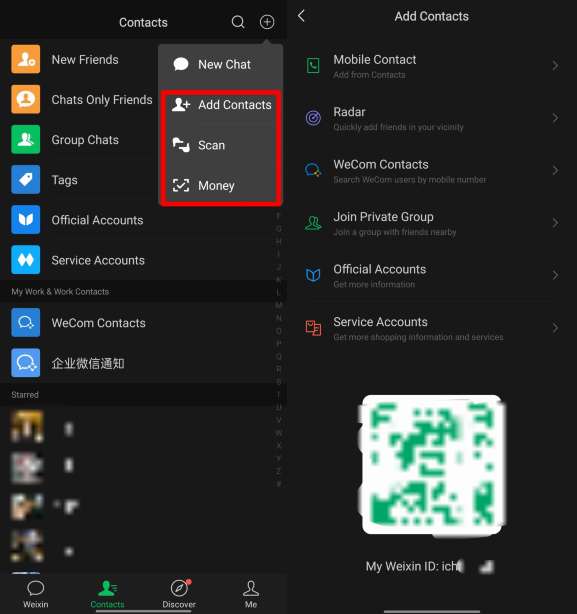
You can easily find the QR code scanner right on your WeChat home screen:
- Open the WeChat app (just make sure you're using the official version from the App Store or Google Play).
- Tap the + icon in the top-right corner of the chat screen.
- Pick Scan from the dropdown menu—this launches the camera scanner right away.
- For quick access, you can also long-press the WeChat icon on your home screen (iOS/Android) to launch the scanner in a flash.
How to Scan a QR Code in WeChat: A Step-by-Step Guide
Once you've got the scanner up and running, the steps are identical no matter what kind of code you're scanning:
- Align the code: Keep your phone steady and center the QR code within the square frame on your screen.
- Wait for the beep or vibration—WeChat will handle the rest and recognize it automatically!
- Follow the prompt:
- For People: Tap "Add to Contacts" and feel free to send a friendly greeting!
- For Groups: Simply scan the group QR code and tap Join Group (just a heads-up: if the group is already full, you'll need an invite from an admin to hop in!).
- To make a payment, just enter the amount, double-check the recipient's name, and pop in your 6-digit payment password.
- To log in, simply tap "Confirm Login" on your phone to authorize your PC or web session and get back to planning your next adventure!
Scanning from a screenshot?
If you've received a QR code in a chat or have a screenshot handy:
- Open the scanner → Tap "Album" (bottom-right corner) → Select the image. WeChat will scan the code from the photo.
See all attractions
 985688 booked




How to Connect with Friends Using QR Codes
This is the most common way QR codes are used socially in China. There are two ways to do this:
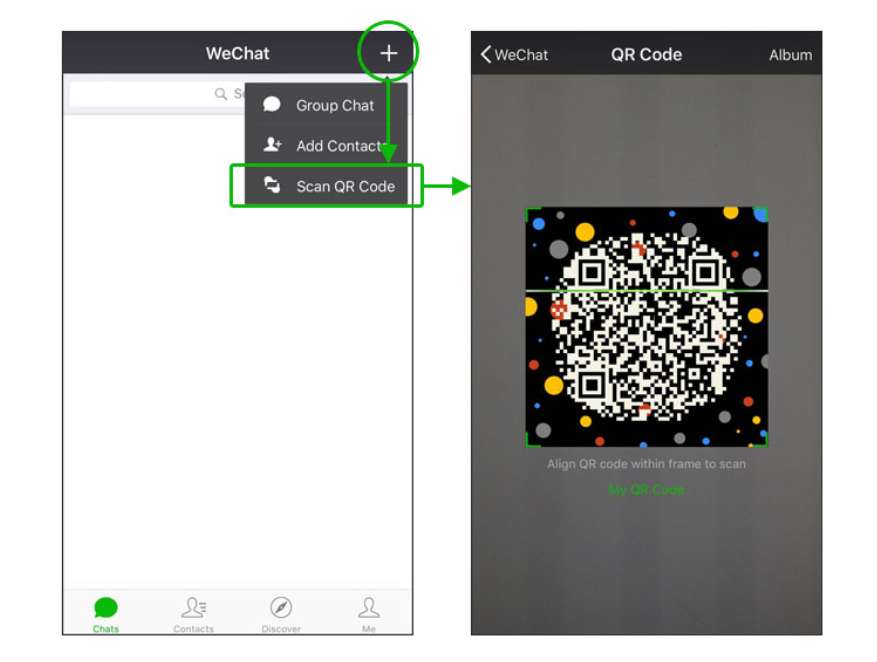
Credit: WeChat official account
A. Scan Someone Else's QR Code
- Open up the scanner (check out Section 2 for more details).
- Point your camera at their code.
- Tap "Add to Contacts" and feel free to personalize your greeting message if you'd like!
- Sit tight while they accept your request!
Credit: WeChat official account
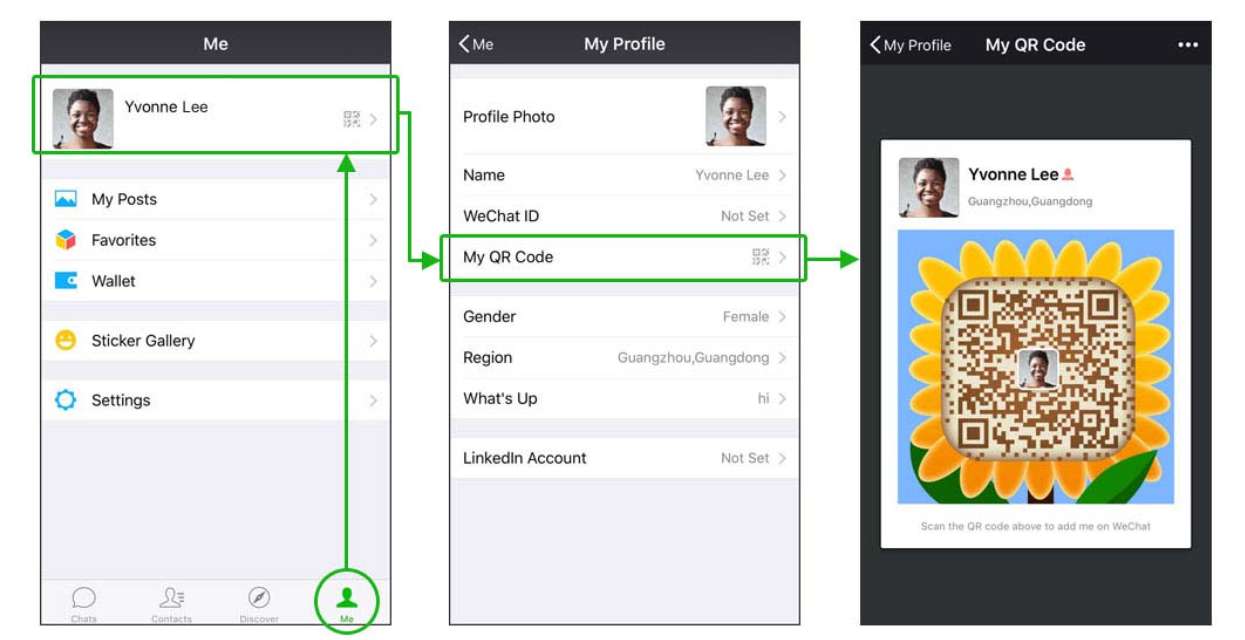
B. Show Your Own QR Code for Others to Scan
- Head over to the "Me" tab in the bottom-right corner.
- Tap your profile photo or name at the top.
- Tap "My QR Code".
- Have your friend scan it, or tap the "..." menu to save it to your album and share it with the world!
How to Pay with a WeChat QR Code (WeChat Pay)
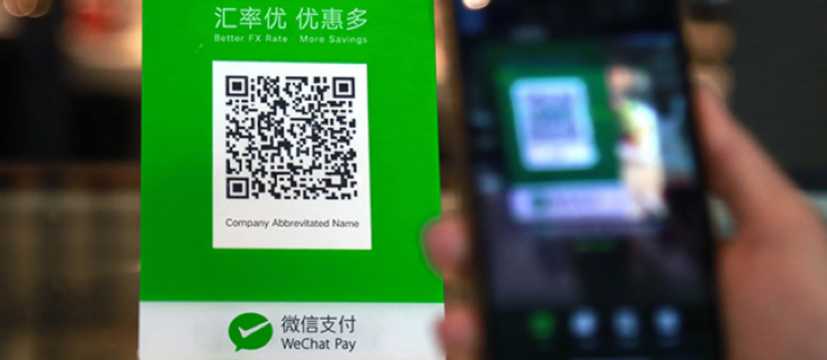
When you're traveling in China, mastering payments is the absolute key to navigating your daily adventures with ease!
How to Get WeChat Pay Up and Running
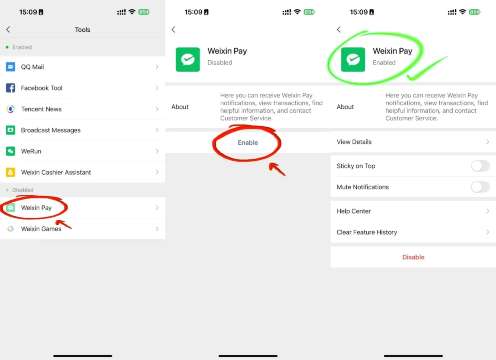
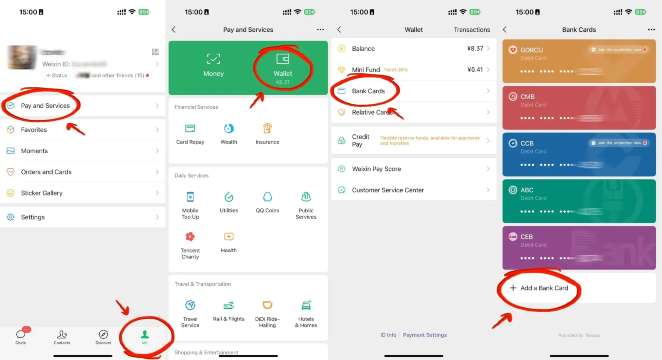
To Pay a Shop (You Scan Them)
- Open up the scanner.
- Scan the merchant's QR code (usually printed and taped to the counter).
- Enter the amount.
- Enter your 6-digit WeChat Pay password.
- Tap "Pay."
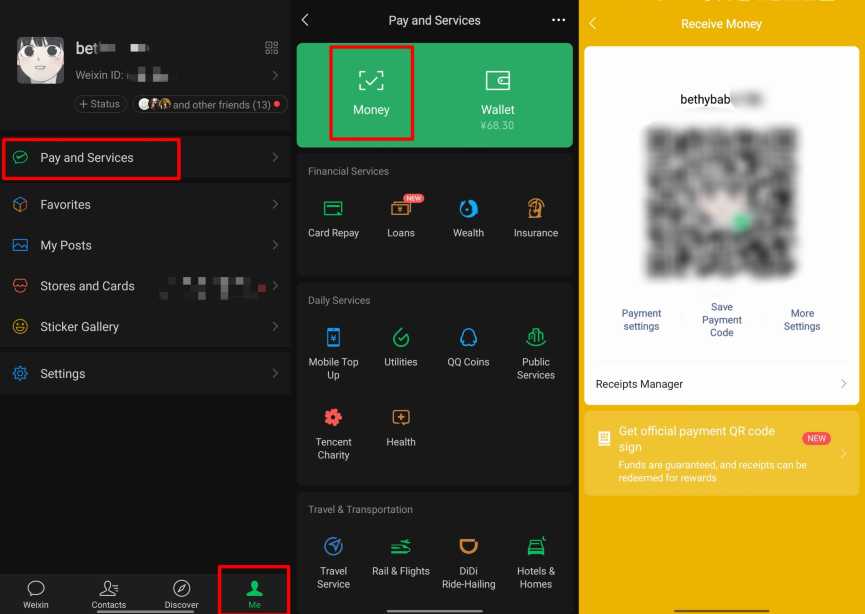
To Receive Money (They Scan You)
- Head over to "Me" → "Wallet" (or "Services").
- Tap "Money" or "Receive Money".
- Show your personal QR code to the person paying you.
- They’ll scan it and punch in the amount to send your way.
Heads up for international travelers: To use WeChat Pay, you'll typically need to link a Chinese bank card or complete real-name verification using your passport. While some international credit cards are now supported, keep in mind that features might be limited depending on where you're from.
How to Scan a QR Code to Log In to WeChat (PC/Desktop/Web)
- Visit web.wechat.com or open the desktop WeChat app (Windows/Mac).
- A large QR code will pop up on your screen.
- Open WeChat on your phone and use the scanner to scan the code on your computer.
- Simply tap "Log In" or "Confirm" on your phone, and your chats will instantly sync to your desktop—you're all set to keep the conversation going!
How to Sign Up & Log In to WeChat Without a QR Code
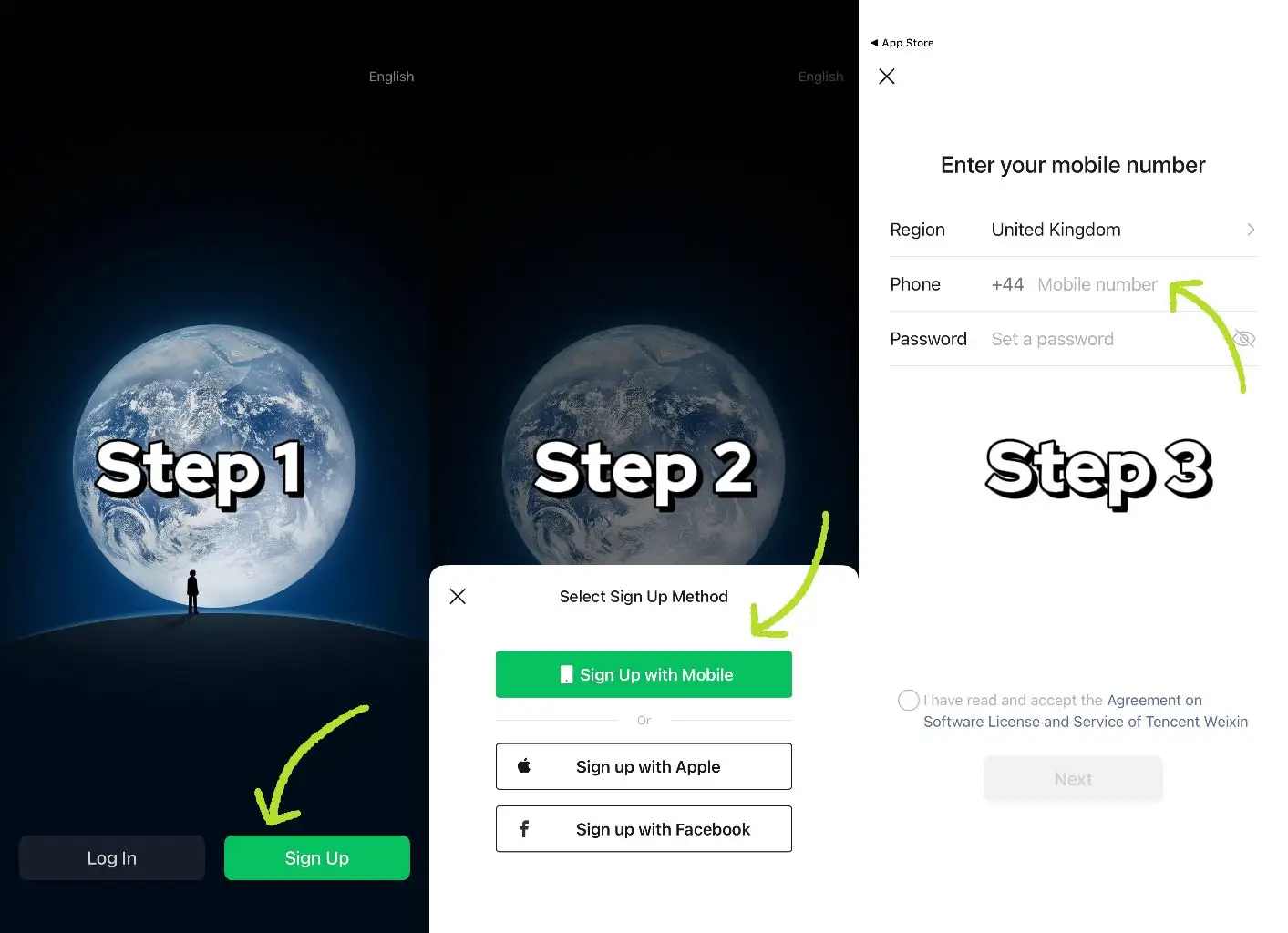
Sign Up Without a QR Code
- Download the official WeChat app (just make sure you don't use a VPN while registering).
- Option 1: Tap "Register with mobile" → select your region code → enter your phone number → set a password → verify via SMS.
- Option 2: Tap "Sign up via Facebook" → grant permission → enter your phone number → verify via SMS.
- If you're asked for help with the QR code, just tap "Verify via Payment Card" or "Activate WeChat Pay" to skip it.
Login Without a QR Code
- Mobile: Enter your linked phone number and account password, or use an SMS verification code.
- PC/Desktop (version 3.9.5+): Select "Mobile Number Login" → enter your phone number and password → verify via SMS to get started on your next journey!
How to Sign Up for WeChat Without Needing a Friend's QR Code
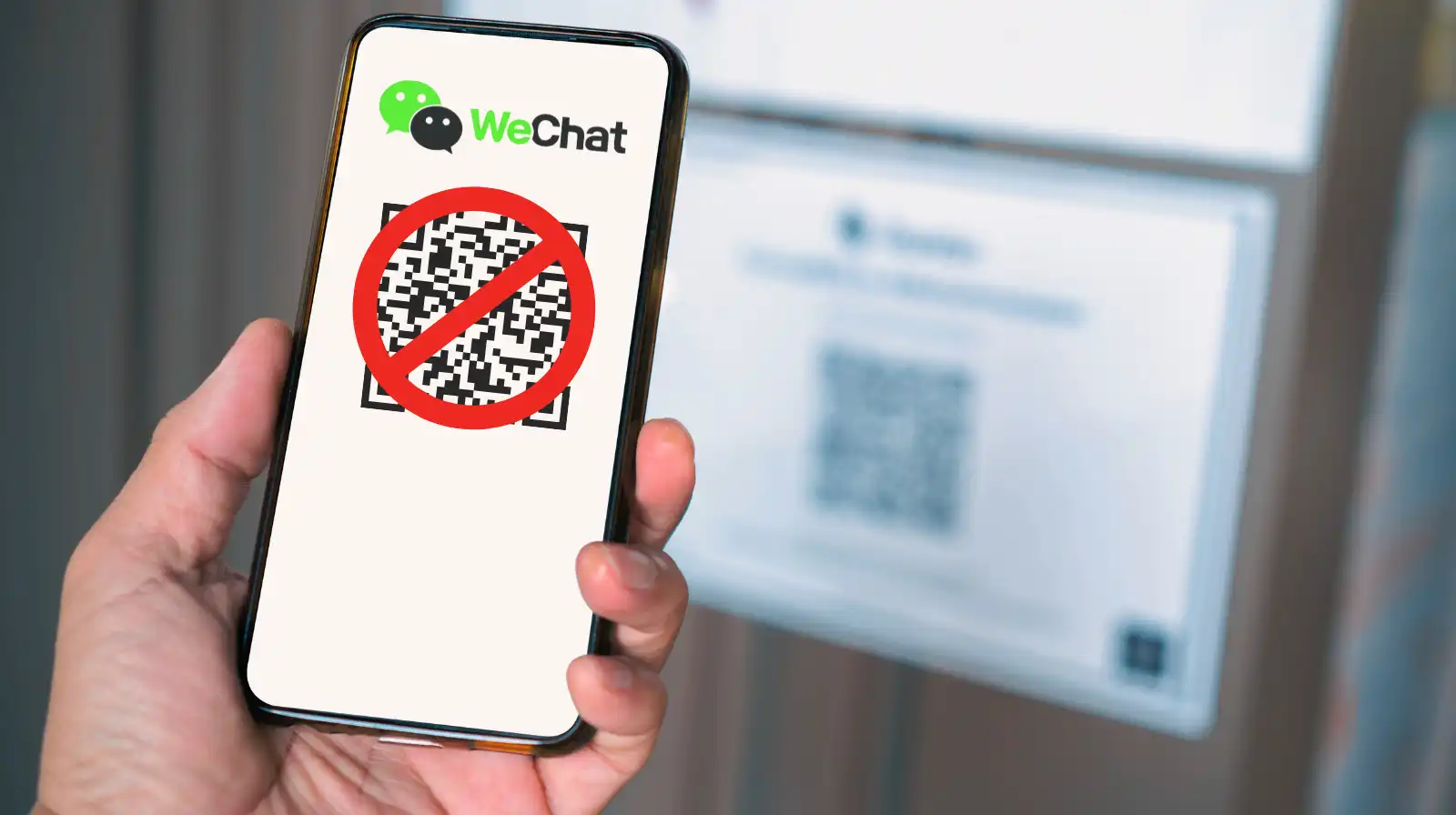
This is the #1 question we get from new international users. WeChat often asks an existing user to scan a QR code to verify your new account—if you don’t have a friend nearby, try these alternatives:
Option 1: Verify with your bank card
- When you're asked for help, just tap "Verify via Payment Card."
- Enter your bank card details (Chinese or supported international cards).
- Complete any necessary authentication steps to wrap up your registration.
Method 2: Verify via WeChat Pay (Weixin Pay)
- Tap "Verify and Activate WeChat Pay."
- Just follow the on-screen steps to enter your details and create your payment password.
- Finish your registration.
Method 3: Standard Mobile Sign-Up (No QR Code Needed Yet)
- Download WeChat from the official App Store or Google Play (just be sure to avoid third-party APKs).
- Open the app → tap "Sign-Up" → "Register with mobile."
- Select your region code, enter your phone number, and create a password.
- Complete your SMS or phone call verification.
Note: You'll typically see the QR verification step pop up after this initial setup, rather than during the installation process itself.
Essential Tips for Your Registration
- Please avoid using a VPN when you sign up—it might accidentally trigger our security systems!
- Always make sure you're using the official version of WeChat.
- If you run into any trouble, just reach out to WeChat Support with your mobile number and some screenshots of the error—they’re usually great about getting back to you within 3 working days.
WeChat Sign-Up: Need a hand with the QR code?
If you're required to verify via QR code, you can use: ① Bank card verification (just enter your card details) or ② WeChat Pay activation (set up your payment password). If you're still having trouble, send your number and a screenshot of the error to WeChat support—they'll get back to you within 3 days.
[10% OFF] Top Hotel Picks in China
Top Shanghai Hotels
Top Beijing Hotels
Top Guangzhou Hotels
See All Hotels























FAQs about WeChat QR code
-
How do I get my WeChat QR code?
-
Can someone scan my WeChat QR code?
-
Can I use WeChat without scanning QR code?
-
How to skip QR code verification during WeChat sign-up?
-
How long does a WeChat QR code last?
-
How to avoid 3% fee on WeChat Pay (international cards)?
-
How to scan WeChat QR code?
-
How to scan QR code to log in WeChat?
Disclaimer: This article has been provided by an individual contributor or third party platform. If there is any discrepancy regarding the copyright, please contact us directly and we will delete the content immediately.

Trending Searches
-
Top Flight Routes
-
Latest Flight Deals
-
eSIM/SIM card