Virgin Australia Seat Map: How to Select Seats on Trip.com?

Have you chosen to fly with Virgin Australia, and want to select your seat in advance? Don't worry, this article will explain the Virgin Australia seat map configurations in detail, and how to choose seats on Trip.com, and enjoy your flights with Virgin Australia!
Vrigin Australia Flight
Flight info.
Departure
Arrival
Weekly Schedule
-

VA1139
Virgin Australia
10:50
SYD
12:05
BNK
S M T W T F SSearch -
VA1140
Virgin Australia
12:45
BNK
14:05
SYD
S M T W T F SSearch

Virgin Australia Seat Map Summary
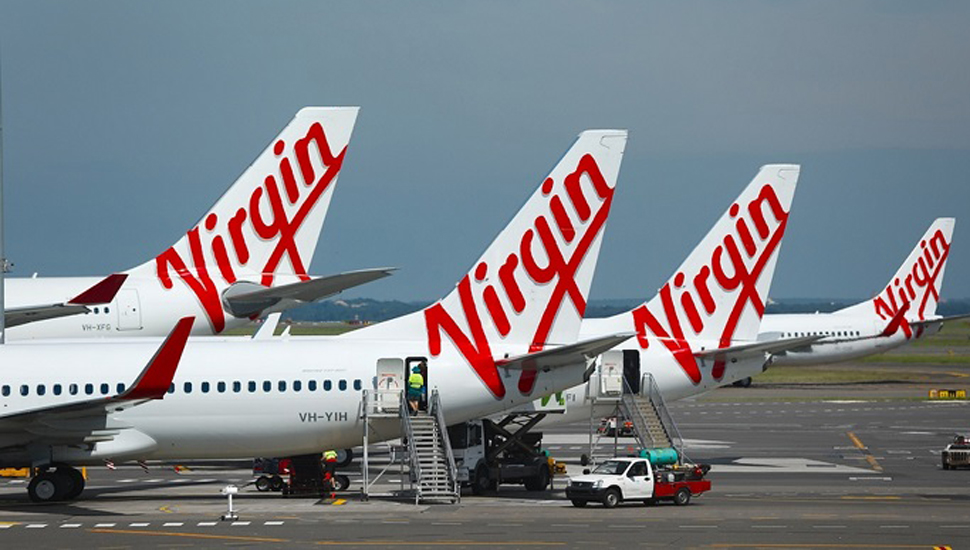
Virgin Australia and Virgin Atlantic set to deepen ties | News ...
Aircraft Type | Total Seats | Business Class | Economy X / Economy | Seat Layout |
Boeing 737-8 | 176 / 174 | 8 / — | 168 / 174 | 3-3 |
Boeing 737-800 | 176 | 8 | 168 | 3-3 |
Boeing 737-700 | 134 | 8 | 126 | 3-3 |
Embraer 190 E2 | 100 | - | 100 (All Economy) | 2-2 |
Key Details for Passengers:
- Boeing 737 Fleet: These are the primary aircraft for domestic and short-haul international routes (like Fiji and Bali). They feature a 2-row Business Class cabin in a 2-2 configuration.
- Embraer 190 E2: The newest addition to the regional fleet, offering a more comfortable 2-2 layout with no middle seats.
- Economy X: On most flights, row 1 (for single-class) or rows behind Business Class, as well as exit rows, are designated as Economy X, offering extra legroom and priority boarding.
Virgin Australia Seat Map | Boeing 737-8/Boeing 737-700
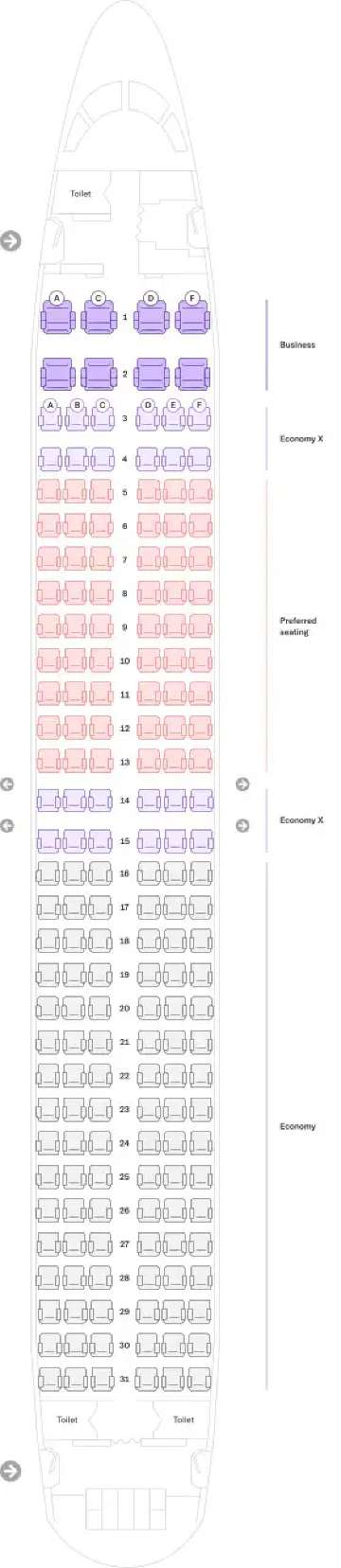
Source from VirginAustralia.com
Virgin Australia Seat Map | Boeing 737-700
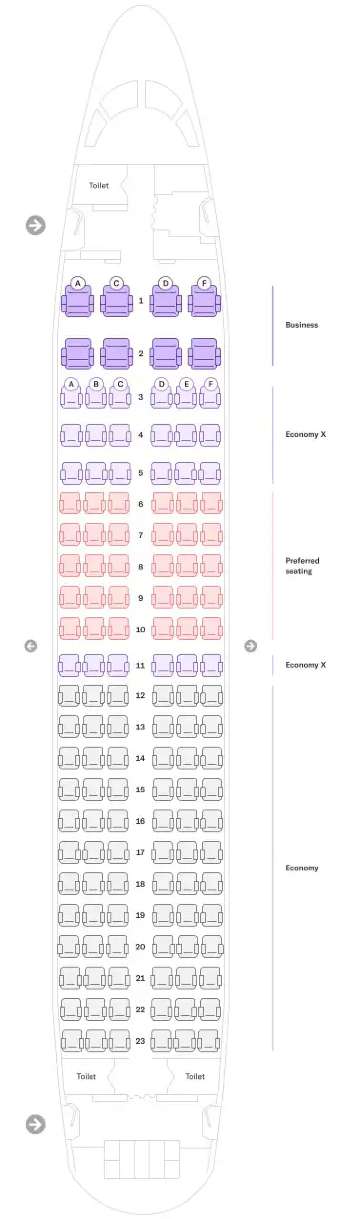
Source from VirginAustralia.com
Virgin Australia Seat Map | Airbus A320
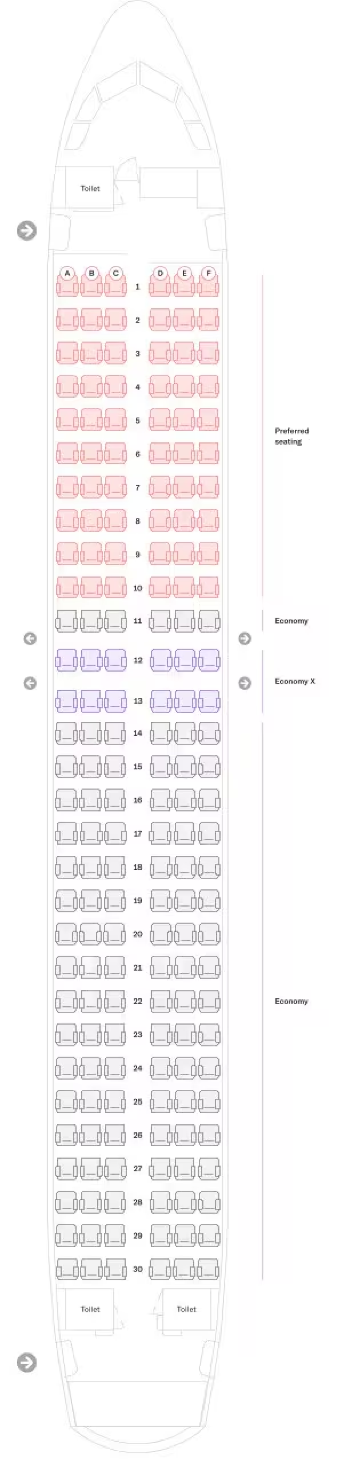
Source from VirginAustralia.com
Virgin Australia Seat Map | Embraer 190 E2
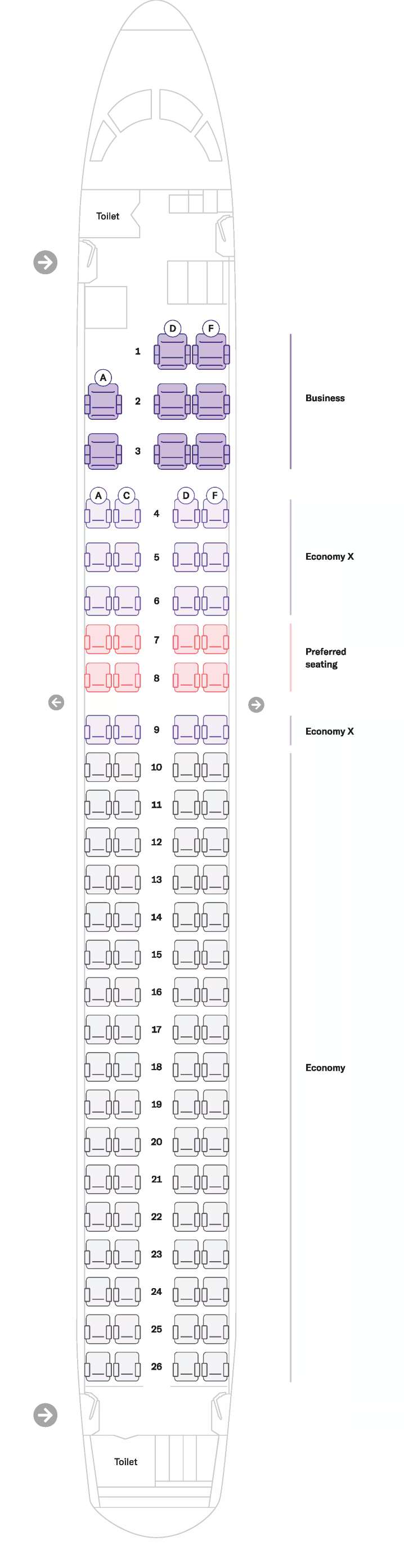
Source from VirginAustralia.com
How to Choose Your Seats on Trip.com: A Step-by-Step Guide
Step 1: Search for Your Flight Begin by logging into your Trip.com account. Enter your origin, destination, and preferred travel dates, then hit "Search" to view the available flight options.
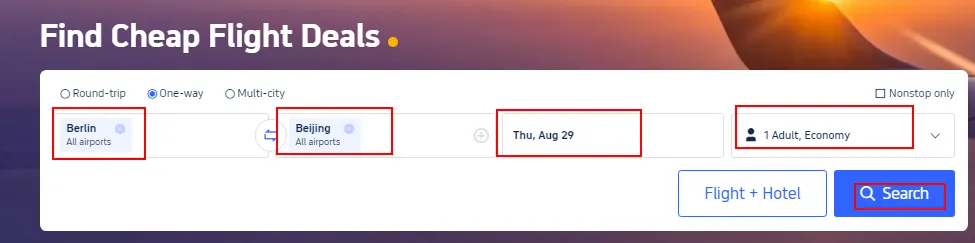
Step 2: Select Your Preferred Fare Browse the results and find the flight that fits your schedule. Once you've made your choice, click "Select" and then "Book" to move forward to the reservation screen.
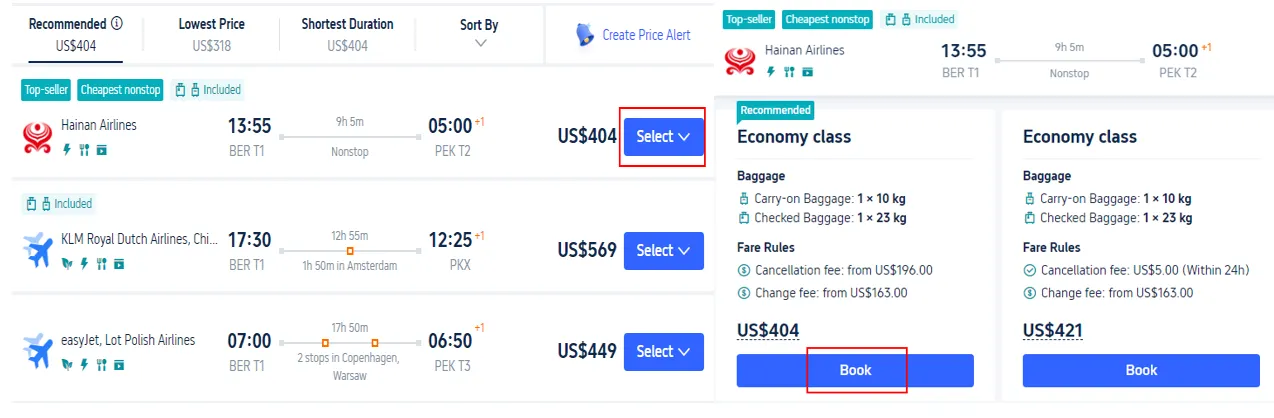
Step 3: Provide Passenger Details Accurately enter your personal information, including your full name, gender, nationality, and passport details. After confirming the info is correct, click "Next" to move to the seat assignment phase.
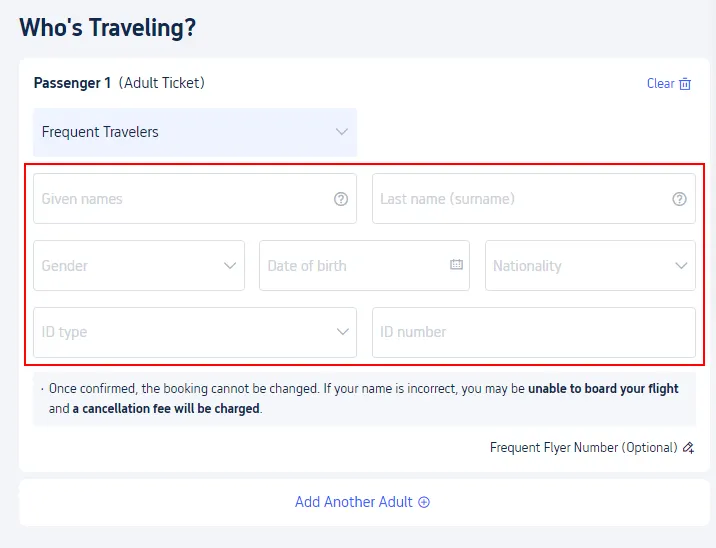
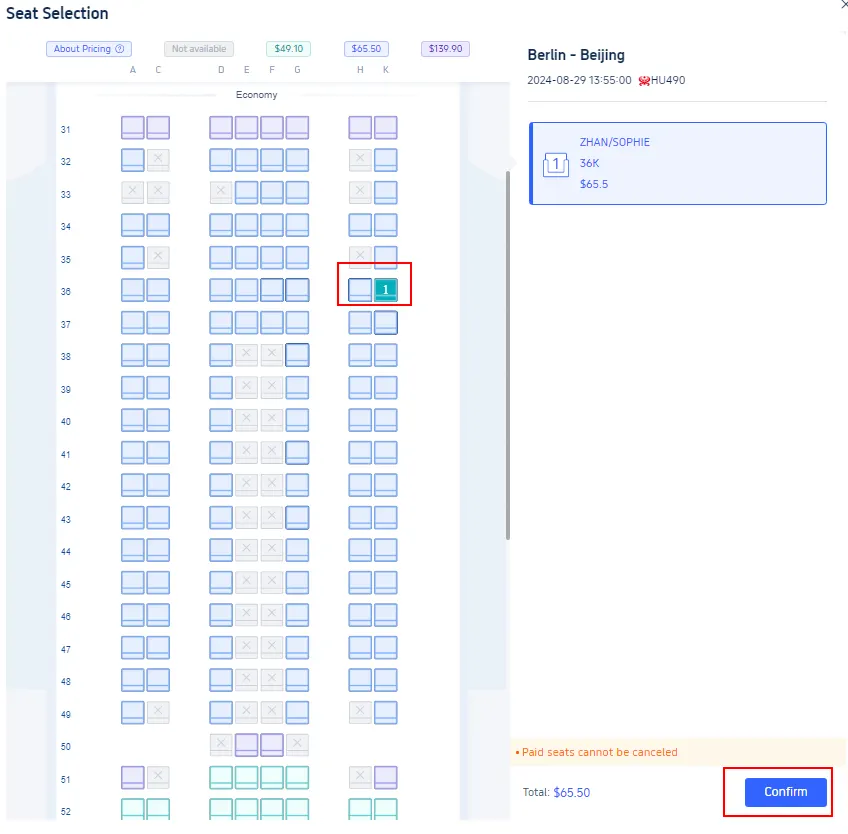
Step 4: Navigate the Seat Map You will be redirected to an interactive seat map of the aircraft. Here, you can distinguish between available and occupied spots. Simply click on your preferred seat to highlight your selection.
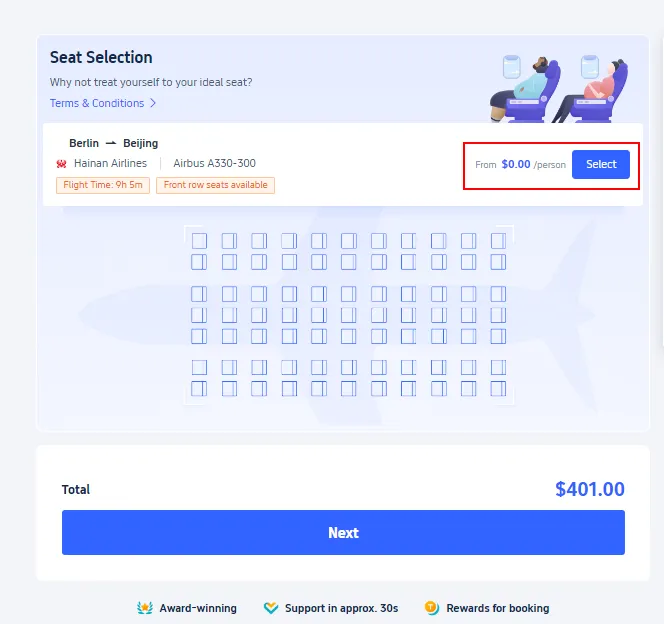
Step 5: Finalize Your Selection Depending on your fare class, you may see different seat categories (such as extra legroom or standard). Once you are happy with your choice, click "Confirm" to lock in your seat and finish the process.
See all attractions
 2592 booked






Why Is Seat Selection Unavailable on Trip.com?
Alaska Airlines announces major expansion of First Class and ...
If you are having trouble choosing your spot on the plane, it is usually due to one of several common airline or system constraints. Here is a breakdown of why this might be happening:
Possible Explanations
Reason | Details |
Airline Restrictions | Some carriers restrict seat selection to their own platforms. In these cases, you may need to take your Trip.com booking reference (PNR) to the airline's official website to choose a seat. |
Booking Processing | Seat selection isn't always instant. You might need to wait for the airline to fully process and issue your ticket before the seat map becomes active. |
Fare Class Limitations | Basic Economy or "Saver" fares often do not include free seat selection. On these tickets, seats are usually assigned randomly at check-in unless you pay an upgrade fee. |
Limited Availability | On high-demand or nearly full flights, the remaining seats may be "blocked" for airport assignment only. You may have to wait until check-in opens (usually 24 hours before flight) to get a seat number. |
Group Booking Requirements | For bookings with multiple passengers, the system often requires full passport and personal details for every individual traveler before it will unlock the seat |
 | ||
Airline name Virgin Australia | Airline code VA | Airline type Full service carrier (FSC) |
Popular Countries Virgin Australia Flies to: China, Australia and Indonesia | ||
Popular Virgin Australia Arrival Cities | ||
Popular Virgin Australia Departure Cities |
Based on Trip.com Historical Data
Top Global Hotels Recommendation
Top Global Hotels
Tokyo
Bali
Bangkok
See All Hotels









FAQs about Virgin Australia Seat Map
-
Does Trip.com allow you to select seats?
-
How do I choose my seat after booking a flight on Trip.com?
-
How do I choose my seats on Virgin Australia?
Disclaimer: This article has been provided by an individual contributor or third party platform. If there is any discrepancy regarding the copyright, please contact us directly and we will delete the content immediately.
Trending Searches
-
Top Flight Routes
-
Latest Flight Deals
-
eSIM/SIM card