Trip.com China High-Speed Train Booking Guide with Promo Codes for Australians


Need China train tickets? Use our Trip.com China train promo code for 3-5% off! Here is our step-by-step guide to booking with foreign passports, choosing seats, and cancelling tickets. No Chinese required!
Trip.com China train - Promo code & discounts
Book your China train tickets as a new user on Trip.com and enjoy a special 3% Off 🎁! Use our exclusive coupon to save big on your first train journey!!!👀
How to Book China High-Speed Train Tickets on Trip.com for Foreigners
So you need to book train tickets in China but don’t speak the language? No worries—Trip.com makes it incredibly easy for travelers. Here’s exactly how to do it without any stress.
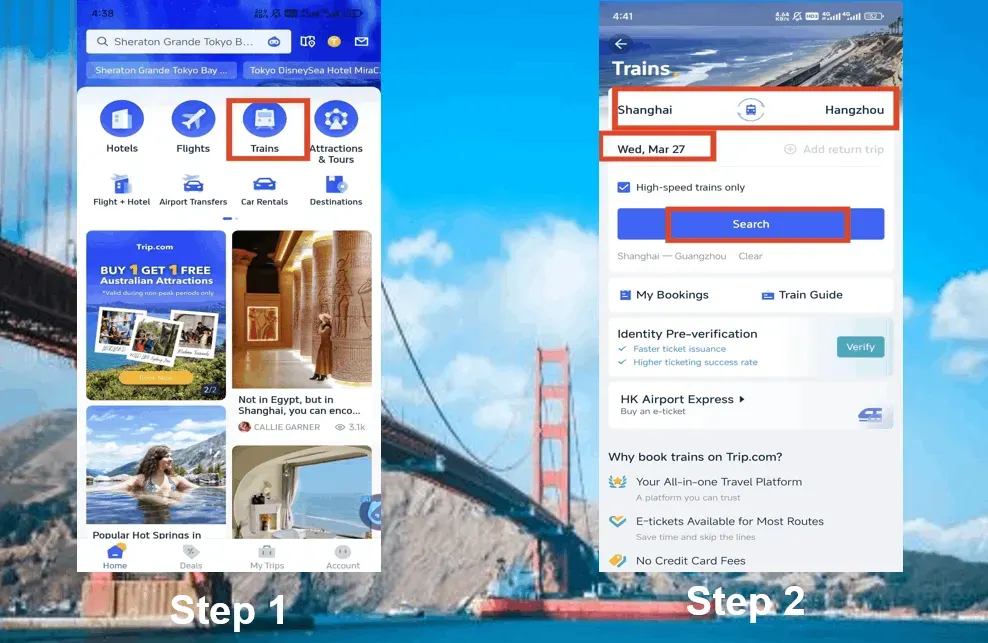
Step 1: Find Your Train
- Go to Trip.com (website or app).
- Enter your departure city (e.g., "Beijing") and destination (e.g., "Shanghai").
- Choose your travel date. Pro tip: Tickets go on sale 15 days in advance—be sure to book ASAP for peak travel times like Chinese New Year and Golden Week!
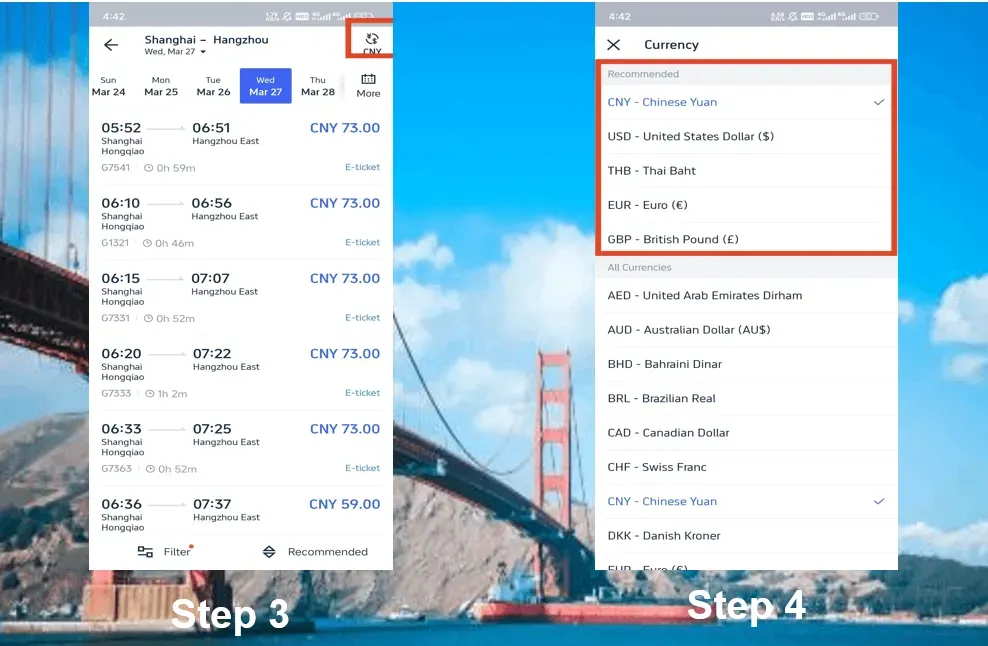
Step 2: Pick Your Train & Seat Class
- G trains = The fastest option (300+ km/h).
- D trains = A bit more leisurely (200-250 km/h).
- Z/T/K trains = A bit more leisurely but budget-friendly (hard/soft sleepers).
Seat options:
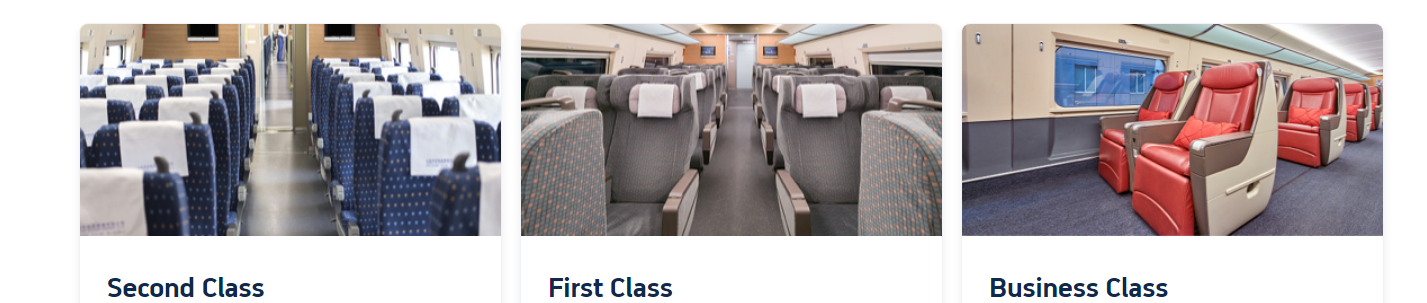
- Second class (the most budget-friendly option, perfect for shorter journeys).
- First Class (extra-wide seating, quieter cabin).
- Business class (if you wanna flex).
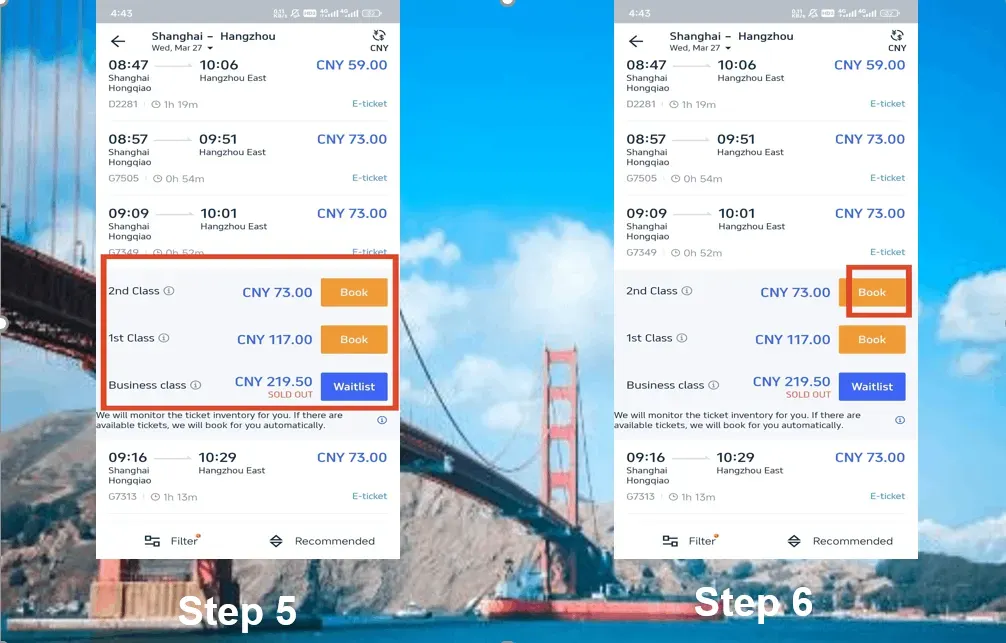
Step 3: Enter passenger information
- Full name (exactly as it appears on your passport).
- Passport number (double-check this!).
- Email & phone (for e-ticket confirmation).
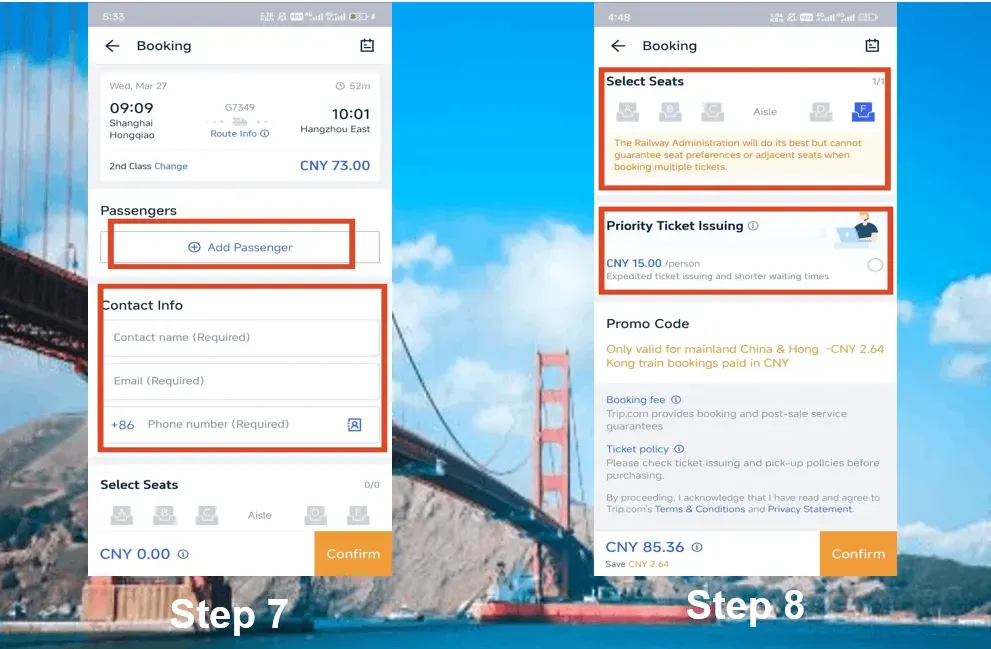
Step 4: Choose Your Seat (If You Can)
- Window (A/F) = Best views.
- Aisle (C/D) = Easy access to the restroom!
- Middle (B) = Avoid if you can.
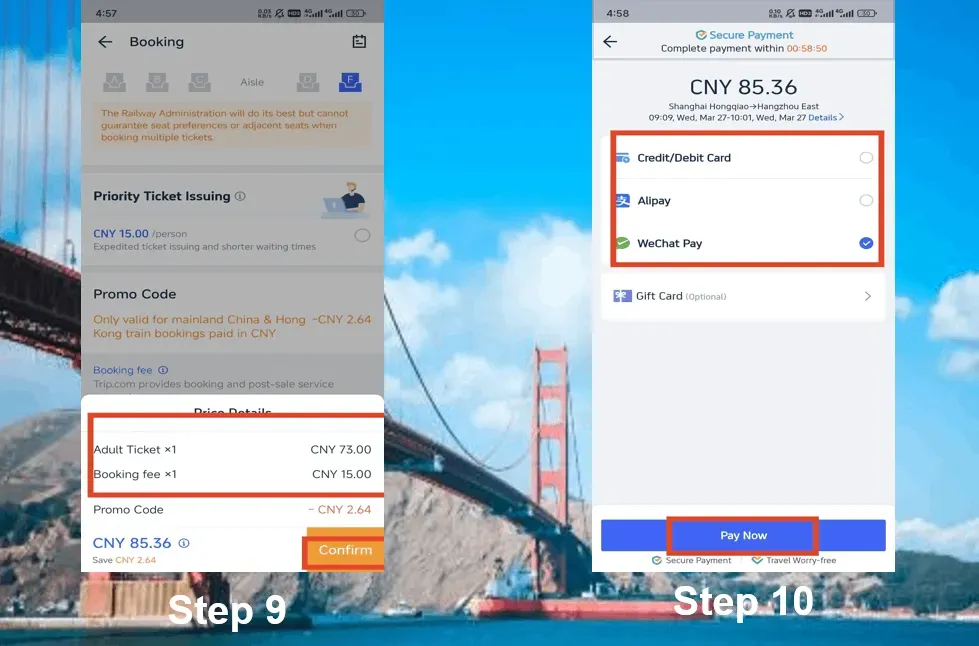
Step 5: Pay now to get your ticket
- Payment methods: Visa, Mastercard, PayPal, Alipay, WeChat Pay.
- E-ticket: No need to pick anything up—simply scan your passport at most major stations. Just a heads-up: you might need manual passport verification at some smaller regional stations.
Pro Tips to Avoid Travel Disasters
✅ Book in advance—popular routes sell out FAST.
✅ Arrive 1 hour early for security checks.
✅ Download your e-ticket (screenshot it in case the Wi-Fi is spotty).
✅ Bring your passport—you’ll need it to board.
Trip.com China Train: Choosing the Right Seat Types
How to Actually Choose Seats on Trip.com
- Once you’ve picked your train, just tap “Seat Selection” (if available—which it usually is!).
- For high-speed trains, you can select your preference for an aisle or window seat, though your exact seat number will be assigned randomly.
- Sleepers: Book in advance (15-day window) to lock in lower berths.
Trip.com: How to Book Seats on China's High-Speed Trains (G/D)
Second Class (the most budget-friendly option, though it can get crowded)
- What you'll get: 5 seats per row (3+2), plenty of legroom to stretch out, and power outlets to keep your devices charged.
- Best for: Short trips (under 4 hours), solo travelers, and budget-conscious adventurers.
- Skip this if: You’re taller than 5’9” or aren't a fan of cozy, shoulder-to-shoulder crowds.
First Class (Worth the Splurge?)
- What you can look forward to: 4 seats per row (2+2), extra-wide seating, and a much quieter cabin.
- Best for: 4+ hour trips and workaholics who need space for their laptops.
- Pro tip: Snag seats F (window) or D (aisle) for maximum comfort.
Business Class (Baller Status)
- What’s included: 3 seats per row (1+2 configuration), lie-flat seats on select routes, and complimentary snacks.
- Perfect for: The Beijing-Shanghai route (4.5 hours), a little self-indulgence, or bouncing back from jetlag.
Source: China Discovery
Trip.com: How to Book Seats on China's Regular Trains (Z/T/K)
Hard Seat (¥100, Hard Lessons)
- What you can expect: Bench seating, zero privacy, and pure, chaotic energy.
- Best for: Masochists or 3-hour daytime trips.
- Reality check: Some older trains don't have AC, so summer travel can turn into a bit of a sweat fest!
Hard Sleeper (Budget Overnight)
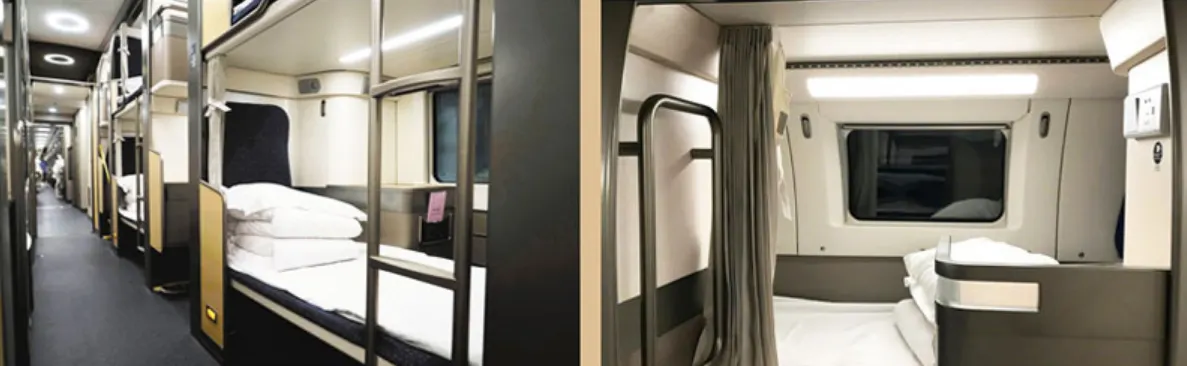
- What to expect: Open bunks (6 per compartment), no door, and shared outlets.
- Perfect for: Quick overnight getaways when you’re under 30 and can catch some Z’s just about anywhere.
- Snag a lower berth if you can: upper bunks give off major coffin vibes, and the middle ones mean you'll miss out on the view.
Soft Sleeper (Overnight VIP)
- What to expect: 4-bunk cabin with a door, bedding, and privacy.
- Perfect for: 12hr+ journeys, light sleepers, or dodging those snoring seatmates.
How to Cancel China Train Tickets on Trip.com
Let’s dive into Trip.com’s cancellation policies—because we know plans can shift, and it’s always good to know exactly where you stand when it comes to your travel budget.
Step 1: Find Your Booking
- Open the Trip.com app → Tap “Trains” → Go to “My Bookings”.
- Pro tip: Filter by “Upcoming” to easily breeze past your past trips.
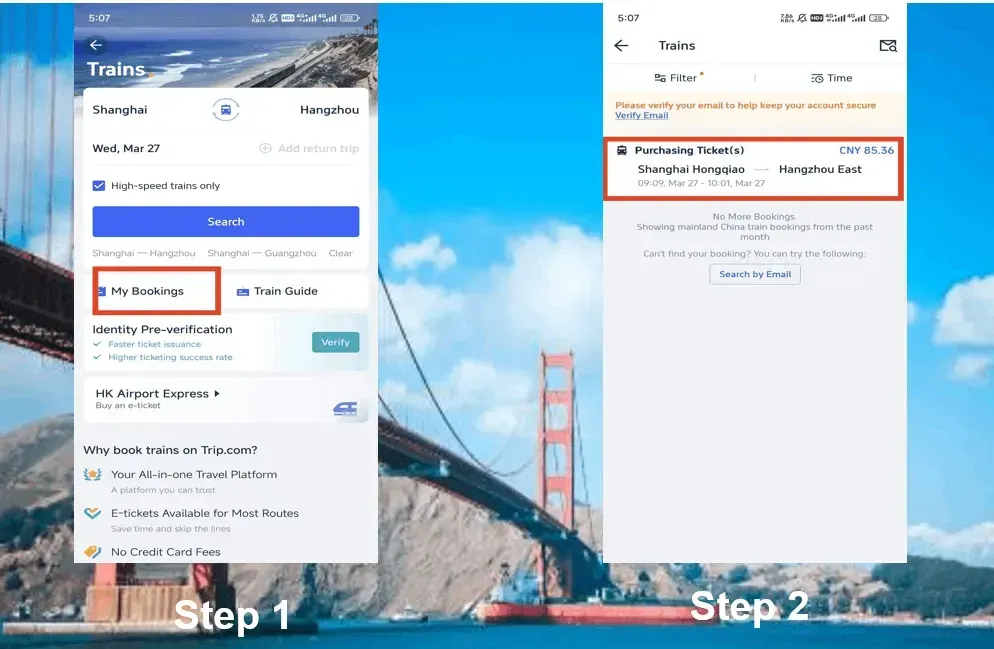
Step 2: Pick the Train to Cancel
- Tap the booking you want to cancel. Double-check the departure time—getting this wrong could cost you.
- Heads up: If your train has already departed, you won't be able to use that ticket.
Step 3: Hit “refund” & brace for fees
- Tap the “refund” button.
- Trip.com will show the refundable amount minus their service fee (usually 3-5%).
- For example, if you cancel a ¥500 ticket 2 days in advance, you'll get a refund of about ¥475.
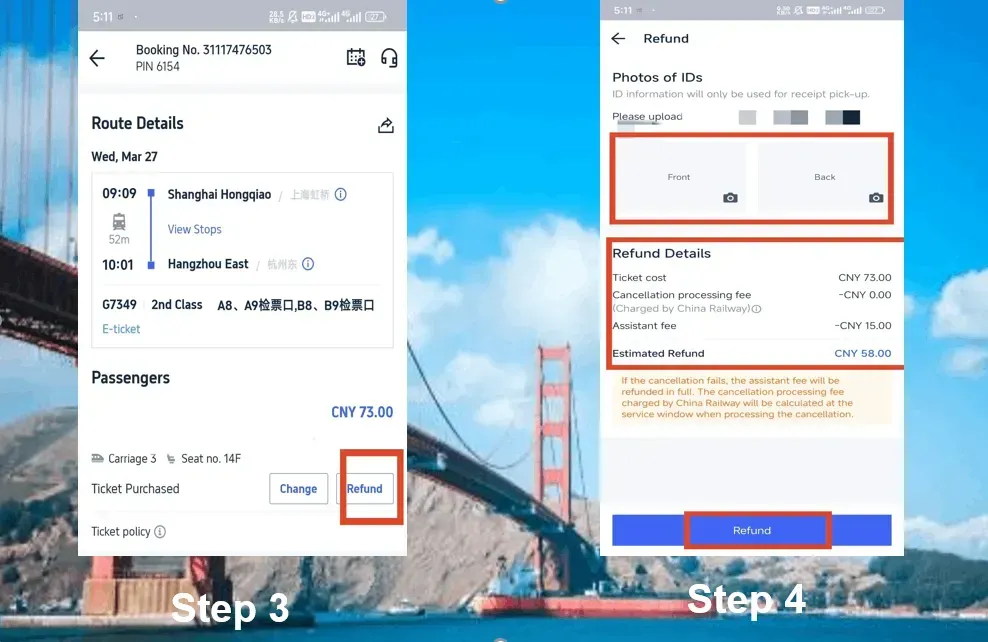
Step 4: Upload Your ID
- You’ll need to upload front/back photos of your passport (yes, even for e-tickets).
- Why, you ask? Chinese railways require verification, and blurry photos can lead to delays.
Step 5: Confirm and wait for your cash
- Check out the refund details → Tap “Confirm”.
- Refunds typically land in your bank or PayPal account within 7-15 days (though it may take a bit longer for international cards).
See all attractions
 1036342 booked





Why Book High-Speed Trains on Trip.com?

- English support (no more struggling with Google Translate).
- Accepts international cards (unlike some Chinese sites).
- No need to wait in line at the station (a huge time-saver).
✅Explore More in Beijing
Top Hotels in Beijing
Things to Do in Beijing
See All Hotels












✅Discover More of Shanghai
Top Hotels in Shanghai
Things to Do in Shanghai
See All Hotels










Trip.com China Train vs. 12306: Which is Better for Foreigners?

Use Trip.com to book train tickets in China unless you’re fluent in the language and have a local bank account.
| Trip.com | 12306 (Official Site) |
Language | Full English support | Only available in Chinese (with clunky translation tools) |
International Cards | Accepts Visa, Mastercard, PayPal, and more. | Requires a Chinese bank account or Alipay |
E-tickets | Automatically issued (use passport to board) | Must collect paper ticket at the station |
Fee info | ~3% service fee + card processing fee/ But you can often snag some discounts, making it even more affordable! | It's free to enter, but navigating in English is a total challenge! |
Customer Support | 24/7 English chat/email support | Mandarin-only hotline |
Best for | Travelers from abroad, first-timers, and anyone looking to skip the stress | Locals or Mandarin speakers traveling on a budget |
FAQs about Trip.com China Trains
-
Can I use Trip.com to buy train tickets in China?
-
What is the best website to buy train tickets in China?
-
Can foreigners buy China train tickets online?
Disclaimer: This article has been provided by an individual contributor or third party platform. If there is any discrepancy regarding the copyright, please contact us directly and we will delete the content immediately.

Trending
-
Popular Attractions
-
eSIM/SIM card
-
Top Flight + Hotel Packages
-
Getting Around
- Forbidden City Tickets
- Universal Studios Japan
- Hutong Beijing
- Shanghai Disneyland Fast Pass
- Canton Tower
- Taronga Zoo Sydney minisite
- Tokyo Disneyland Ticket
- Summer Palace Beijing
- Zhangjiajie National Forest Park
- Shanghai Tower
- Shanghai Disneyland Ticket
- Puffing Billy Tickets
- Universal Beijing Resort
- Hong Kong Disneyland Map
- China Harbin Ice and Snow World
- Shanghai Metro Map
- Universal Studios Hollywood
- Hotels near Charlottetown Airport
- Hotels near Shanghai Pudong International Airport
- Hotels near Tribhuvan International Airport
- Hotels in Venice Beach
- Hotels near Kai Tak Cruise Terminal Park
- Hotels near Tengchong Tuofeng Airport
- Hotels near Intercontinental Beach
- Hotels in Karon Beach