How to Book a Flight for Someone Else on Trip.com?


Planning a trip for a friend or family member? You can easily book flights for others on Trip.com! Discover how to make bookings on their behalf, what information you'll need, plus get our top tips for group travel and a quick guide to refund and cancellation policies.
to Bangkok
to Manila
to Shanghai
to Tokyo
to Seoul
See all flights


Can I Book a Flight for Someone Else on Trip.com?
Yes, you absolutely can! Booking flights for someone else is a breeze on Trip.com. Whether you're surprising a loved one with a getaway, helping family members like parents or kids get where they need to go, or organizing a business trip for a colleague, we've got you covered.
The only critical requirement is that the passenger’s personal details (full name, date of birth, passport/ID number) must match their official travel documents exactly—even a small typo can lead to check-in issues at the airport. You can use your own payment method (credit/debit card, digital wallets) and contact information for the booking, while the traveler only needs to present their valid ID or passport to board the flight.
How to Book a Flight for Someone Else on Trip.com: A Step-by-Step Guide
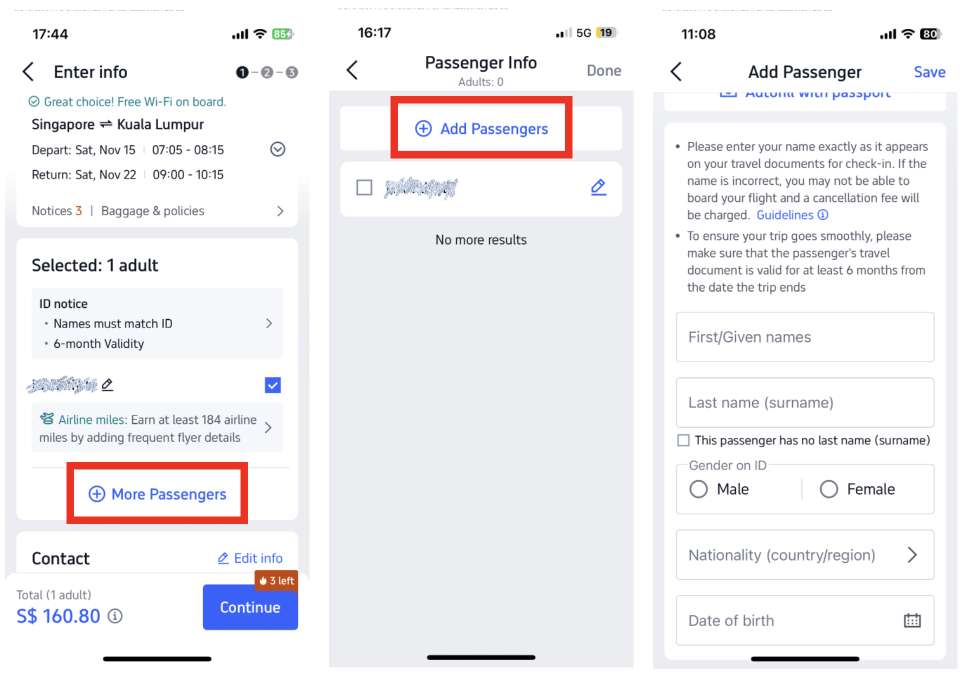
Booking for someone else is just as easy as booking for yourself—the only difference is that you'll enter their details instead of your own. Just follow these simple steps on the Trip.com app or website:
Step 1: Start your flight search
- Log in to your Trip.com account (or book as a guest)
- Head over to the Flights tab
- Choose your trip type (One-way, round-trip, or multi-city)
- Ready for your next adventure? Just enter your departure and arrival airports, pick your travel dates, and let us know how many people are coming along for the ride!
- Hit "Search" to see all the flights waiting for you!
Step 2: Pick your perfect flight
- Compare airlines, departure and arrival times, prices, and fare rules—including refund and cancellation policies—to find the perfect flight for your next adventure.
- Find the perfect flight for your journey and click to continue!
Step 3: Time to enter the traveler's details
- In the Passenger Information section, please enter the traveler’s full name, date of birth, and passport or ID number exactly as they appear on their official documents.
- Take a moment to double-check for any typos—it’s the most important step to ensure a smooth check-in and keep your travel plans stress-free!
Step 4: Enter Your Contact Details
- Enter your email address and/or phone number (feel free to add the traveler's contact info too, so they can get updates directly!)
- This ensures you'll receive your booking confirmation, e-ticket, and flight status updates—all of which you can easily forward to the traveler later!
Step 5: Finalize Your Payment and Confirm
- Choose your favorite way to pay—whether it's by credit/debit card, PayPal, or another option—and simply enter your details to finalize your booking.
- Take one last look at your booking summary—check your flight details, passenger info, and total cost to make sure everything is perfect for your upcoming adventure!
- Click Confirm to finalize your booking—you'll receive an instant confirmation via email or SMS!
Step 6: Share the Itinerary with Your Fellow Traveler
- Go ahead and forward that Trip.com confirmation email—complete with the e-ticket and booking reference number—to the traveler so they're all set for their upcoming adventure!
- Share your Trip.com booking link or app itinerary so they can easily keep an eye on flight updates themselves!
Planning a Trip for Someone Else? Here’s the Info You’ll Need to Book Their Flight
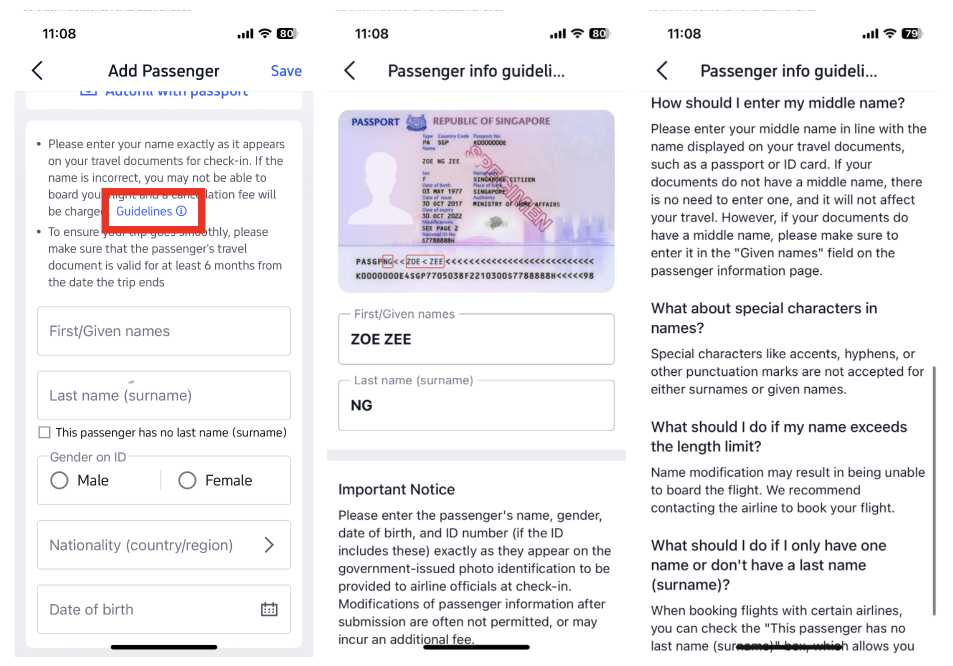
To ensure a smooth booking process and avoid any hiccups, it’s a great idea to have all the traveler’s official document details and travel preferences ready to go. Here’s the key information you’ll need:
Required Traveler Information
- Your full legal name (exactly as it appears on your passport or government-issued ID—please, no nicknames or abbreviations!)
- Date of birth (DD/MM/YYYY format, as it appears on your ID)
- Passport or ID number (plus the country of issue if you're traveling internationally)
- Travel document expiration date (for international flights)
Essential Booking Details
- Departure/arrival cities or airports
- Travel dates (whether you're planning a one-way, round-trip, or multi-city adventure!)
- Choose your preferred cabin class (Economy, Business, or First Class)
- Number of travelers (adults, children, infants)
Optional (But Highly Recommended)
- Baggage allowance needs (e.g., extra checked luggage)
- Seat selection preferences (window or aisle, specific rows)
- Meal preferences (vegetarian, halal, etc.—for airlines that offer special meal options)
You'll also want to have your payment details (card number, CVV, and billing address) and contact info (email and phone number) handy, so you can easily receive your booking confirmations and manage your flight details whenever you need to.
See all attractions
 2290 booked






How to Book Group Flights for Everyone on Trip.com?
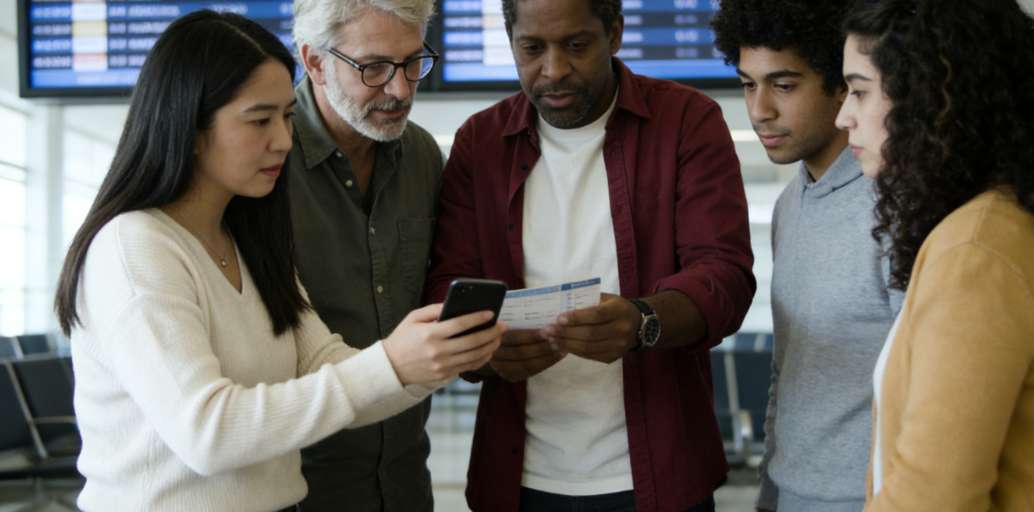
Planning a group getaway with family, friends, or your business team? Trip.com makes booking flights a breeze! Simply add multiple passengers during the booking process and keep all their itineraries organized in one place. Here’s how:
For Small Groups (2–10 Passengers)
- Just follow steps 1–2 above to search for and pick your flight
- In the Passenger Information section, simply click "Add Passenger" and enter the official details for each member of your group—just repeat these steps for every traveler!
- To keep things simple, use one contact email or phone number—either yours or your group coordinator’s—for all your booking confirmations.
- Complete your payment in one go—Trip.com will take care of the rest by generating a separate e-ticket for every passenger!
- Once you've booked, you can easily share individual itineraries with everyone in your group!
For Larger Groups (10+ Passengers)
- Planning a trip for your corporate team or a large group? Make it easy with Trip.com’s bulk booking features, available right on our desktop site and business account portal.
- Save passenger details for future trips, generate one-click expense reports, and handle all your changes or cancellations in a single, convenient spot.
- Need a hand with your group trip? Reach out to our 24/7 customer support team for personalized help with your booking, including custom fare quotes and flexible change policies.
How to Change or Cancel Your Trip.com Flight Booking
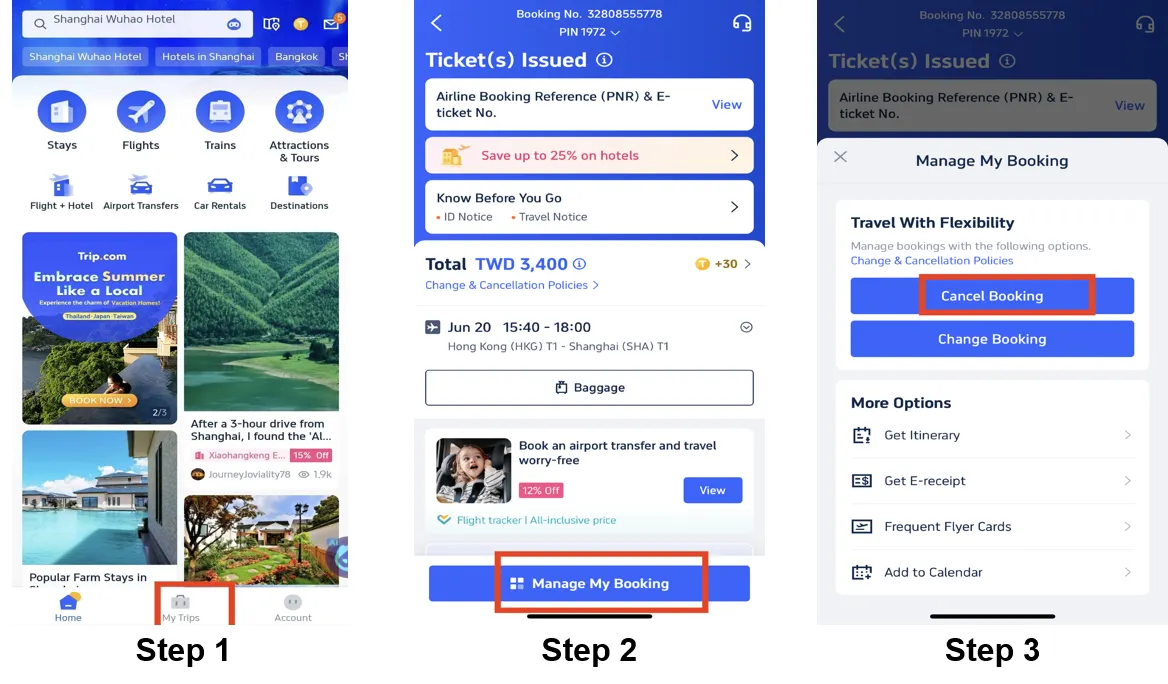
If your travel plans take an unexpected turn, don't worry! You can easily change or cancel flights on behalf of the traveler right from your Trip.com account—no extra steps needed from them. Just keep in mind that all changes and cancellations are subject to the airline’s fare rules, and fees may apply for non-flexible tickets. Here’s how to get it done:
How to Cancel Your Flight
- Log in to your Trip.com account and head over to the "My Trips" tab.
- Find your booking (it'll be listed in your account, even if it's for another traveler)
- Tap on your booking and select "Cancel Flight."
- Confirm your cancellation—Trip.com will display any applicable cancellation fees (per passenger).
- Once confirmed, we'll send a refund confirmation email your way! Your refund will be credited back to your original payment method, though keep in mind that processing times can vary depending on the airline or your payment provider.
How to Change Your Flight (Date, Time, or Airport)
- Head over to "My Trips" and select the booking you're looking for.
- Simply click "Change Flight" to select your new travel date, time, or route.
- Pick a new flight that works for you (we'll clearly show you any price differences or change fees right on Trip.com).
- Confirm your changes and take care of any extra fees or fares, if they apply.
- We'll send a new e-ticket with all the updated details straight to your inbox—be sure to forward it to the traveler right away so they're ready for their trip!
More Handy Tips for Managing Your Bookings
- Check flight status: Get real-time updates on delays, gate changes, and cancellations right in My Trips—share them with the traveler to keep their journey smooth and stress-free!
- Add extras after you book: Need a little more? You can still purchase extra baggage, select your perfect seat, or add travel insurance to your trip even after you've booked (just head to My Trips > Manage Extras).
- Requesting a refund: If your ticket is refundable, simply follow the cancellation steps mentioned above. Your refund will be credited back to your original payment method, processing times vary by payment method: Credit/Debit Card takes 7–15 business days, PayPal/E-Wallets take 3–7 business days, and Bank Transfers can take up to 30 business days.
Essential Tips for Booking Travel for Someone Else
- Travel Tip: Make sure your documents match perfectly! Never abbreviate your name or guess your birth date or ID number—airports and airlines are super strict about document matching when you check in, so double-check those details to keep your journey smooth and stress-free.
- Payment guidelines: While most airlines are happy to accept third-party payments (meaning you can use your card for someone else's booking), some may ask to see the cardholder’s ID when checking in. To ensure a smooth journey, it’s always a good idea to double-check the airline’s specific fare conditions before you finalize your booking.
- Travel documents are your responsibility: While you handle the flight booking, it’s up to you to ensure you have the necessary visas, entry permits, or vaccination records required for your destination.
- Flexible fare options: If your travel plans are still up in the air, opt for flexible or refundable tickets to dodge those hefty change or cancellation fees—you'll spot them easily marked on our flight selection page!
- Baggage and extras: Be sure to double-check your airline’s free baggage allowance! Keep in mind that low-cost fares often only cover carry-on luggage, so it’s always a smart move to pre-book any extra bags to snag the best prices.
[10% OFF] Top Hotel Picks for Your Global Getaway
Discover the Best Hotels Around the World
See All Hotels







FAQs about Booking Flight Tickets for Someone Else
-
Who receives the flight confirmation?
-
What if I make a typo in the traveller’s details when booking flights?
-
Can I use my credit card to pay for someone else’s flight?
-
Can I book seat selection or special meals for the traveller?
Disclaimer: This article has been provided by an individual contributor or third party platform. If there is any discrepancy regarding the copyright, please contact us directly and we will delete the content immediately.
Trending Searches
-
Top Flight Routes
-
Latest Flight Deals
-
eSIM/SIM card
-
Trip.com FAQs
- Trip.com Reviews
- Trip.com Cancellation Policy
- Trip.com Payment Methods
- Trip.com Phone Number
- Trip.com Check In
- Trip.com Ticket Issued Status
- Trip.com Change Passport
- Trip.com Customer Support
- Trip.com Membership
- Trip.com VIP Lounge Access
- Trip.com Baggage Allowance
- Trip.com Flight Ticket
- Trip.com Hotel Refund
- Trip.com Flight Change
- Trip.com Seat Selection
- Trip.com E-Receipt
- Trip.com E-Ticket
- Trip.com Flight Cancellation
- Trip Coins
- KAMENOI HOTEL Hotels in Aso