How to Use Price Alerts and Save on Cheap Flights on Trip.com?


Learn how to set up Trip.com Price Alerts and use our flexible date search to snag cheap flights anywhere in the world. Find the best times to book and get ahead of the game by predicting flight price drops right here on Trip.com.
to Bangkok
to Manila
to Shanghai
to Tokyo
to Seoul
See all flights


What is a Trip.com Price Alert?
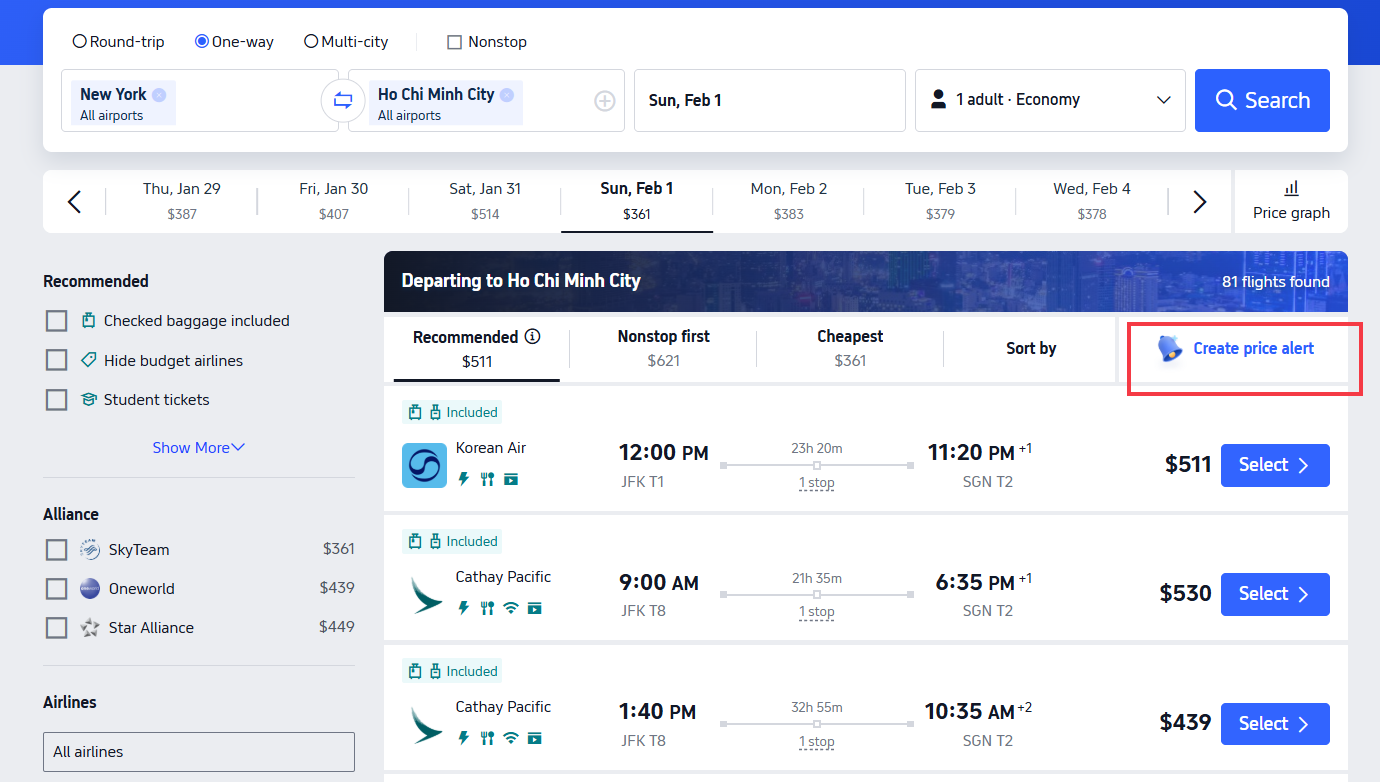
Create a price alert
Trip.com Price Alert is a free, global tool available on both our app and desktop site that takes the hassle out of flight hunting by automatically tracking fares for your specific routes, dates, and cabin class. Say goodbye to constant manual checks—we’ll send you instant notifications the moment prices drop to fit your budget!
How to Set Up Price Alerts on Trip.com
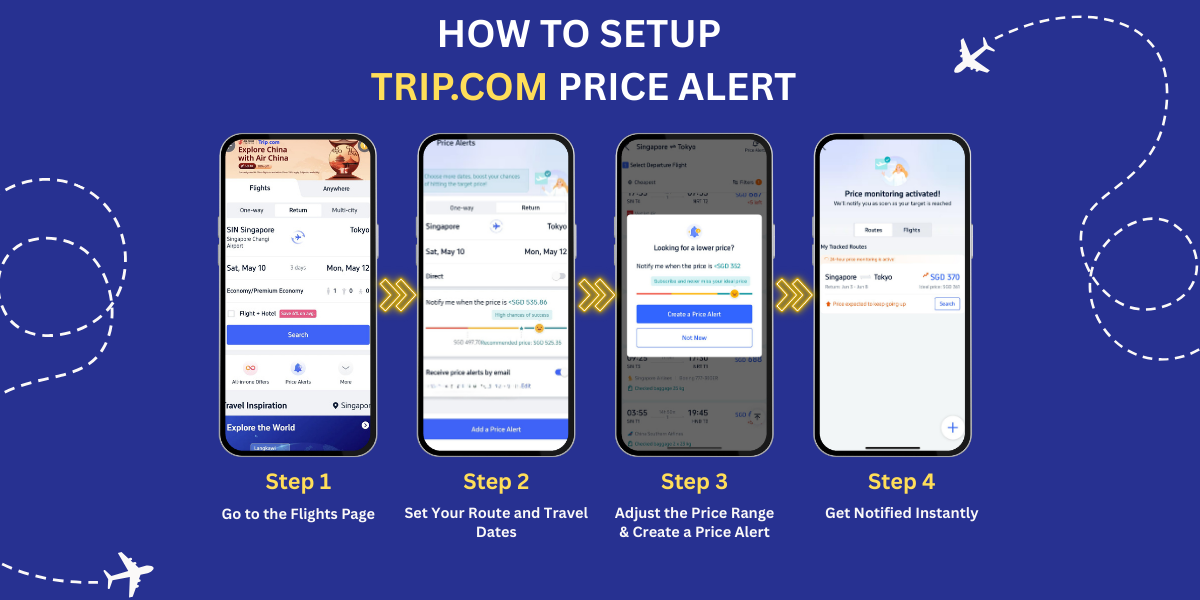
Setting up Price Alerts is a breeze, whether you're using the Trip.com mobile app or our desktop site. There's no need for a special membership or account upgrade—a free Trip.com account is all you need to get started!
Step 1: Head over to the Flights section
Open the Trip.com app or head over to our official website. Log in to your free account, then simply tap or click the Flights tab—you'll find it as a prominent icon right on the homepage, or in the top navigation bar if you're on a desktop.
Just scroll down a little, and you'll spot the Price Alert button right underneath the flight search bar—the same place where you usually plug in your travel dates. It’s highlighted, so you can't miss it!
Step 2: Time to add your flight details
Head over to the Price Alert setup page and enter your trip details. While all fields are optional, the more specific you are, the more accurate your alerts will be!
- Departure city/airport and destination city/airport
- Travel type: One-way or round-trip (don't forget to add your return date for round-trips!)
- Exact travel dates (feel free to set alerts for multiple date ranges on the same route!)
- Choose your cabin class (Economy, Business, or First—we'll default to Economy for you)
Step 3: Define your ideal price range
Use our interactive price slider to set your budget—we’ll even show you the current average fare for your route as a handy reference! As you adjust the slider, watch the color-coded success rate indicator (red, yellow, or green) update in real time. It’s the perfect tool to help you strike that sweet spot between your budget and snagging a great deal.
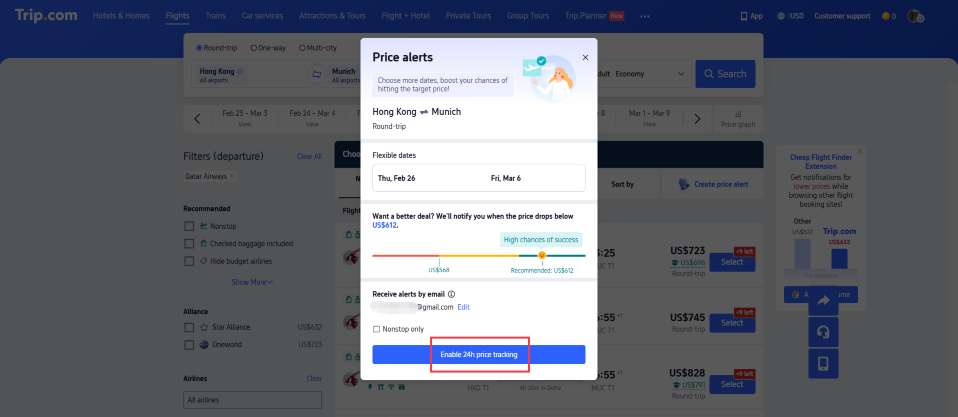
Step 4: Pick how you'd like to be notified, then hit confirm!
Choose how you'd like to get notified about price drops (feel free to select both to make sure you never miss a deal!):
- App Push Notifications: Get instant travel alerts sent straight to your phone (just make sure to enable Trip.com push permissions in your device settings first!)
- Email Notifications: Get travel alerts sent straight to the email address linked to your Trip.com account—perfect for staying in the loop even when you're not using the app!
Simply click or tap the "Confirm" or "Turn On Alert" button to lock in your settings. You can easily manage, edit, or cancel your active Price Alerts whenever you like by heading over to your Trip.com Personal Center (just look under the Flights > Price Alerts tab).
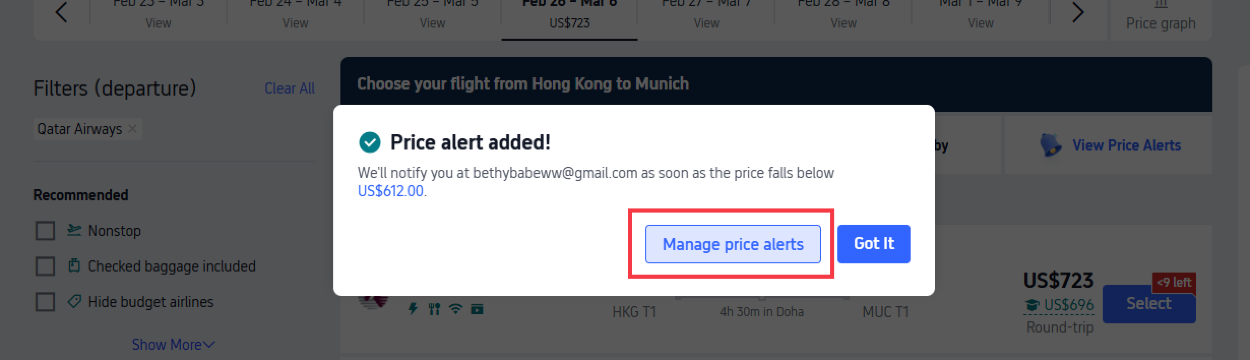
Pro Tip: Try setting 2–3 price alerts for the same route—like a "budget" green alert and a "stretch" yellow alert—to keep your options open for different fare scenarios!
See all attractions
 2393 booked






How to Predict Flight Price Drops on Trip.com
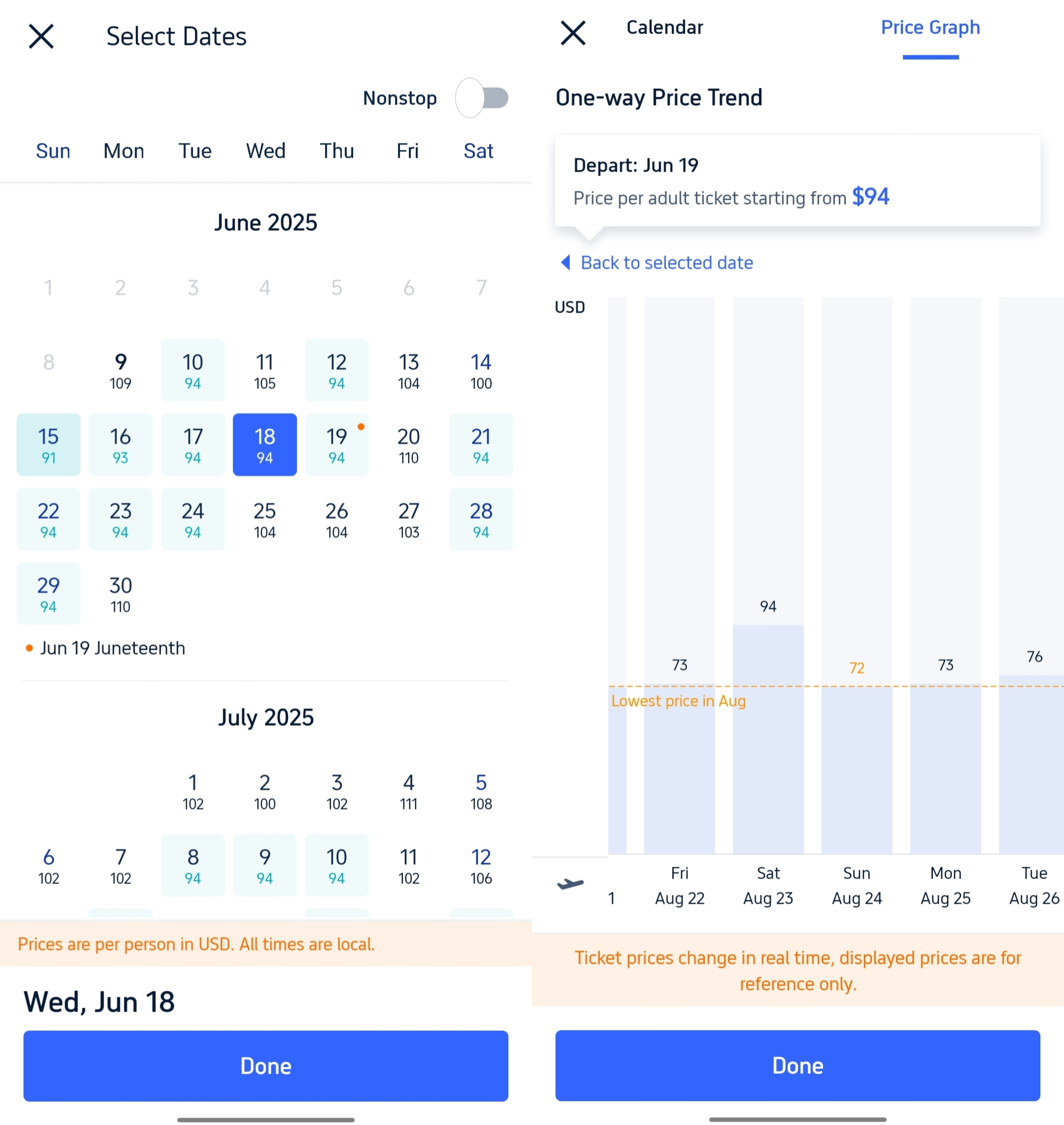
Trip.com puts real-time, free fare-prediction tools right at your fingertips. By combining these handy platform insights with general airline trends, you'll know exactly when to hold out for a price drop—or when to book fast to beat a price hike!
- Keep an eye on the Price Trend Graph: That 7/14/30-day chart on the flight search page is your best travel buddy. If you see a steady downward trend, sit tight and keep your Price Alert turned on. But if the prices are climbing? Don't wait—book that trip now!
- Keep an eye out for Price Drop tags: Trip.com highlights flights with real-time labels like "Limited-Time Price Drop," "Today Only Special," or "Member Exclusive Fare." These tags mean the fare is currently lower than the 7-day average, so be sure to book quickly while seats are still available!
- Keep an Eye on Pre-Notifications: The Trip.com app will send you handy little pre-alerts when fares start to dip (e.g., "Fare down 8%—almost at your target!"). Think of this as your cue that a bigger price drop is likely just 1–3 days away!
- Stay in the Loop with Global Promos: Trip.com features global sales—like airline anniversary deals, Black Friday specials, and seasonal events—right on our homepage banner. Plus, we’ll send push notifications and emails 1–3 days in advance so you’re always ahead of the curve. Set a Price Alert for your travel window to lock in those unbeatable fares!
- Book During the Off-Season: Flight prices tend to drop across the board when your destination is in its off-season, meaning there's less tourist demand. Keep an eye out for the season status flags on our flight search page—they’re a great tool to help you time your booking perfectly!
- Keep an eye out for low inventory alerts: If you see "Few seats left" or "Limited inventory" on Trip.com, it’s a sign that fares are about to climb—airlines tend to raise prices when availability gets tight. Don't wait for a price drop; book your seat now to lock in your fare!
The Cheapest Time to Book Your Flights on Trip.com
Fare pricing on Trip.com follows the global rules of airline supply and demand—these universal booking tips work for every route and are based on real-time updates to airline inventory.
The Best Time to Book Your Trip on Trip.com
- For international long-haul adventures, try to book 3–6 months in advance—airlines tend to release their best discounted seats for future travel first!
- For regional short-haul trips, aim to book 1–2 months ahead to snag the best deals!
- Need a last-minute getaway? Check Trip.com between midnight and 2 AM local time! Airlines often release unsold seats at deep discounts to fill their flights, and Trip.com updates those fares in real-time so you can snag the perfect deal.
The Cheapest Days to Book and Travel with Trip.com
- The Best Time to Book: Aim for Tuesday between midnight and 8 AM local time. Airlines typically adjust their fares on Monday evenings, and Trip.com updates those price drops overnight, making Tuesday mornings the sweet spot for finding the lowest global fares. It’s best to avoid booking on Mondays, as high business travel demand tends to drive prices up.
- Travel Tip: Aim for Monday–Thursday to save! Weekend trips (Sat/Sun) typically cost 14% more on all global routes.
The Best Time of Day to Score Cheap Deals on Trip.com
- The Global Golden Hour: Aim for 6 AM–8 AM local time! Trip.com updates airline inventory overnight, meaning the cheapest unsold seats are ready and waiting for you first thing in the morning.
- Score last-minute deals: Midnight–2 AM local time (as mentioned above).
Trip.com Shoulder Season: Your Ticket to the Biggest Global Savings
Unlock the lowest fares on Trip.com by booking flights during a destination’s shoulder season—that perfect sweet spot between peak and off-season. Since tourist demand dips during these times, airlines often slash prices to fill seats. Plus, keep an eye out for extra seasonal promo discounts from Trip.com, which we frequently stack on top of those airline fares to help you save even more on your next adventure!
More Ways to Save on Trip.com

Price Alerts are just the beginning—pair them with these global Trip.com promos and travel hacks to unlock maximum savings:
Trip.com Promo Codes and Member Rewards
- Unlock free Trip.com membership perks: Enjoy exclusive member-only fares, price protection that refunds you if the price drops after you book, and easy point redemptions to save on your future adventures!
- Unlock Savings with Trip.com Promo Codes: Head over to our promo page for early access to flash sales, exclusive Student Flight Discounts, Black Friday/Cyber Monday fares, and special airline alliance deals.
- Score big on shoulder season: Snag flights during a destination’s shoulder season (that sweet spot just before or after the peak rush) to save 20–40% on fares. Keep an eye on the Trip.com homepage—we’ll flag these deals for you!
Flexible Flight Options with Trip.com
Upgrade your journey with our stress-free travel add-on! Enjoy transparent pricing and global coverage, all while locking in low fares and keeping your plans flexible—say goodbye to those pesky change or cancellation fees. Here are the core benefits (just remember to use one before your first flight; they can't be combined):
- 1 free flight change: Adjust your dates, times, or even your route—you'll only need to cover the fare difference if your new flight costs more.
- 1 free full refund: Cancel your booking and get your money back to your original payment method (no Trip.com credit).
- Priority customer support: Skip the wait and breeze through last-minute changes or travel hiccups.
Please note: While the flight fare can be refunded or credited, the Air Flexibility service fee itself is non-refundable.
Find Your Perfect Trip with Trip.com's Flexible Dates Search
The easiest, free way to save $100+ on international flights:
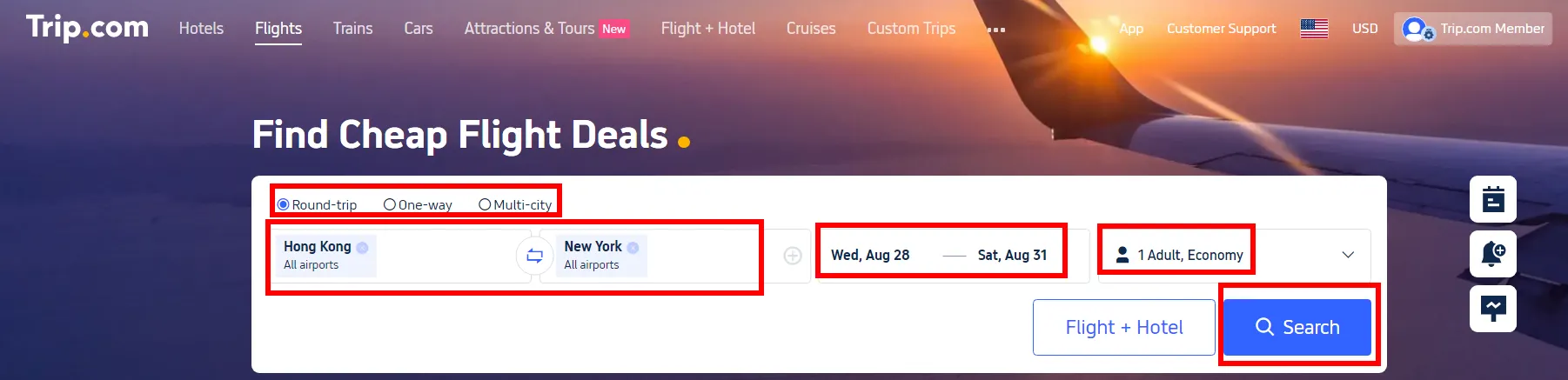
- Ready to find the perfect flight? Just click on "Flexible Dates" right next to the date picker in the search bar to explore more options!
- Trip.com offers a handy calendar view that highlights the cheapest fares for your route over the next 1–2 weeks.
- Shift your trip by a day or two to snag the best price—it’s that easy!
[10% OFF] Top Hotel Picks for Your Global Getaway (Flexible Booking Available)
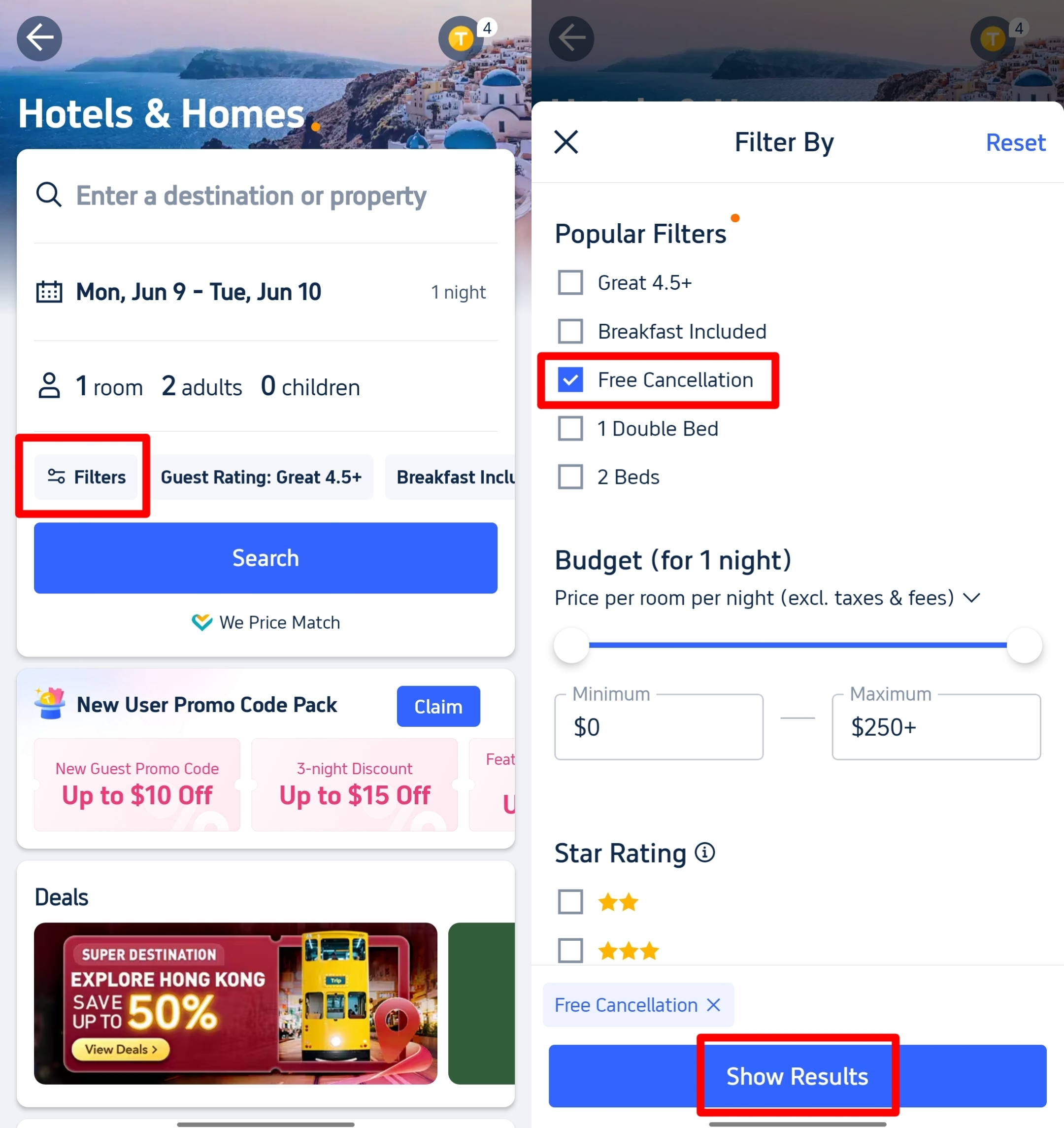
🎁 Book the cheapest flights worldwide and arrange your Trip.com airport transfer! Plus, grab a fast, reliable eSIM. Search for the best hotels and filter by the "free cancellation" tag to book with total flexibility!
Discover the Best Hotels Around the World
See All Hotels







FAQs about Trip.com Price Alert
-
When Is Trip.com the Cheapest to Book Flights?
-
How long does a Trip.com Price Alert stay active?
-
Can I set Price Alerts for multi-city flights?
-
Do I need to have the Trip.com app open to get push notifications?
-
Can I set multiple Price Alerts for the same flight route?
Disclaimer: This article has been provided by an individual contributor or third party platform. If there is any discrepancy regarding the copyright, please contact us directly and we will delete the content immediately.
Trending
-
Top Flight Routes
-
Latest Flight Deals
-
eSIM/SIM card
-
Trip.com FAQs
- Trip.com Reviews
- Trip.com Cancellation Policy
- Trip.com Payment Methods
- Trip.com Phone Number
- Trip.com Check In
- Trip.com Ticket Issued Status
- Trip.com Change Passport
- Trip.com Customer Support
- Trip.com Membership
- Trip.com VIP Lounge Access
- Trip.com Baggage Allowance
- Trip.com Flight Ticket
- Trip.com Hotel Refund
- Trip.com Flight Change
- Trip.com Seat Selection
- Trip.com E-Receipt
- Trip.com E-Ticket
- Trip.com Flight Cancellation
- Trip Coins
- Hotels near Dehang Village