Trip.com Price Match Policy: Does Trip.com Match Prices


Hesitant to book your tickets on Trip.com due to concerns over flight delays or cancellations? We have you covered. This guide explains the Trip.com Price Match. Trip.com provides comprehensive assistance for all bookings made via our site. Discover how to apply and secure your travel plans today.
to Bali
to Singapore
to Shanghai
See all flights


What is Trip.com Price Match?
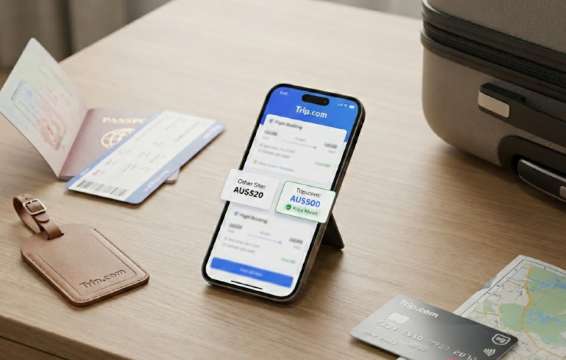
Trip.com price match means if you find a lower price for the same room type and dates on another qualifying platform, you can request a refund of the difference in Trip Coins. While Trip.com aims to provide competitive, real-time rates for all travel services, it does not maintain a sitewide, automatic price-matching policy for all bookings. You should check whether price match is highlighted during booking.
- Price Lock Commitment: Trip.com guarantees that your flight price will not change once payment is completed.
- Price Difference Coverage: If a price increase occurs before your ticket is issued due to a Trip.com system issue, Trip.com will cover the difference to protect your interests.
- Post-Issuance Protection: Once your ticket is successfully issued, Trip.com is committed to ensuring your entire journey proceeds smoothly.
Does Trip.com Have Price Match?
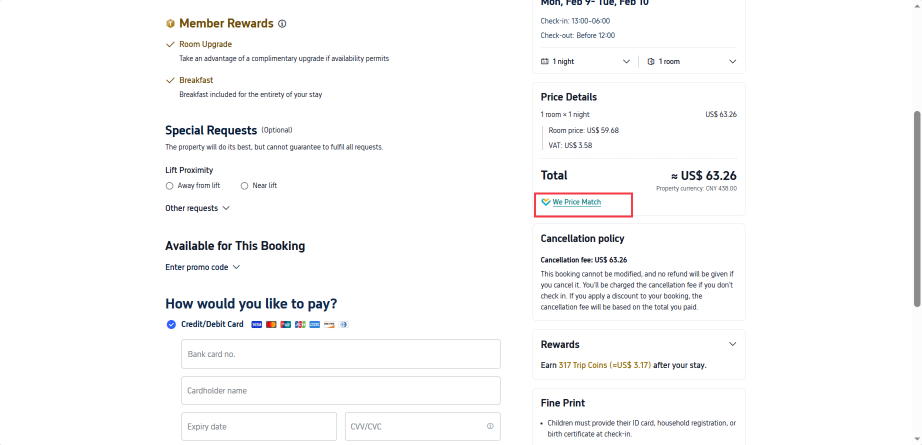
Yes! For select hotel bookings, Trip.com offers a Price Match Guarantee to ensure you always get the best possible room rates. When you see the "We Price Match" prompt on the checkout page, it indicates that Trip.com can provide price match services for that specific booking. If you find a lower price for the same room type and dates on another qualifying platform, you can request a refund of the difference in Trip Coins.
How to Submit a Price Match Request
- Book Your Stay: Complete your hotel booking on Trip.com.
- Find a Lower Price: Locate a cheaper rate for the identical booking on an "Applicable Platform".
- Submit Your Request: Provide proof of the price difference by midnight (11:59 PM local time) the day before your check-in date.
- Await Approval: Trip.com will review your request and notify you of the status within 24 hours.
- Receive Your Refund: Once approved, your account will be credited with the difference in Trip Coins within one working day after you complete your stay.
Trip.com Price Match Eligibility Criteria
- Room Type Match: The lower price must be for the exact same room type at the same property with the same dates and conditions.
- Confirmed Bookings Only: You cannot submit a request for bookings that have not been confirmed or those that have already been cancelled.
How to Check Flight Ticket Price Trends on Trip.com?
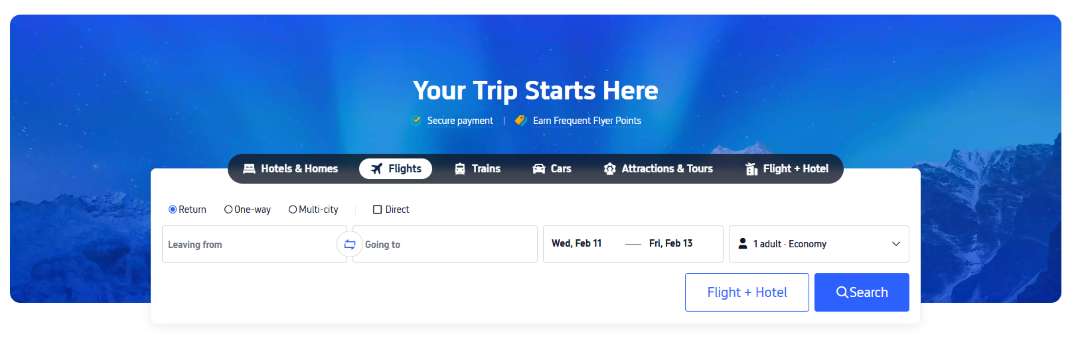
Step 1: Visit the Trip.com official website and select your flight. Enter your desired destination, choose your travel dates, and specify the number of passengers, then click "Search."
Step 2: View and filter results based on the most affordable options. The system will display flights matching your selected dates, starting with the cheapest fares. You can browse various prices to see which airlines offer the most attractive rates and schedules. To narrow down your search, use the filters on the left to show only flights that meet your specific needs, such as non-stop options or those including checked baggage.
Step 3: Click "Price Table".
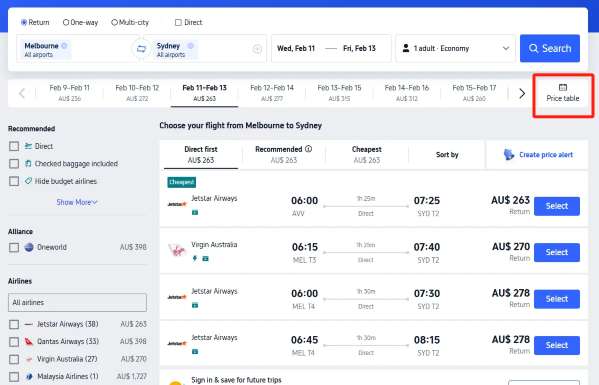
The Flight Ticket Price Change Table is your ultimate tool for timing your booking perfectly, so you can see exactly how prices behave at a glance.
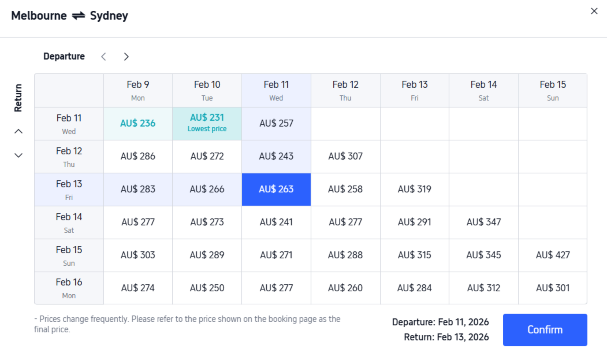
By using this feature, you can stop guessing what a "good deal" looks like. It provides a clear picture of average fares and seasonal spikes for your specific route. By analyzing trends from the past few months, you’ll be able to spot patterns—like which days of the week are consistently cheaper—allowing you to book with total confidence.
How to Set Up Ticket Price Alerts?
Never miss a bargain with Trip.com’s Price Alerts! By simply selecting your destination and dates, you can turn on notifications via the app or site. We’ll ping you the moment fares drop or a flash sale goes live, ensuring you secure those rock-bottom prices before anyone else does.
Step 1: Visit the Trip.com website and select Flights
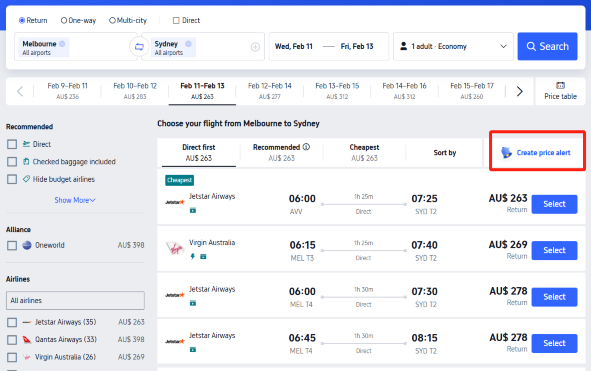
Step 2: Input your destination, dates, and the number of travelers, then hit "Search." The system will pull up flights for your chosen dates, automatically prioritizing the lowest fares at the top. If you aren't ready to buy yet, simply tap "Create price alert" to stay updated on any fare changes.
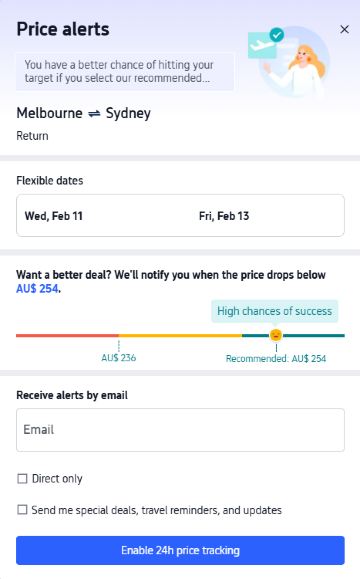
Step 3: Turn on 'Price Tracking' and choose your filters and select "Turn on 24/7 price tracking" for real-time notifications. To ensure you never miss a deal and to speed up the process, please make sure you are logged in first.
How to Buy Cheap Flights on Trip.com?

an airplane flying in the sky Via Unsplash (by Izdhan Imran)
Booking a budget-friendly flight is less about luck and more about using the right tools. Here is how you can master the Trip.com platform to save money.
Use the Price Table & Price Alerts Tool
Before you commit to a date, use the visual tools to find the cheapest window.
- How to find it: After entering your route, click on the Price Table or Create Price Alerts.
- Why it works: It shows you price fluctuations across the entire month. Often, flying just one day earlier or later (especially moving from a Sunday to a Tuesday) can drop the price by 20-40%.
- The Benefit: Trip.com will send you a push notification or email the second the fare drops to your target price. This is essential for "flash sales" that only last a few hours.
Join the Trip.com Loyalty Program
Trip.com has a "Trip Coins" system that functions like digital cash.
- Sign in to Book: Member-only deals are often hidden from guests.
- Earn as you spend: You earn Trip Coins on every flight and hotel booking, which you can use to instantly discount your next flight.
- App-Only Deals: Prices are often slightly lower on the mobile app compared to the desktop site to encourage app usage.
Get Trip.com Coupons and Mastercard Offers
Trip.com offers a lot deals for Australians and Mastercard Offers. Get the coupons below and start your trip with Trip.com now!
See all attractions
 2369 booked






Top Global Hotels Recommendation
Top Global Hotels
Tokyo
Bali
Bangkok
See All Hotels










FAQs about Trip.com Price Match
-
Does Trip.com offer a price match guarantee?
-
What should I do if I find a lower price elsewhere?
-
Will I get a cash refund if a lower price is approved?
-
Is price match available for flights and hotels?
-
Is Trip.com price match guaranteed once I submit a request?
Disclaimer: This article has been provided by an individual contributor or third party platform. If there is any discrepancy regarding the copyright, please contact us directly and we will delete the content immediately.
Trending Searches
-
Top Flight Routes
-
Latest Flight Deals
-
eSIM/SIM card
-
Trip.com FAQs
- Trip.com Reviews
- Trip.com Cancellation Policy
- Trip.com Payment Methods
- Trip.com Phone Number
- Trip.com Check In
- Trip.com Ticket Issued Status
- Trip.com Change Passport
- Trip.com Customer Support
- Trip.com Membership
- Trip.com VIP Lounge Access
- Trip.com Baggage Allowance
- Trip.com Flight Ticket
- Trip.com Hotel Refund
- Trip.com Flight Change
- Trip.com Seat Selection
- Trip.com E-Receipt
- Trip.com E-Ticket
- Trip.com Flight Cancellation
- Trip Coins
- Tongren Grand Canyon Tickets