Nihao China App Guide: Travel, Maps & Payments in China

Mobile payments dominate everyday life in China, powering everything from local dining and shopping to public transit. Designed specifically for international visitors, Nihao China—an official app from China UnionPay—streamlines daily transactions. Beyond cashless payments, it serves as an all-in-one travel companion, providing transit access, real-time translation, currency conversion, and tax refund details for a hassle-free journey.
to Shanghai
to Guangzhou
to Beijing
See all flights



What Is the Nihao China App?

Created by China UnionPay, Nihao China is an all-in-one payment and travel app tailored for international travelers visiting mainland China.
Key features include:
- Scan-to-Pay: Quick QR code transactions at local merchants
- Transit Access: Direct scanning for subways and public buses
- Travel Utilities: Real-time currency conversion and English-Chinese translation
- Tourist Benefits: On-the-go tax refund guidance and services
- Smart Services: Essential travel guides, local mini-apps, and integration with select payment platforms
You can easily set up an account using your foreign phone number or email address.
📌 Travel Tip: Even if you plan to use Nihao China, it is still useful to set up another payment option such as Alipay or WeChat Pay before your trip.
Where to Download the Official Nihao China App
The official Nihao China App (developed by China UnionPay Co., Ltd.) is available for download across major app stores and official web portals:
1. Official Mobile App Stores
- iOS / Apple App Store: Search for
Nihao Chinaor download directly via the Apple App Store. (Requires iOS 13.0 or later). - Android / Google Play Store: Search for
Nihao Chinaby developer China UnionPay or access it on Google Play.
2. Official UnionPay Web Portal
- Direct Web Access: Visit the UnionPay International Nihao China Portalto scan the official QR code directly for mobile installation and access setup guides.
How to Register for Nihao China
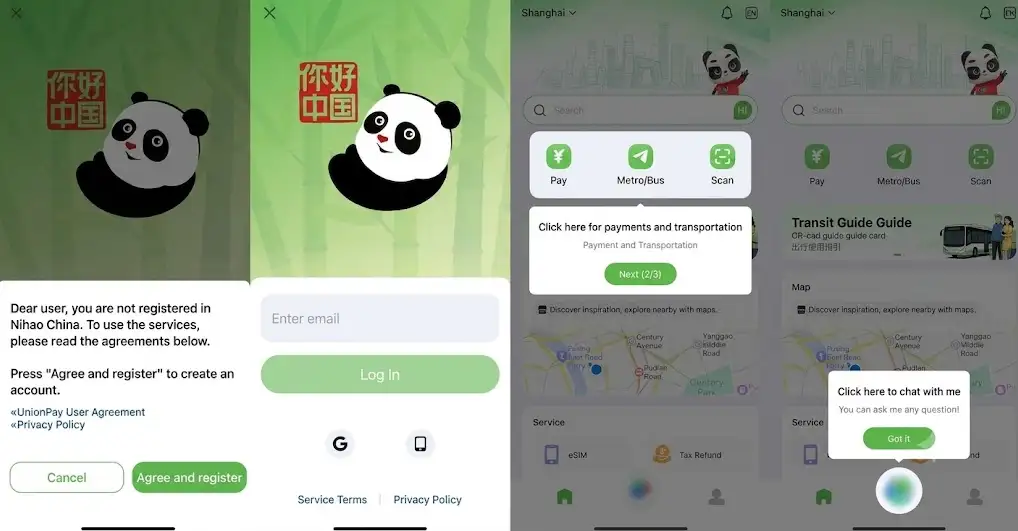
Preparing the app before your flight ensures a smooth arrival in China.
Step 1: Download the App Install Nihao China directly from the official Apple App Store or Google Play Store.
Step 2: Create Your Account Register using any of the available sign-in options, which may include:
- International mobile number
- Email address
- Other in-app login methods
Step 3: Complete Identity Verification (If Prompted) To unlock full payment features, you may need to complete a brief identity check. Have your passport handy and follow the on-screen steps. Note: Verification rules vary based on transaction limits, linked card types, and local regulations.
Step 4: Secure Your Account Set up your payment PIN and security options. Always keep your security codes, payment PIN, and card details confidential.
See all attractions
 988939 booked




Which International Bank Cards Work with Nihao China?
The Nihao China App is built on the China UnionPay network, which gives it broad compatibility with major international bank cards.
Supported International Card Networks
You can link and use international credit and debit cards issued by major global networks, including:
- 💳 Visa (Credit & Debit)
- 💳 Mastercard (Credit & Debit)
- 💳 UnionPay (Cards issued outside Mainland China, e.g., Hong Kong, Singapore, Australia, UK)
- 💳 JCB
- 💳 Diners Club / Discover
Important Usage & Linking Tips
- Card Verification (3D Secure): Ensure your international bank card is enabled for online transactions and 3D Secure / International SMS Verification, as your issuing bank will send an OTP (One-Time Password) during card binding.
- Name Matching: The cardholder name entered during setup must match the name on your passport and bank records exactly.
- Transaction Fees: While UnionPay / Nihao China generally waives service fees for small-value transactions (often under 200 CNY), your home issuing bank may still charge standard foreign transaction / currency conversion fees depending on your card terms.
- Backup Option: It is recommended to link at least two different cards (e.g., one Visa and one Mastercard) in case your primary bank blocks a cross-border transaction for fraud protection.
How to Link a Bank Card to Nihao China
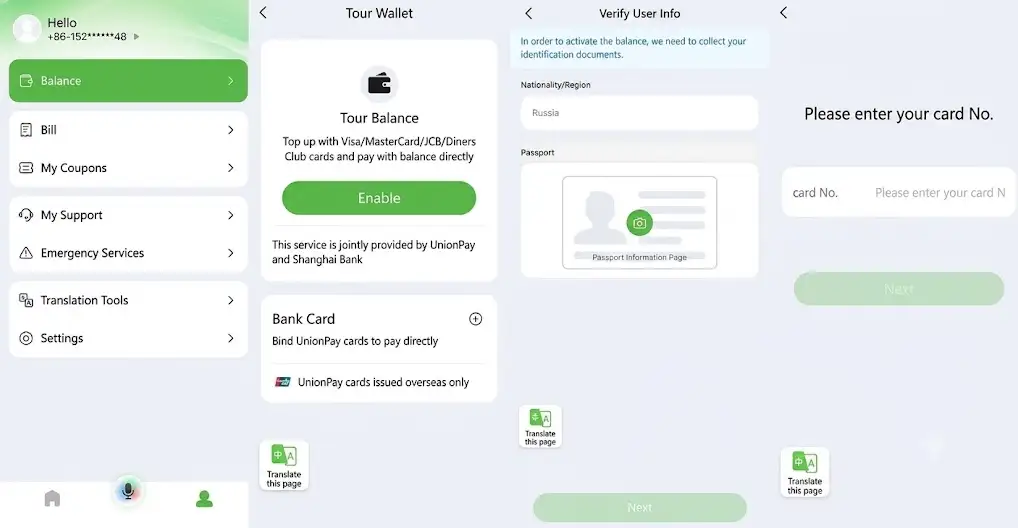
ote: Screen names and menu titles may vary slightly depending on your app version, but the card-linking workflow remains the same.
How to Link Your Card:
- Launch the Nihao China app.
- Navigate to the Payment or Wallet tab.
- Select Bank Card and tap Add Card.
- Input your card details accurately.
- Complete your issuing bank's security check.
- Confirm successful linking before making purchases.
Security Checks Required by Your Bank: During setup, your bank may request an SMS One-Time Password (OTP), approval inside your mobile banking app, a 3D Secure prompt, or an identity check.
🔒 Security Tip: Never store payment credentials or log in to payment apps on shared or public devices.
How to Pay with Nihao China
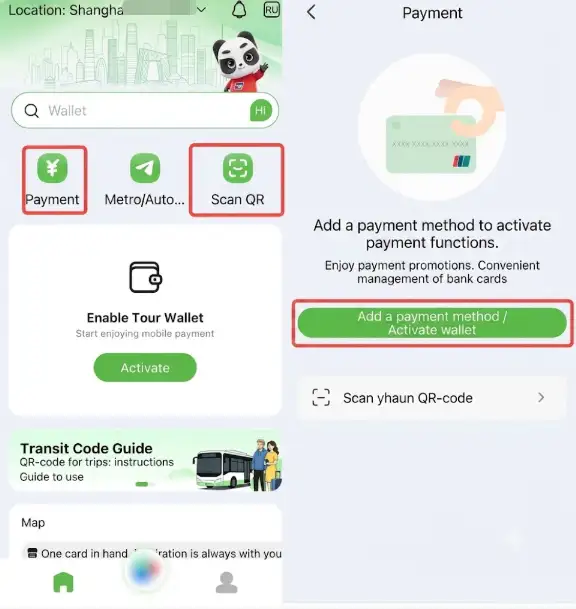
Nihao China supports two common QR payment methods.
1. Show Your Payment QR Code
Use this method when the merchant scans your phone.
Steps:
- Open Nihao China
- Tap Pay
- Show your payment QR code
- Let the merchant scan it
- Complete any payment verification requested
This method may be available at:
- Convenience stores
- Supermarkets
- Restaurants
- Shopping malls
- Hotels
- Other participating merchants
2. Scan the Merchant's QR Code
Use this method when the merchant displays a QR code.
Steps:
- Open Nihao China
- Tap Scan
- Scan the merchant's QR code
- Enter the payment amount if required
- Check the amount carefully
- Confirm the payment
This can be useful at smaller shops, restaurants, markets, and other merchants that display QR payment codes.
📌 Important: Always check the merchant name and payment amount before confirming a QR transaction.
Find the Best Hotels in China
Shanghai
Beijing
Guangzhou
Shenzhen
Macau
Taipei
Hong Kong
See All Hotels























































How to Use Nihao China for Metro and Bus Travel
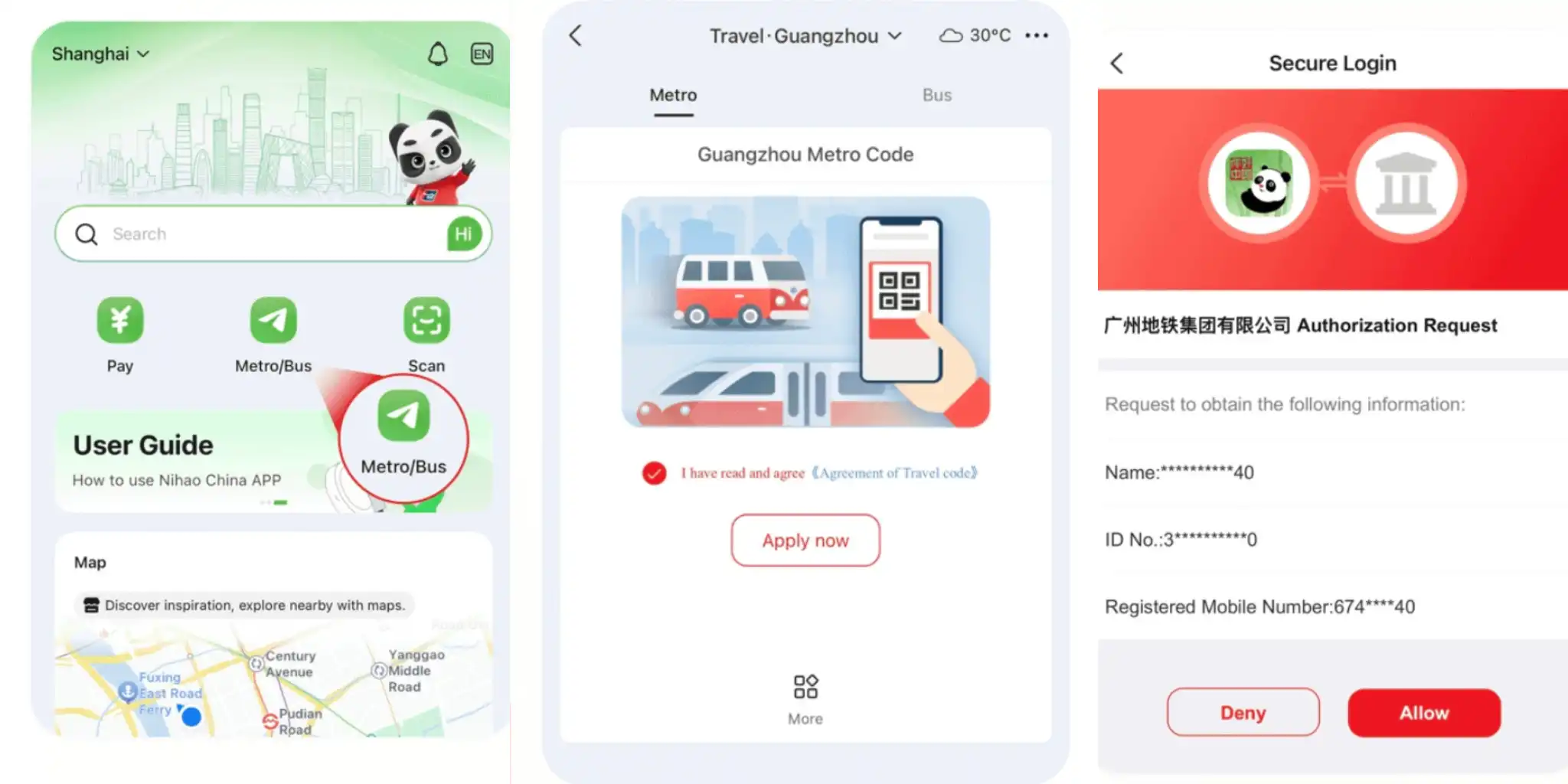
Public transport is one of Nihao China's most useful features for travelers.
UnionPay states that its transport services cover metro systems in dozens of major Chinese cities and bus networks across more than 1,700 county-level areas.
Coverage includes major destinations such as:
- Beijing
- Shanghai
- Guangzhou
- Shenzhen
- Xi'an
- Other participating cities
How to Use the Metro QR Code
- Open Nihao China
- Go to Transport
- Select your current city
- Activate the local transport QR service if required
- Display the QR code at the metro gate
- Scan according to the local system's instructions
Depending on the city, you may need to scan when entering and leaving the metro.
How to Use Nihao China on Buses
Open the city's transport QR code and scan it using the bus payment reader.
Bus rules differ between cities, so follow the instructions shown inside the app or on the local bus system.
🚇 Transport Tip: Activate your city's transport QR before reaching the station, especially during busy periods when mobile signal may be slower.
How to Transfer Funds from Nihao China to WeChat Pay
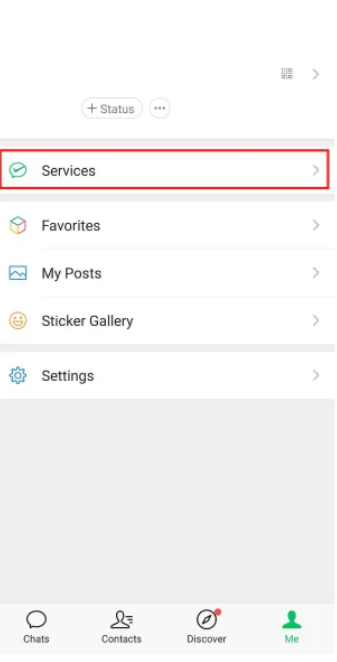
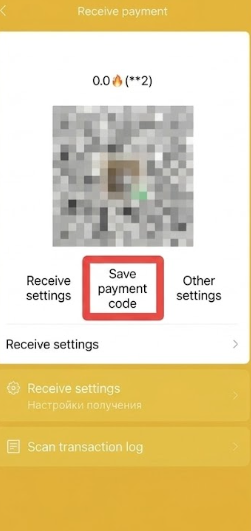
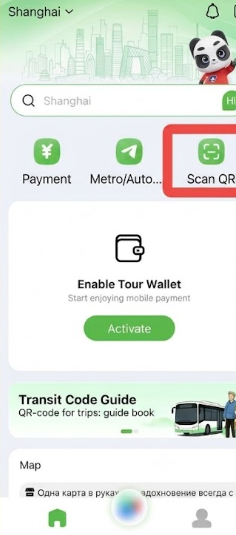
Another useful feature of Nihao China is the ability to transfer small amounts of money into WeChat Pay for using specific services within China, such as mini-programs or local services.
General Steps:
- Open WeChat → Go to the Payment menu → Select "Receive" and save the receiving QR code to your phone.
- Open the Nihao China app, select the "Scan" menu, and upload the saved QR code from your photo gallery.
- Enter the desired transfer amount (subject to a daily limit of approximately CNY 500).
- Once completed, the funds will be deposited into your WeChat Pay account according to the system process.
How to Use Nihao China to Pay for Subways and Buses in China
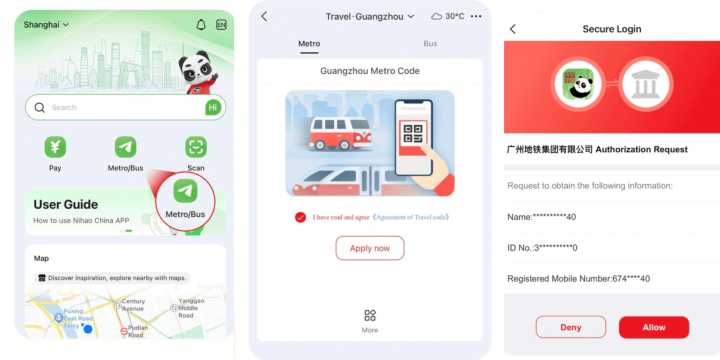
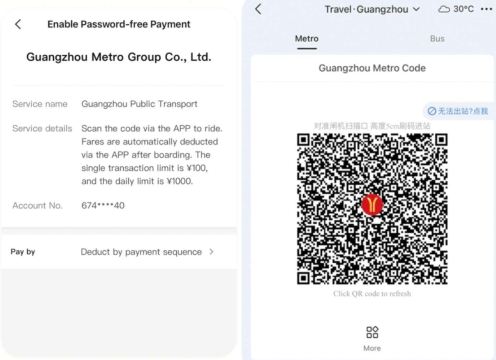
In addition to store purchases, Nihao China offers travel features that make using public transportation easier for tourists without the need to buy separate local transit cards.
Supported Modes:
- 🚇 Subway/Metro: Supported in over 43 major urban areas, including Beijing, Shanghai, Guangzhou, Shenzhen, and Xi'an.
- 🚌 Buses: Supported across local transit networks in over 1,760 cities and counties.
How to Use:
- Open the Travel / Transit section in the app.
- Select the city you are currently traveling in.
- The system will generate a transit QR Code.
- Scan the QR Code at the subway station gates or on the bus scanners.
With these simple steps, navigating China becomes far more convenient—no time wasted purchasing traditional paper tickets or local transit cards.
FAQs About Nihao China App
-
Is Nihao China an official app?
-
Can I use Nihao China on the Beijing and Shanghai Metro?
-
Do I still need cash in China?
-
Is Nihao China better than Alipay?
Disclaimer: This article has been provided by an individual contributor or third party platform. If there is any discrepancy regarding the copyright, please contact us directly and we will delete the content immediately.

Popular Content
-
Trending Searches
-
Featured guides
-
Popular airlines and airports
- Trip.com Reviews
- Trip.com Cancellation Policy
- Trip.com Payment Methods
- Trip.com Phone Number
- Trip.com Check In
- Trip.com Ticket Issued Status
- Trip.com Change Passport
- Trip.com Customer Support
- Trip.com Membership
- Trip.com VIP Lounge Access
- Trip.com Baggage Allowance
- Trip.com Flight Ticket
- Trip.com Hotel Refund
- Trip.com Flight Change
- Trip.com Seat Selection
- Trip.com E-Receipt
- Trip.com E-Ticket
- Trip.com Flight Cancellation
- Trip Coins
- Jiande Travel Guide
- Canton Fair Autumn 2026 (140th Session)
- Trip.com Afterpay
- Air China
- Oahu Road Trip
- Shanghai Disney App
- Train through a Building
- Qingdao Metro
- Xian Airport to City
- Travel Insurance Bali
- China Food Delivery App
- Hong Kong Disneyland
- Los Angeles to Monterey Road Trip
- eSIM Singapore
- Sydney Light Rail
- Qantas Flight
- Virgin Australia Flights
- Brisbane Airport
- Jetstar Flight
- Japan Airlines
- Sydney Airport
- Melbourne Airport
- Qantas Flights
- Air New Zealand Flights
- Emirates Flights
- Qatar Airways
- Singapore Airlines
- Perth Airport
- Indigo Flights
- Malaysia Airlines
- Hobart Airport
- Thai Airways
- Cathy Pacific
- Fiji Airways
- British Airways
- Darwin Airport
- Adelaide Airport
- United Airlines
- Airnorth
- Avalon Airport
- Tan Son Nhat Airport